
Building a website today is easier than ever, especially with platforms like WordPress. But before your website can go live, you need one important thing: reliable web hosting.
Many beginners hear terms like “shared hosting,” “cloud hosting,” or “WordPress hosting” and feel confused about what they actually mean. Is WordPress hosting different from normal hosting? Do you really need it? And how does it affect your website speed, SEO, and business growth?
These are important questions because your hosting choice can directly impact your website’s performance, security, customer experience, and even your rankings on Google.
For businesses in Dubai, Abu Dhabi, and across the UAE, website speed and reliability matter more than ever. Customers expect fast-loading websites, secure browsing, and smooth online experiences. That’s why many businesses now look for web hosting UAE solutions specifically optimized for WordPress websites.
In this beginner-friendly guide, we’ll explain what WordPress hosting is, how it works, its biggest features and benefits, and how to choose the right hosting for your website.
What is WordPress Hosting?
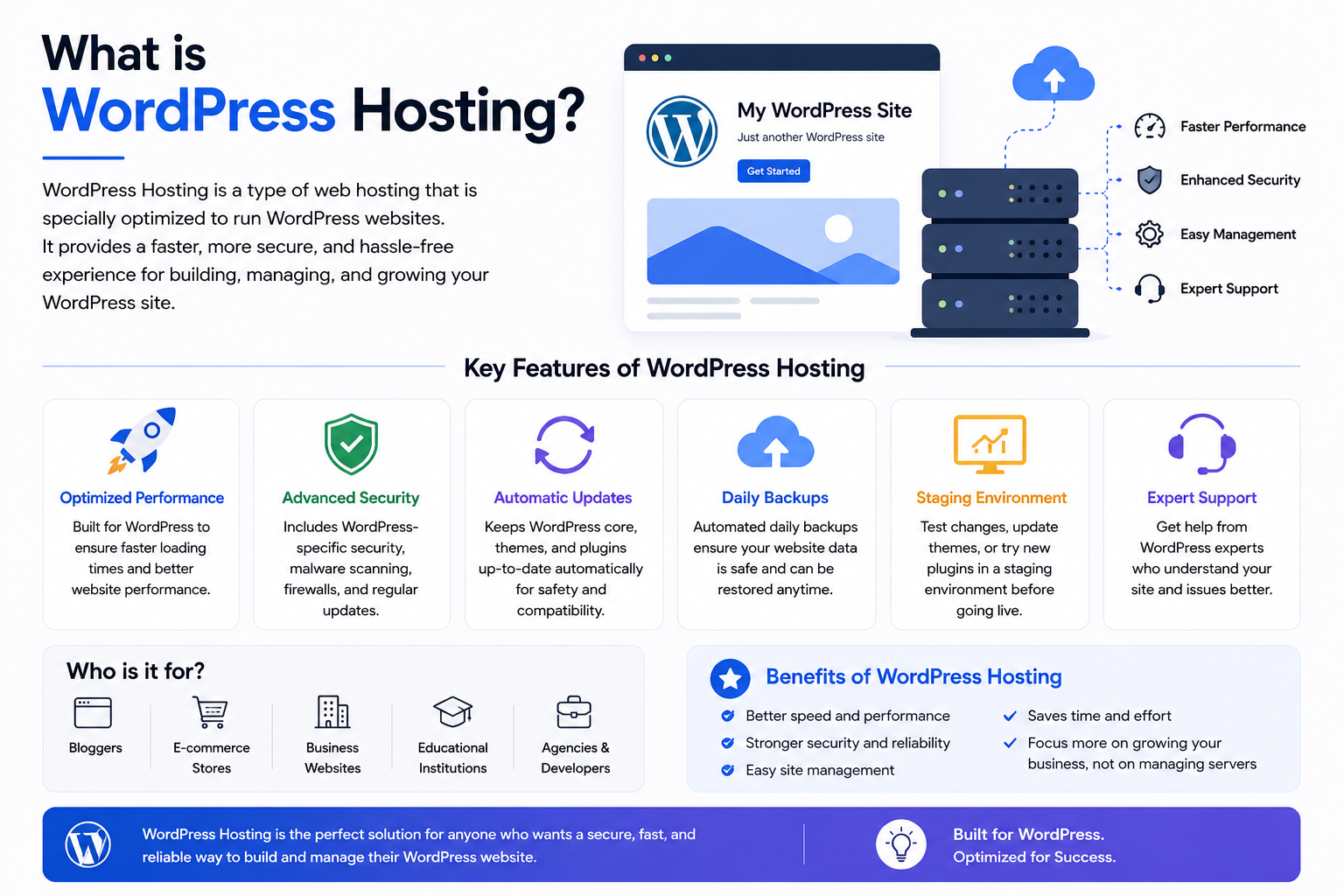
WordPress hosting is a type of web hosting specially optimized to run WordPress websites more efficiently.
In simple words, it is a hosting environment designed specifically for WordPress so your website becomes:
- Faster
- More secure
- Easier to manage
- More stable
Think of regular hosting like a standard apartment.
WordPress hosting is more like a fully customized apartment designed specifically for WordPress websites. Everything is configured to help WordPress perform better.
Since WordPress powers a massive portion of websites globally, many web hosting services now provide specialized hosting environments for it.
These hosting plans usually include:
- One-click WordPress installation
- Automatic updates
- Enhanced security
- Faster server performance
- WordPress caching
- Daily backups
- Malware protection
- WordPress expert support
This is why many businesses searching for the best web hosting solutions often prefer WordPress hosting over generic hosting plans.
WordPress Hosting vs Regular Web Hosting
One of the most common beginner questions is:
“Can I run WordPress on normal hosting?”
Yes, you can.
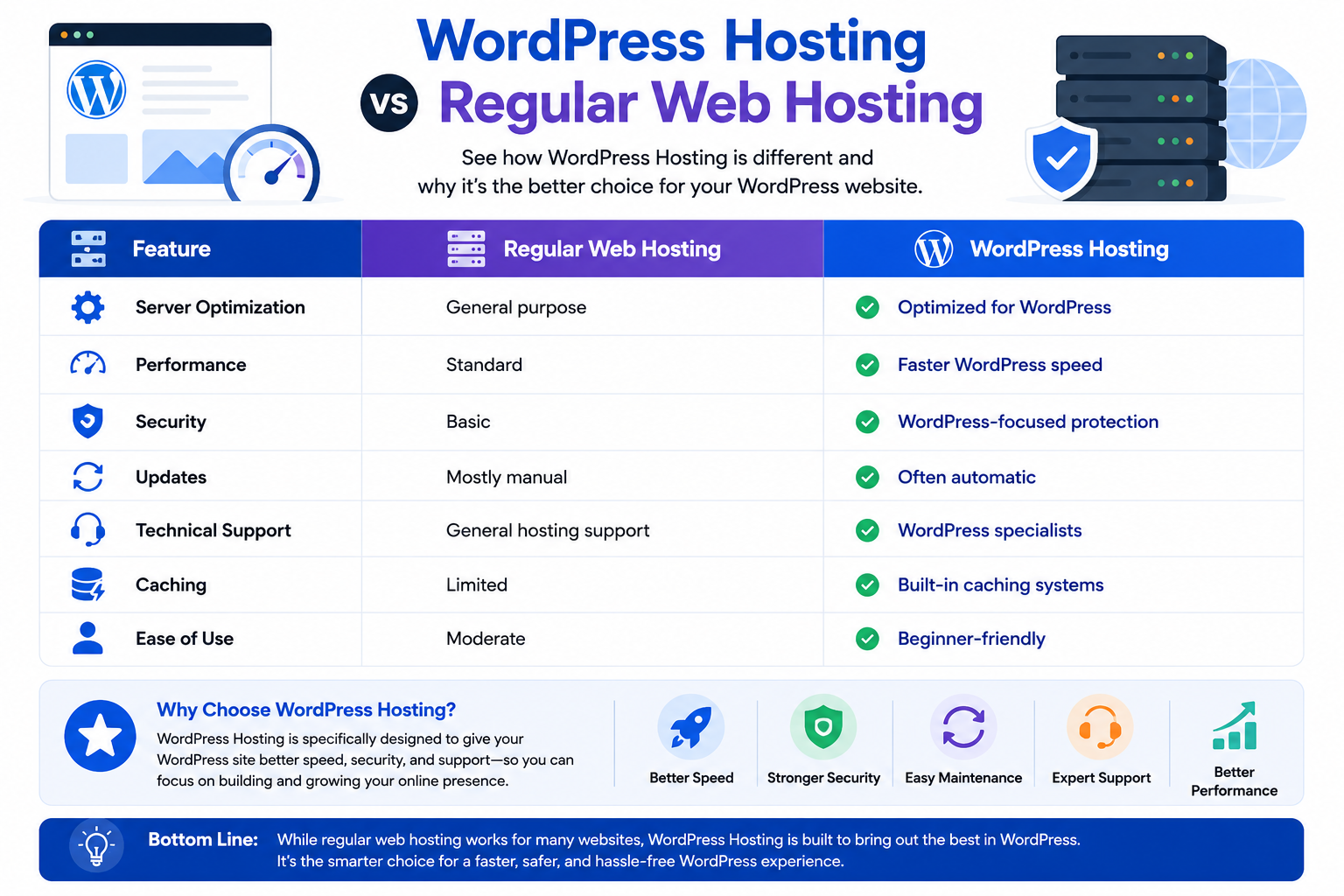
But WordPress hosting is specifically optimized for WordPress websites, while regular hosting is designed for general website usage.
Here’s a simple comparison:
Feature | Regular Web Hosting | WordPress Hosting |
Server Optimization | General purpose | Optimized for WordPress |
Performance | Standard | Faster WordPress speed |
Security | Basic | WordPress-focused protection |
Updates | Mostly manual | Often automatic |
Technical Support | General hosting support | WordPress specialists |
Caching | Limited | Built-in caching systems |
Ease of Use | Moderate | Beginner-friendly |
If your website runs on WordPress, specialized hosting usually delivers a smoother experience.
How Does WordPress Hosting Work?
To understand WordPress hosting, it helps to first understand how websites work.
When someone visits your website:
- They type your domain name into a browser.
- The browser connects to your hosting server.
- The server retrieves website files and database information.
- WordPress processes the request.
- The website appears on the visitor’s screen.
WordPress hosting improves this process by optimizing the server environment specifically for WordPress websites.
Optimized Server Environment
Hosting companies configure servers specifically for WordPress technologies like:
- PHP
- MySQL
- LiteSpeed
- Apache
- NGINX
This improves compatibility and performance.
Built-In Caching
Caching stores temporary versions of website pages.
Without caching, WordPress must repeatedly generate pages for every visitor, which consumes more resources.
Caching improves:
- Speed
- User experience
- Server efficiency
Automatic Updates
Good web hosting company providers often handle:
- WordPress core updates
- Plugin updates
- Security patches
This reduces security risks and maintenance work.
Enhanced Security Layers
Because WordPress is extremely popular, hackers frequently target WordPress websites.
Most WordPress hosting environments include:
- Malware scanning
- Firewalls
- Brute-force protection
- DDoS protection
- SSL certificates
- Daily backups
These security systems help protect websites from attacks.
How WordPress Hosting Affects Website Speed & SEO
Many beginners don’t realize that hosting directly impacts SEO.
Even a beautifully designed website can struggle in search rankings if the hosting environment is slow.
Search engines prioritize websites that provide better user experiences.
This includes:
- Faster loading times
- Stable uptime
- Mobile responsiveness
- Secure browsing
Better Core Web Vitals
Google measures website performance using Core Web Vitals.
These include factors like:
- Loading speed
- Visual stability
- Responsiveness
Poor hosting can negatively affect these metrics.
Optimized WordPress hosting helps improve:
- LCP (Largest Contentful Paint)
- Server response time
- Page rendering speed
Improved Mobile Performance
Most UAE internet users browse websites using mobile devices.
Slow websites often lose mobile visitors quickly.
Fast hosting environments improve:
- Mobile page loading
- User engagement
- Conversion rates
Better SEO Rankings
Faster websites often experience:
- Lower bounce rates
- Better engagement
- Longer session durations
- Improved search visibility
This makes hosting an important part of technical SEO.
Why It Matters for Businesses
Today, websites are the digital storefront of modern businesses.
For many customers, your website creates the first impression of your company.
A slow or unstable website can damage:
- Customer trust
- Sales opportunities
- SEO performance
- Brand credibility
This is especially important for businesses using web hosting in UAE because local competition continues growing rapidly.
Faster Customer Experience
Customers expect websites to load quickly.
Even a few seconds of delay can increase abandonment rates.
Reliable web hosting services UAE providers help businesses maintain faster website experiences.
Better Website Reliability
Downtime can hurt businesses financially and damage reputation.
Professional hosting environments improve:
- Uptime
- Stability
- Reliability
This is critical for:
- Online stores
- Corporate websites
- Service businesses
- Booking platforms
Easier Website Management
Many business owners are not technical experts.
WordPress hosting simplifies tasks like:
- Updates
- Backups
- Security monitoring
- Website setup
- Performance optimization
This allows businesses to focus more on growth instead of technical maintenance.
Who Should Use WordPress Hosting?
WordPress hosting works well for many different website types.
Bloggers & Personal Websites
Perfect for:
- Blogs
- Portfolios
- Personal brands
- Content creators
UAE Startups & SMEs
Many startups choose WordPress because it is:
- Affordable
- Flexible
- Easy to scale
This is why many businesses search for web hosting company Dubai providers that support business growth.
eCommerce Stores
Platforms like WooCommerce rely heavily on fast and stable hosting.
Online stores especially benefit from:
- Faster checkout pages
- Better uptime
- Stronger security
Agencies & Corporate Websites
Agencies managing multiple websites often prefer managed WordPress hosting because it simplifies maintenance and scalability.
Types of WordPress Hosting
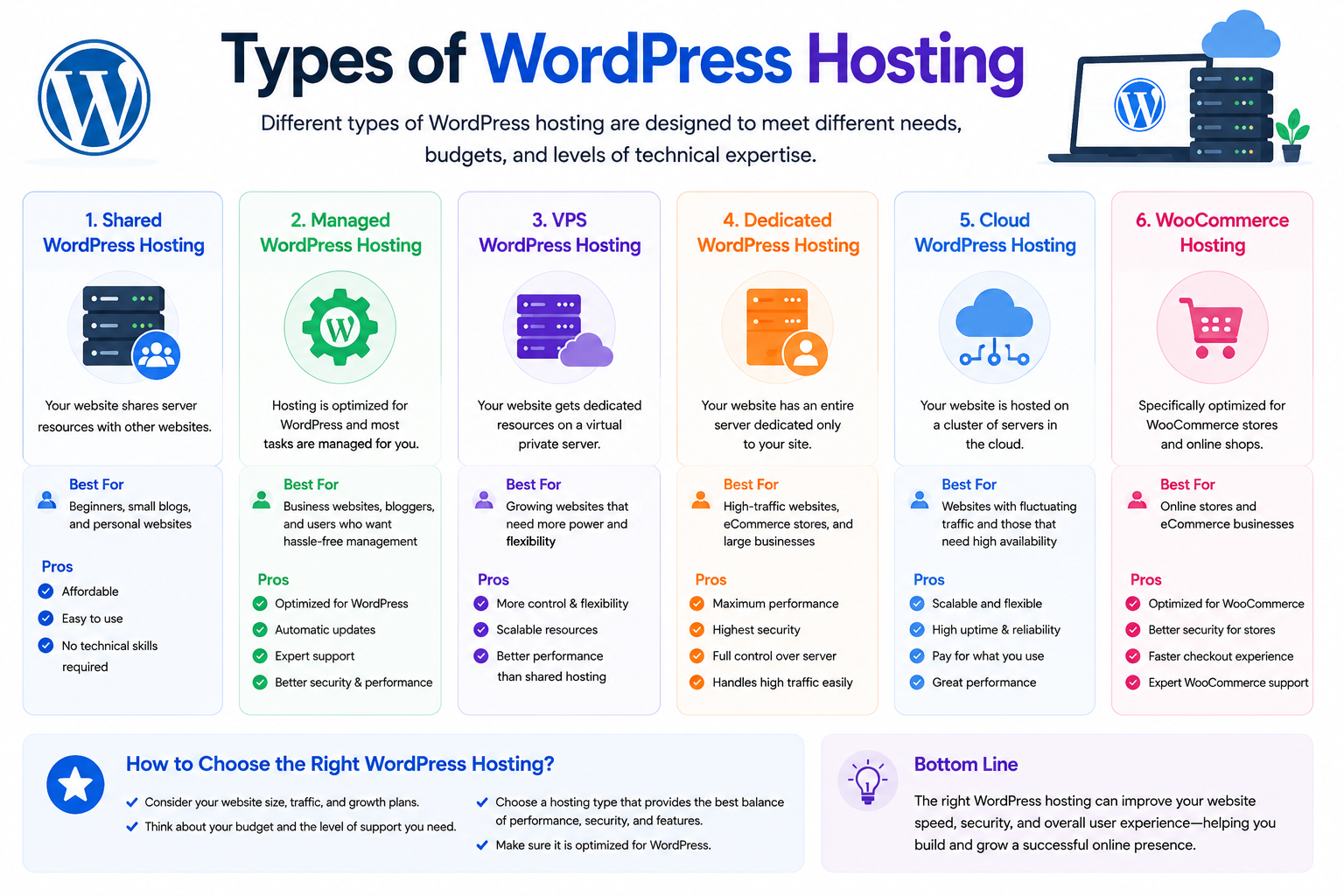
Different websites require different hosting environments.
Shared WordPress Hosting
Shared hosting means multiple websites share the same server resources.
This is one of the most affordable hosting options.
Best for:
- Small websites
- Beginners
- Low-traffic blogs
- Startup businesses
Advantages:
- Lower cost
- Beginner-friendly
- Easy setup
Limitations:
- Shared resources
- Limited scalability
- Slower during traffic spikes
Many people searching for cheapest web hosting begin with shared hosting.
VPS WordPress Hosting
Virtual Private Server hosting provides dedicated virtual resources.
Compared to shared hosting, VPS offers:
- Better performance
- More flexibility
- Improved scalability
- Greater control
Ideal for:
- Growing businesses
- Medium traffic websites
- eCommerce stores
Many businesses eventually upgrade to VPS and cloud hosting solutions as traffic increases.
Cloud WordPress Hosting
Cloud hosting uses multiple connected servers instead of relying on one physical machine.
Benefits include:
- Better scalability
- Improved uptime
- High reliability
- Traffic flexibility
Cloud hosting is popular among businesses requiring stable high-performance infrastructure.
Some companies also compare cloud solutions with amazon web hosting environments for enterprise scalability.
Dedicated WordPress Hosting
Dedicated hosting gives one customer an entire physical server.
This provides:
- Maximum performance
- Full control
- Enhanced security
- Advanced customization
Typically used for:
- Large enterprises
- High-traffic websites
- Enterprise applications
Managed WordPress Hosting
Managed hosting means the hosting provider handles technical management tasks.
This may include:
- Updates
- Security monitoring
- Performance optimization
- Backups
- Server maintenance
This option is ideal for businesses wanting less technical responsibility.
Key Features of WordPress Hosting
The biggest reason people choose WordPress hosting is the specialized features.
One-Click Installation
Beginners can install WordPress quickly without manual setup.
SSD Storage
Many hosting providers use SSD storage instead of older hard drives.
SSD storage improves:
- Loading speed
- Data retrieval
- Website responsiveness
CDN Integration
A CDN (Content Delivery Network) stores website content across multiple global locations.
This helps websites load faster for international visitors.
Automatic Backups
Daily backups help restore websites if problems occur.
SSL Certificates
SSL encrypts website data and improves website security.
Secure HTTPS websites also help improve SEO trust.
WordPress Expert Support
Unlike generic hosting support, WordPress specialists understand:
- Themes
- Plugins
- Performance issues
- WordPress errors
Common WordPress Hosting Mistakes to Avoid
Many beginners make hosting decisions based only on pricing.
This can create serious problems later.
Choosing Hosting Only by Price
Cheap hosting may save money initially but can cause:
- Slow websites
- Poor support
- Frequent downtime
Ignoring Scalability
Businesses often grow faster than expected.
Hosting should allow future upgrades without complicated migrations.
Not Checking Backup Policies
Always confirm whether backups are:
- Automatic
- Daily
- Easily restorable
Ignoring Support Quality
Good support becomes extremely valuable during technical emergencies.
Overloading Shared Hosting
Shared hosting works for beginners, but high-traffic websites eventually need stronger infrastructure.
How to Choose the Right WordPress Hosting
Choosing the right hosting depends on your business goals, website traffic, and future plans.
Understand Your Website Needs
Small blogs may work fine on shared hosting.
Growing businesses may require VPS or cloud infrastructure.
Consider Future Growth
Scalable hosting helps avoid expensive migration problems later.
Evaluate Performance Features
Look for:
- SSD storage
- LiteSpeed servers
- CDN integration
- Caching systems
Review Security Features
Reliable hosting should include:
- Malware protection
- SSL certificates
- Firewalls
- Backups
Compare Pricing Carefully
Some providers advertise lifetime web hosting or ultra-cheap hosting plans that lack proper performance and support.
Always compare:
- Renewal pricing
- Resource limits
- Security features
- Scalability
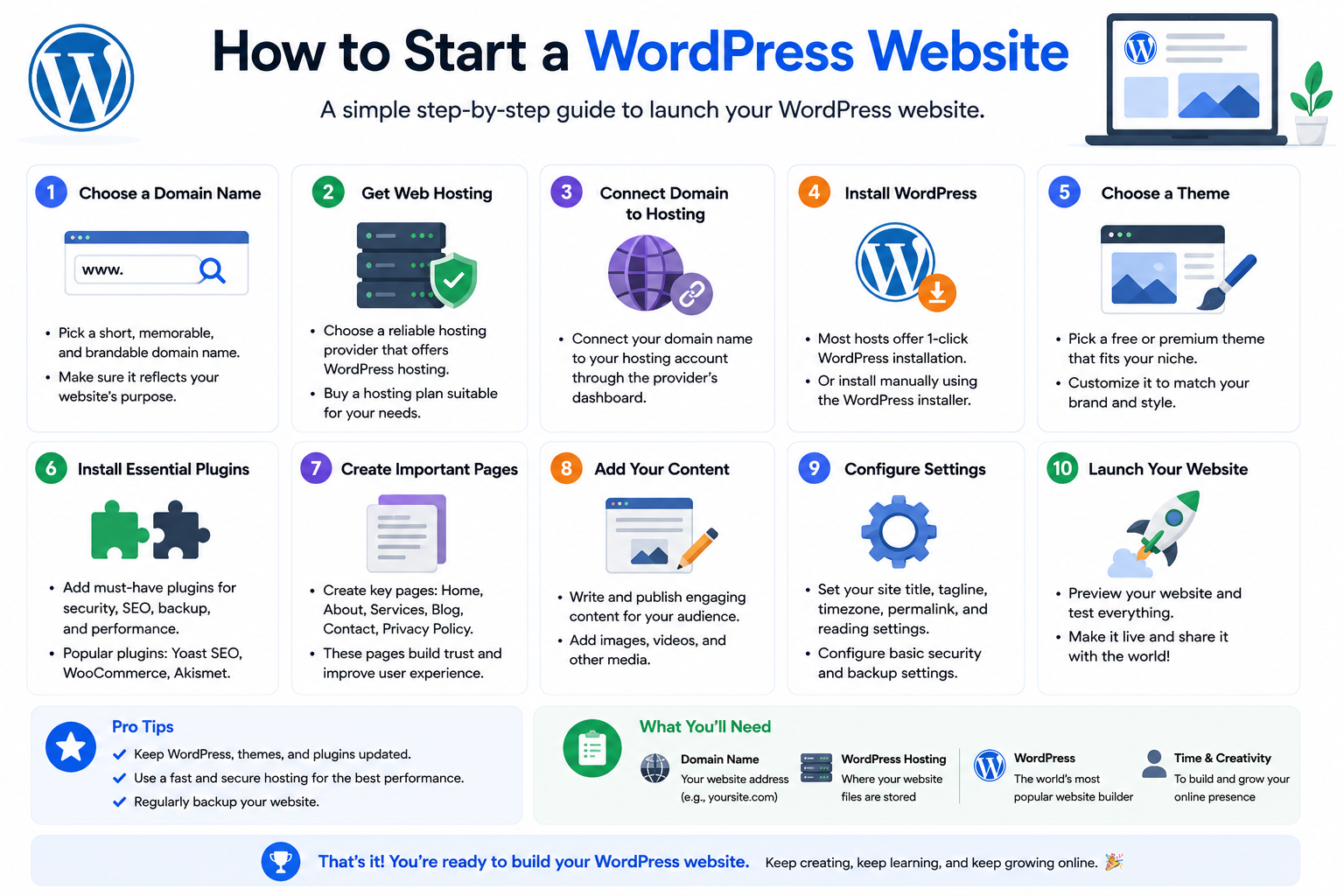
How to Start a WordPress Website
For beginners, the process usually looks like this:
Step 1: Register a Domain Name
Choose a professional domain name for your business.
Businesses targeting UAE audiences often prefer .ae domains.
Step 2: Purchase Hosting
Choose a hosting plan suitable for your website size and goals.
Step 3: Connect Domain to Hosting
Your DNS settings connect the domain to your hosting server.
Step 4: Install WordPress
Most hosting providers offer one-click installation.
Step 5: Choose a Theme
Themes control website design and layout.
Step 6: Install Plugins
Plugins add features like:
- SEO tools
- Security
- Contact forms
- Caching
Step 7: Launch Your Website
Once everything is ready, your website becomes publicly accessible.
Real-Life Example
Imagine a startup clothing brand in Dubai launching an online store using WordPress and WooCommerce.
Initially, the company uses shared hosting because traffic is low.
As the business grows and online orders increase, the website starts slowing down during sales campaigns.
The company upgrades to cloud WordPress hosting.
After upgrading:
- Website speed improves
- Checkout becomes smoother
- Downtime decreases
- Mobile performance improves
- SEO rankings improve
This is a common growth journey for businesses using web hosting Dubai services.
Common Misconceptions About WordPress Hosting
“WordPress Hosting Is Only for Blogs”
WordPress now powers:
- Corporate websites
- eCommerce stores
- Educational platforms
- Membership sites
- Business portals
“All Hosting Is the Same”
Different hosting environments vary greatly in:
- Speed
- Security
- Reliability
- Scalability
“Cheap Hosting Is Always Better”
Low pricing can sometimes lead to:
- Poor support
- Slower servers
- Limited security
“Managed Hosting Removes Control”
Managed hosting simplifies maintenance while still allowing customization.
Related Concepts You Should Understand
Understanding hosting becomes easier when you understand related technologies.
Domain Names
A domain name is your website address.
Examples:
- .com
- .ae
- .net
This connects closely with domain registration (.ae focus) strategies for UAE businesses.
DNS (Domain Name System)
DNS connects your domain to your hosting server.
It functions like the internet’s phonebook.
TLD & SLD
TLD (Top-Level Domain)
Examples:
- .com
- .ae
- .org
SLD (Second-Level Domain)
The main name before the extension.
Example:
- creativeon in creativeon.ae
Cloud Infrastructure
Modern hosting increasingly relies on cloud infrastructure for:
- Reliability
- Scalability
- Performance
- Redundancy
Google Workspace Integration
Many businesses integrate hosting infrastructure with Google Workspace for:
- Professional email
- Team collaboration
- Cloud storage
- Business communication