

Managing a Google Workspace for Education environment becomes much easier when users are organized properly. As schools grow, administrators often need to manage hundreds or even thousands of student, teacher, and staff accounts. Without a clear structure, applying policies, controlling access, and maintaining consistency can become difficult.
This is where Organizational Units (OUs) play an important role.
Organizational Units help schools organize users into logical groups so that settings and services can be managed more efficiently. A well-planned OU structure makes administration simpler, reduces mistakes, and helps schools maintain a consistent learning environment.
This guide focuses on how schools can manage Organizational Units effectively, including planning strategies, organizational structures, best practices, common mistakes, and ongoing maintenance.
What Are Organizational Units in Google Workspace?
An Organizational Unit (OU) is a way to group users within the Google Admin Console. Administrators can apply settings, service access rules, and policies to an entire group of users instead of configuring accounts one by one.
For example, a school may create Organizational Units for:
- Students
- Teachers
- Administrative Staff
- IT Staff
- School Leadership
Users within the same Organizational Unit typically receive similar settings and permissions.
Think of Organizational Units as folders that help organize people rather than files. They provide structure and make large Google Workspace environments easier to manage.
Why Organizational Units Matter for Schools
Schools often have multiple user groups with different needs.
Students may require stricter controls than teachers. Administrative staff may need access to services that students do not. Different campuses may also require different configurations.
Without Organizational Units, administrators would need to manage settings at the individual user level, which quickly becomes difficult as the number of accounts grows.
Organizational Units help schools:
- Keep user management organized
- Apply settings consistently
- Reduce administrative workload
- Support growth as the school expands
- Minimize configuration errors
- Make policy management easier
For many schools, Organizational Units form the foundation of Google Workspace administration.
How Organizational Units Work
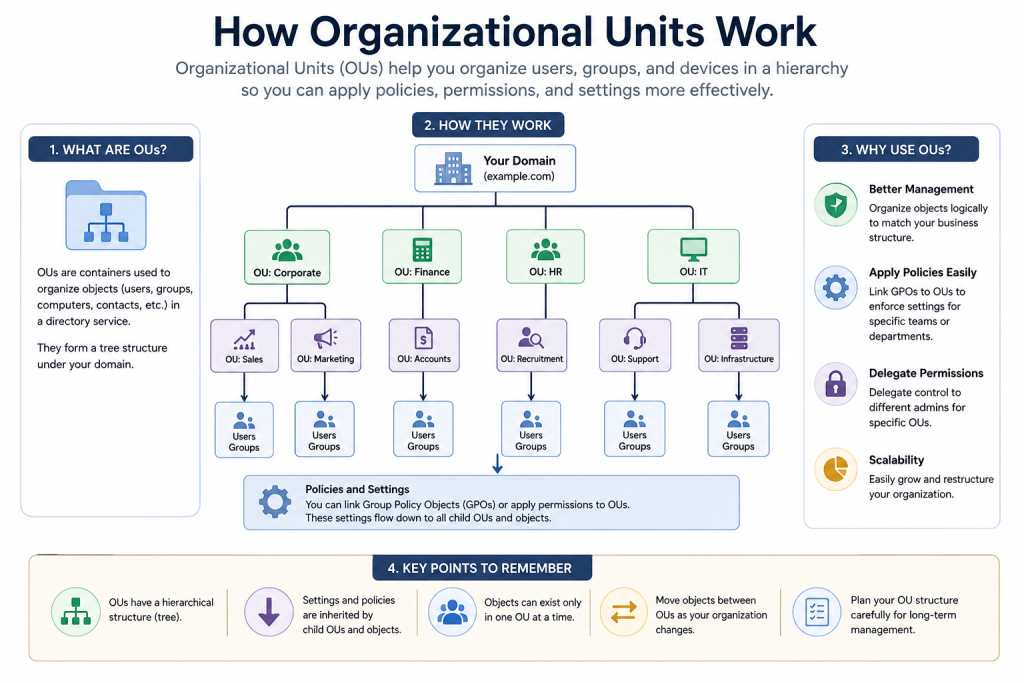
Organizational Units are arranged in a hierarchy.
At the top is the root Organizational Unit, which contains all users in the Google Workspace domain. Administrators can then create additional Organizational Units beneath it.
For example:
School Domain
- Students
- Elementary School
- Middle School
- High School
- Staff
- Teachers
- Administration
- Support Staff
- IT Department
This structure allows settings to be managed at different levels depending on the school’s needs.
A well-organized hierarchy helps administrators understand where users belong and how settings are applied.
Understanding Organizational Unit Inheritance
One of the most important concepts in Organizational Unit management is inheritance.
Inheritance means that child Organizational Units receive settings from their parent Organizational Unit unless those settings are specifically changed.
Consider the following structure:
School Domain
- Students
- High School
- Grade 10
- High School
If a setting is applied to the Students Organizational Unit, it is generally inherited by High School and Grade 10.
This behavior can save administrators significant time because common settings only need to be configured once.
Why Inheritance Matters
Many Organizational Unit management problems occur because inheritance is not fully understood.
For example:
- An administrator changes a setting at a parent OU.
- The change affects multiple child OUs.
- Unexpected behavior occurs because inherited settings were overlooked.
Understanding inheritance helps administrators design cleaner structures and avoid unnecessary complexity.
Keeping Inheritance Manageable
To keep inheritance easy to manage:
- Create a logical hierarchy.
- Avoid excessive nesting.
- Document major policy decisions.
- Review inherited settings periodically.
- Avoid creating unnecessary exceptions.
The simpler the structure, the easier inheritance becomes to understand.
Common Organizational Unit Structures Used by Schools
There is no single Organizational Unit structure that works for every school.
The best approach depends on the school’s size, administration model, and operational requirements.
Structure by User Role
Many schools organize users according to their role.
Example:
- Students
- Teachers
- Administrative Staff
- IT Staff
- Leadership
This structure is simple and easy to maintain.
It works particularly well when each role requires different settings and permissions.
Structure by Grade Level
Some schools organize students according to grade.
Example:
- Grade 1
- Grade 2
- Grade 3
- Grade 4
- Grade 5
This approach can make it easier to manage age-based requirements and educational policies.
Structure by School Division
Large schools often separate students into educational divisions.
Example:
- Elementary School
- Middle School
- High School
This structure is commonly used in K–12 environments.
Structure by Campus
Schools operating multiple campuses may organize users by location.
Example:
- Main Campus
- North Campus
- South Campus
This approach helps when campuses have different administrative requirements.
Hybrid Structure
Many schools combine multiple approaches.
Example:
Students
- Elementary
- Grade 1
- Grade 2
- Grade 3
- Middle School
- Grade 6
- Grade 7
- Grade 8
- High School
- Grade 9
- Grade 10
- Grade 11
- Grade 12
Staff
- Teachers
- Administration
- Support Staff
This model provides flexibility while remaining organized.
Characteristics of a Well-Designed Organizational Unit Structure
An effective Organizational Unit structure should support both current needs and future growth.
Easy to Understand
Administrators should immediately understand where users belong.
If the structure is confusing, management becomes difficult.
Easy to Maintain
Schools experience changes every year.
Students graduate, teachers join, and departments evolve.
A good structure remains manageable despite these changes.
Scalable
The structure should continue working even if enrollment increases significantly.
Planning for growth reduces the need for major restructuring later.
Reflects the School’s Organization
The Organizational Unit structure should match how the school actually operates.
When the structure reflects reality, user management becomes more intuitive.
Reduces Policy Conflicts
Well-designed structures help prevent overlapping configurations and administrative confusion.
Example Organizational Unit Structures
Example 1: Small School
A small school with a few hundred users may use a simple structure.
School Domain
- Students
- Teachers
- Administrative Staff
This approach is straightforward and easy to manage.
Example 2: K–12 School
A larger school may require additional organization.
School Domain
- Students
- Elementary
- Middle School
- High School
- Staff
- Teachers
- Administration
- Support Staff
- Leadership
This structure balances simplicity and flexibility.
Example 3: Multi-Campus Institution
Schools with multiple campuses may organize users by location.
School Domain
- Main Campus
- North Campus
- South Campus
Each campus can then contain its own student and staff Organizational Units.
This model works well when campuses operate independently.
Organizational Unit Planning Checklist
Before creating a new Organizational Unit, administrators should evaluate whether it is truly necessary.
Consider the following questions:
- Does this group require different settings?
- Will this Organizational Unit exist long term?
- Does it reflect the school’s structure?
- Will future administrators understand its purpose?
- Could an existing Organizational Unit meet the same need?
- Will this make management easier or more complicated?
A little planning can prevent major restructuring projects later.
Common Mistakes When Managing Organizational Units
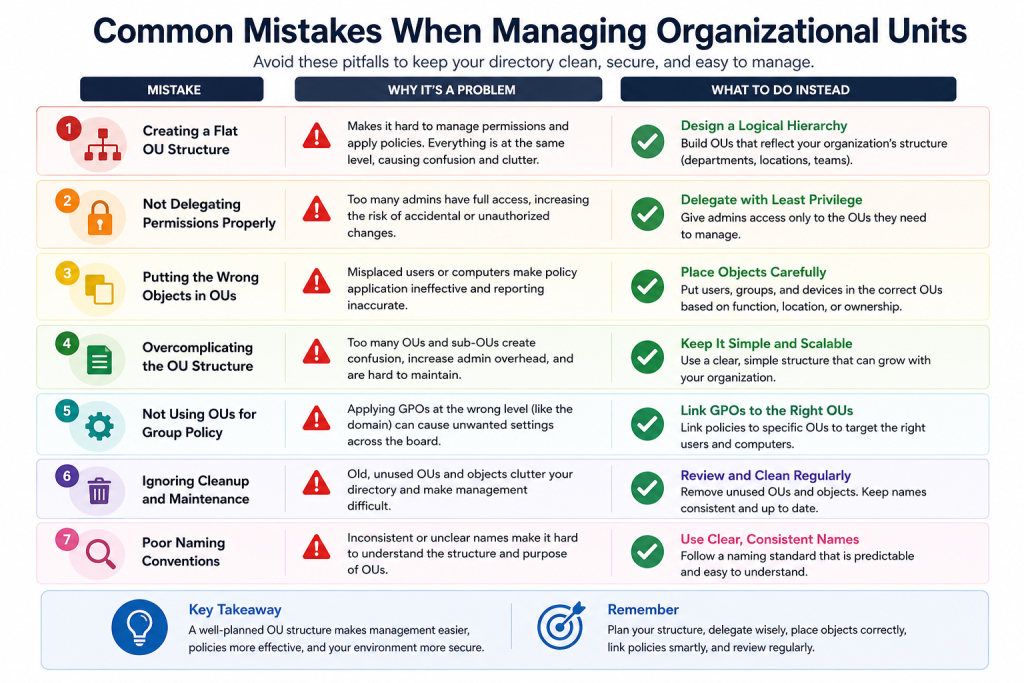
Even experienced administrators sometimes create Organizational Unit structures that become difficult to manage.
Understanding common mistakes can help schools avoid future problems.
Creating Too Many Organizational Units
One of the most common mistakes is creating Organizational Units for every possible scenario.
More Organizational Units do not automatically improve organization.
Excessive complexity often creates confusion.
Building Deep Hierarchies
A structure with many nested levels can become difficult to understand.
Administrators may struggle to determine where settings originate.
Keeping the hierarchy reasonably simple improves long-term manageability.
Creating Organizational Units for Temporary Needs
Temporary projects, short-term initiatives, or seasonal activities usually do not require dedicated Organizational Units.
Organizational Units should generally represent stable, long-term structures.
Ignoring Future Growth
Some schools create structures that work today but become difficult to maintain as enrollment increases.
Planning for future expansion helps avoid large-scale reorganization later.
Poor Documentation
When Organizational Units are not documented, new administrators may struggle to understand why certain decisions were made.
Simple documentation can save significant time in the future.
Signs Your Organizational Unit Structure Needs Improvement
Over time, some Organizational Unit structures become difficult to manage.
Common warning signs include:
Frequent User Relocation
If users are constantly being moved between Organizational Units, the structure may not reflect how the school actually operates.
Duplicate Organizational Units
Similar Organizational Units performing the same function can create confusion.
Administrative Uncertainty
If administrators regularly debate where users belong, the hierarchy may need revision.
Increasing Complexity
When new Organizational Units are continuously added without clear planning, the structure can become difficult to maintain.
Difficulty Explaining the Structure
A well-designed Organizational Unit structure should be easy to explain.
If administrators struggle to describe it, simplification may be necessary.
Reviewing Organizational Units Each School Year
Organizational Units should not be considered a one-time setup.
Schools change constantly, and Organizational Unit structures should be reviewed regularly.
Beginning of the School Year
Review:
- New student groups
- New staff accounts
- Department changes
- Enrollment growth
During the School Year
Monitor:
- Organizational changes
- New programs
- Campus expansions
- Administrative adjustments
End of the School Year
Evaluate:
- Graduating classes
- Structural changes
- Lessons learned
- Areas needing improvement
Annual reviews help keep the Organizational Unit structure aligned with the school’s needs.
Organizational Units and Google Groups
Schools often use both Organizational Units and Google Groups.
While they may seem similar, they serve different purposes.
Organizational Units primarily help administrators organize users and manage settings.
Google Groups are generally used for communication, collaboration, and resource sharing.
Because they serve different functions, most schools benefit from using both appropriately.
A detailed comparison between Organizational Units and Google Groups deserves its own dedicated discussion.
Best Practices for Managing Organizational Units Effectively
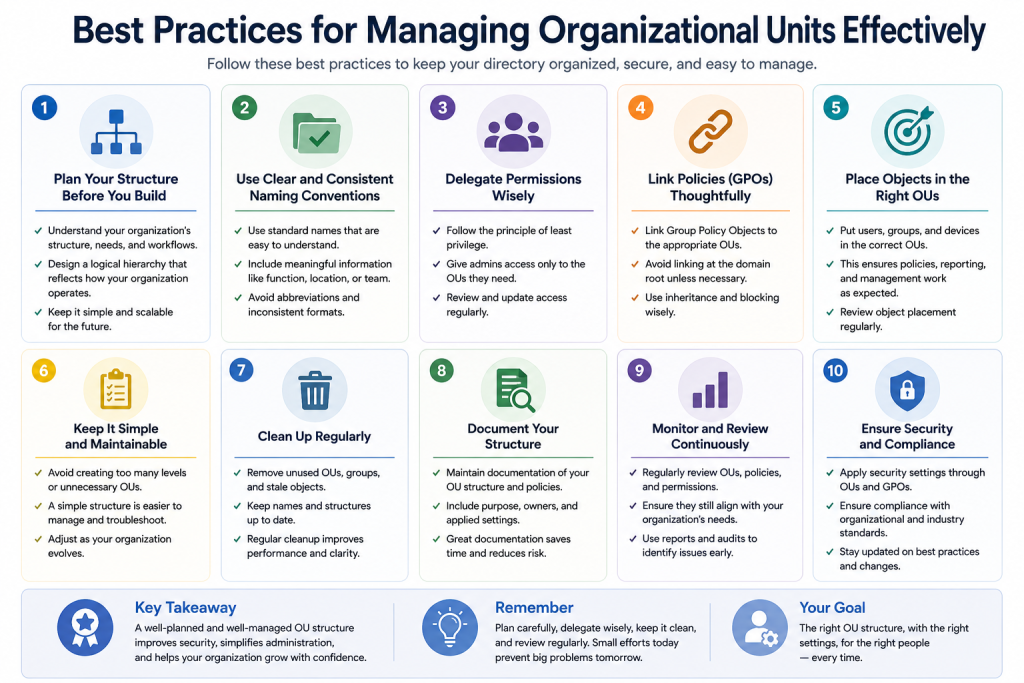
Successful Organizational Unit management often follows a few simple principles.
Start Simple
Begin with the simplest structure that meets the school’s needs.
Additional complexity can always be added later if required.
Think Long-Term
Design Organizational Units around stable organizational structures rather than temporary situations.
Use Consistent Naming
Clear and consistent names make administration easier.
Examples include:
- Students
- Elementary Students
- High School Students
- Teachers
- Administrative Staff
Document Decisions
Record why Organizational Units were created and how they are intended to be used.
Review Regularly
Regular reviews help identify unnecessary complexity before it becomes a problem.
Avoid Unnecessary Changes
Frequent restructuring can create confusion and increase administrative workload.
Make changes thoughtfully and only when there is a clear reason.
Frequently Asked Questions
There is no fixed number. Schools should create only the Organizational Units necessary to support their organizational structure and administrative requirements.
Not always. Smaller schools may manage students effectively with broader groupings, while larger schools may benefit from grade-level organization.
Yes. However, major restructuring requires planning to avoid confusion and unintended consequences.
Most schools benefit from reviewing their Organizational Unit structure at least once per year.
Creating an overly complex hierarchy is one of the most common challenges. Simpler structures are usually easier to maintain.
Summary
Managing Organizational Units effectively is one of the most important parts of administering Google Workspace for Education. A thoughtful Organizational Unit structure helps schools organize users, maintain consistency, reduce administrative effort, and support long-term growth.
The most successful Organizational Unit structures are usually simple, logical, and aligned with how the school operates. By understanding inheritance, planning carefully, reviewing structures regularly, and avoiding unnecessary complexity, schools can create an environment that remains manageable year after year.
Rather than creating Organizational Units for every situation, administrators should focus on building a structure that is easy to understand, easy to maintain, and capable of growing alongside the school.
About the Author
This guide is brought to you by Asher Feroze. I’ve worked in various roles at CreativeON, including Manager Operations, Manager Marketing, and Level 2 Client Support. These days, I focus on helping people understand Google Workspace and cloud technologies in simple, practical language. My goal is to help schools, educators, and administrators make better technology decisions for learning and collaboration.