

Introduction
Website speed is no longer optional—it directly affects user experience and search rankings. If a page loads slowly, users leave quickly, no matter how good the content is.
To measure real-world performance, Google introduced Core Web Vitals, which evaluate how fast a site loads, how quickly it responds, and how stable the layout feels while loading.
Most WordPress site owners focus on themes, plugins, and images—but often ignore the most important factor: hosting performance. In reality, your hosting setup plays a major role in all Core Web Vitals results.
What Are Core Web Vitals?
Core Web Vitals are user experience metrics defined by Google Core Web Vitals.
They include:
- LCP (Largest Contentful Paint): How fast main content loads
- INP (Interaction to Next Paint): How quickly the site responds to user actions
- CLS (Cumulative Layout Shift): How stable the layout is during loading
Together, they show how “fast and smooth” your website feels to real users.
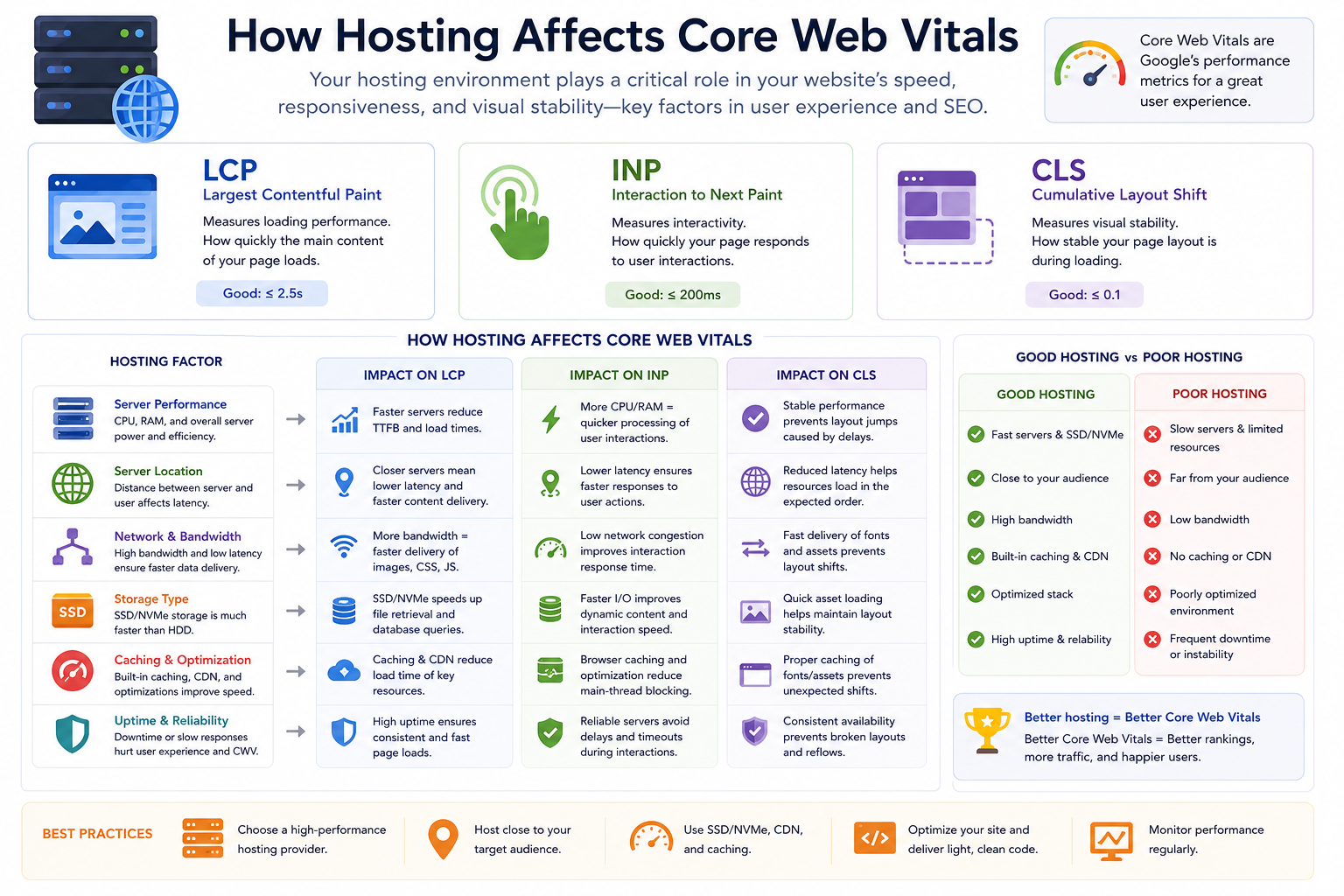
How Hosting Affects Core Web Vitals
1. LCP (Loading Performance)
LCP depends heavily on how fast your server delivers content.
Slow hosting leads to:
- Delayed page rendering
- Slow database responses
- High server response time (TTFB)
Fast WordPress hosting improves LCP using:
- NVMe SSD storage
- LiteSpeed or optimized NGINX
- Server-level caching
- CDN integration
2. INP (Responsiveness)
INP measures how quickly your site reacts when users interact with it.
Poor hosting can cause:
- Slow form submissions
- Laggy WooCommerce checkout
- Delayed button clicks
Better hosting improves responsiveness through:
- Faster PHP execution (PHP 8.3+)
- More CPU and RAM availability
- Redis object caching
- Optimized database performance
3. CLS (Visual Stability)
CLS is mostly caused by front-end design, but hosting still contributes.
Slow-loading assets can cause:
- Images shifting layout
- Fonts loading late
- Page elements moving during load
Fast and stable hosting reduces these issues by delivering assets quickly and consistently.
Key Hosting Features That Improve Performance
A high-performance WordPress hosting stack typically includes:
- NVMe SSD storage for faster data access
- LiteSpeed Web Server for better request handling
- PHP 8.3+ for faster processing
- Redis Object Cache for database optimization
- HTTP/3 support for faster connections
- CDN integration for global speed
Each layer improves different parts of Core Web Vitals.
Shared Hosting vs Managed WordPress Hosting
Shared Hosting
Shared hosting places multiple websites on one server.
Limitations include:
- Slower response during traffic spikes
- Limited CPU and memory
- Inconsistent performance
It works for small websites but struggles with Core Web Vitals optimization.
Managed WordPress Hosting
Managed hosting is built specifically for WordPress performance.
It offers:
- Optimized server stack
- Built-in caching
- Better scalability
- Improved security and stability
For performance-focused websites, it delivers far better Core Web Vitals results.
Why Hosting Matters More Than Front-End Optimization
Even if your images are optimized and plugins are clean, weak hosting will still slow your site down.
Hosting controls:
- Server response time (TTFB)
- Database performance
- Page generation speed
- Traffic handling capacity
This makes hosting the foundation of all performance improvements.
Tools to Measure Core Web Vitals
You can monitor performance using:
- Google PageSpeed Insights
- Google Search Console
- Lighthouse
- Chrome UX Report (CrUX)
These tools help identify real user experience issues, not just lab results.
Conclusion
Core Web Vitals are not just technical SEO metrics—they reflect real user experience.
While design and optimization matter, hosting is the foundation that determines how well your website performs.
To improve Core Web Vitals effectively, focus on:
- Faster servers
- Better caching
- Modern hosting technology
- Scalable infrastructure
In most cases, upgrading hosting alone can dramatically improve performance, SEO, and user satisfaction.