
Businesses today create and manage more digital files than ever before. Contracts, invoices, employee records, customer documents, proposals, presentations, marketing assets, and operational reports all need to be stored securely while remaining accessible to the right people.
Many organizations start with a simple approach. Employees save files on personal computers, external drives, USB devices, or even personal cloud accounts. At first, this may seem manageable. However, as the business grows, so do the challenges. Important documents become difficult to locate, multiple versions of the same file appear, employees accidentally overwrite information, and security risks increase.
Google Drive helps businesses solve these problems by creating a centralized environment for storing, organizing, sharing, and protecting company information. Instead of searching through emails or asking coworkers for the latest version of a document, teams can work from a single source of truth.
Whether you run a startup, a growing SME, an educational institution, a healthcare provider, or a large enterprise, Google Drive can become the foundation of a modern document management strategy.
Why Businesses Need a Structured Document Management System
Poor document management costs businesses more than most owners realize.
Employees spend valuable time searching for files. Teams create duplicate documents because they cannot locate existing versions. Sensitive information gets shared with the wrong people. When staff members leave the company, critical business files may disappear with them.
A structured document management system helps solve these challenges by ensuring that:
- Files are stored in one central location
- Teams work on current versions
- Access is controlled appropriately
- Information remains available when employees change roles
- Business records stay organized and searchable
Google Drive provides the tools necessary to achieve these goals while supporting both office-based and remote teams.
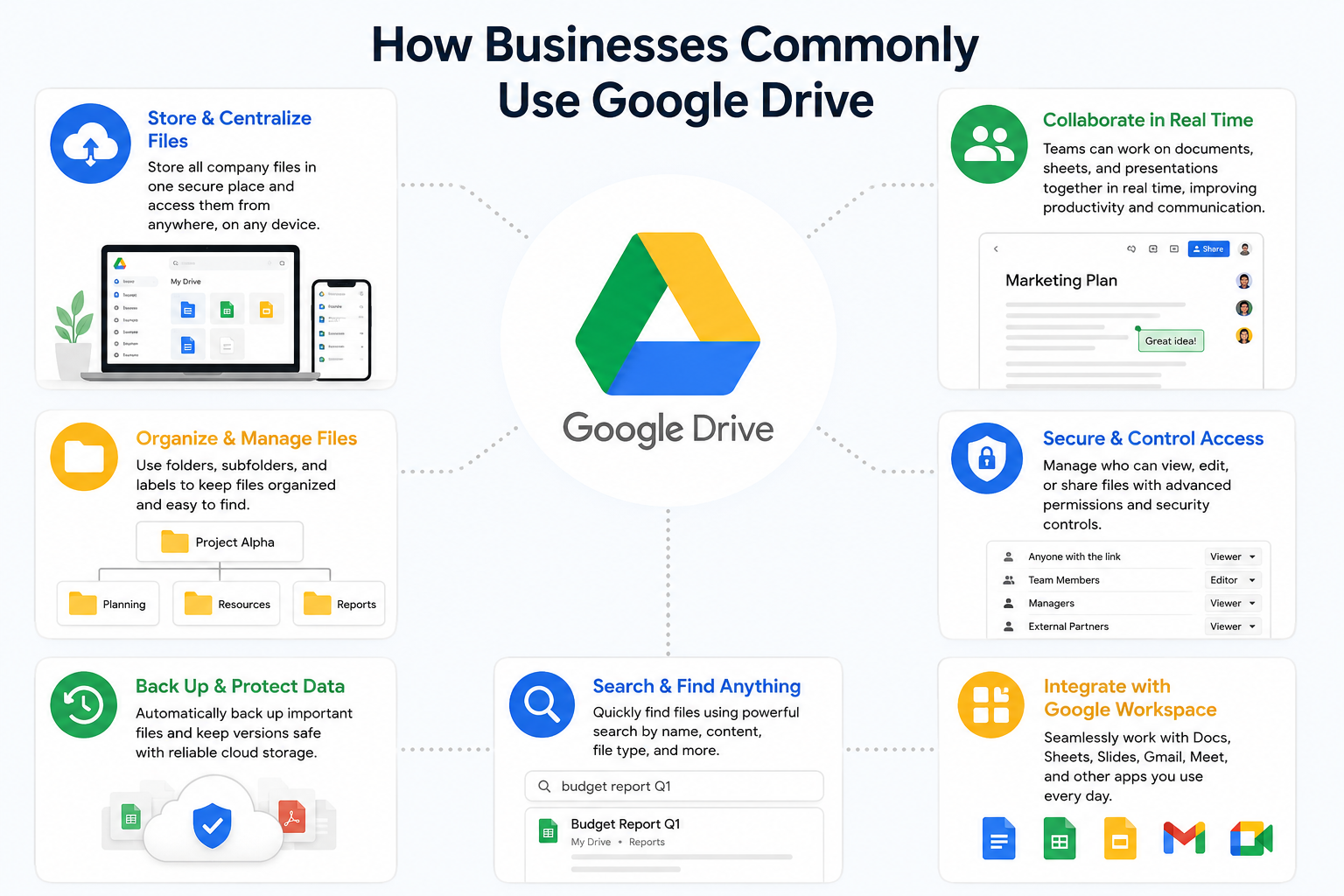
How Businesses Commonly Use Google Drive
Every department within an organization has different document requirements.
Sales Teams
Sales departments often manage large volumes of customer-facing documents.
These typically include:
- Proposals
- Quotations
- Contracts
- Product brochures
- Presentation decks
- Customer onboarding documents
For example, a sales manager in Lahore may maintain a Shared Drive containing approved proposal templates and current pricing sheets. This ensures every salesperson uses the latest materials rather than outdated files stored on personal laptops.
Human Resources
HR departments handle some of the most sensitive information within an organization.
Google Drive can be used to manage:
- Employment contracts
- Training materials
- Company policies
- Performance reviews
- Recruitment documentation
- Employee handbooks
Carefully configured permissions help ensure confidential records remain accessible only to authorized personnel.
Finance Departments
Finance teams require secure storage and controlled access.
Common files include:
- Budget reports
- Tax documentation
- Payroll information
- Invoices
- Financial statements
- Audit records
By restricting access at the folder level, organizations can reduce the risk of unauthorized viewing or modification.
Marketing Teams
Marketing departments often work with large files and collaborative projects.
Examples include:
- Campaign assets
- Design files
- Videos
- Content calendars
- Brand guidelines
- Social media resources
Google Drive allows multiple stakeholders to access approved versions while maintaining consistency across campaigns.
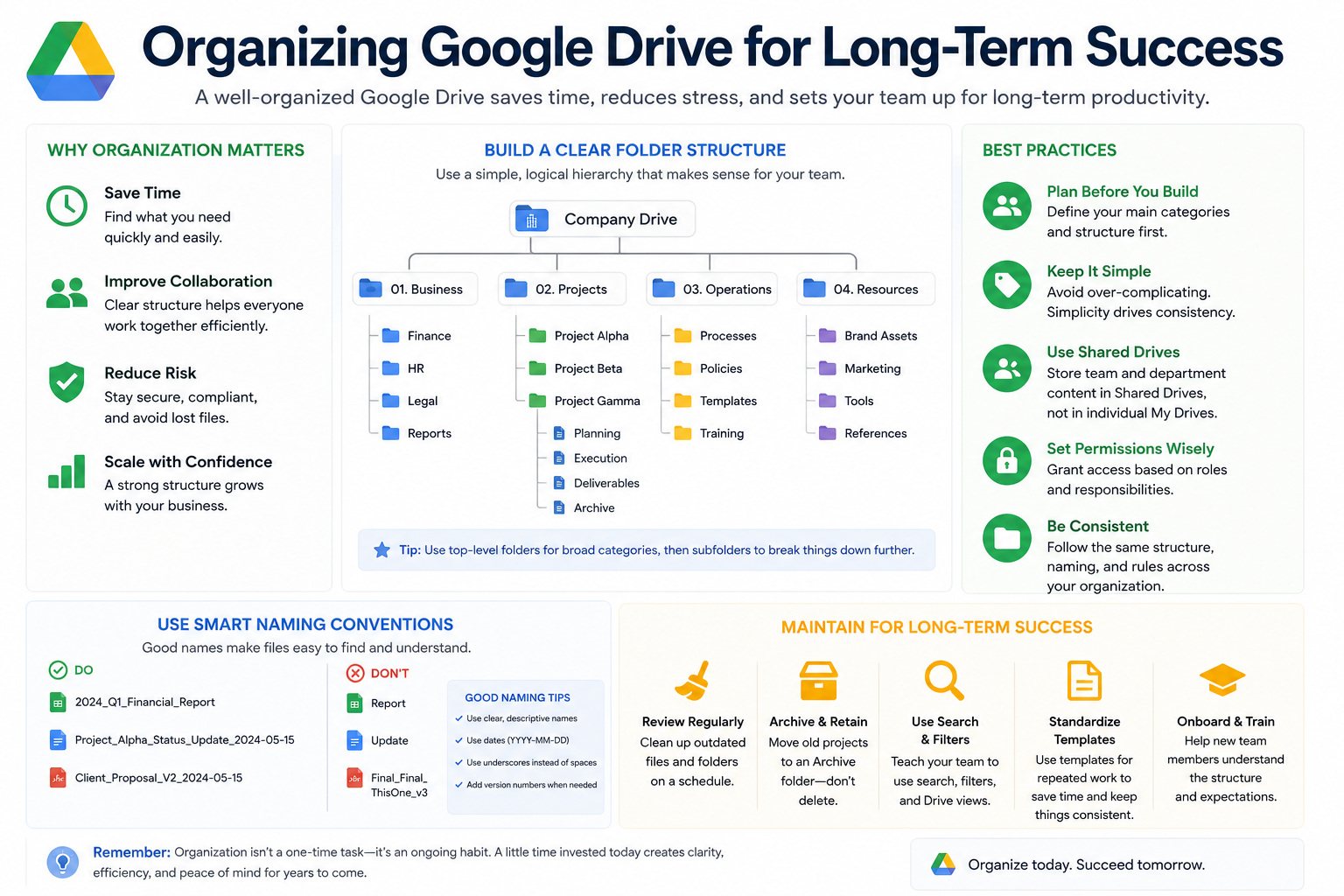
Organizing Google Drive for Long-Term Success
A disorganized Drive eventually becomes difficult to manage.
Businesses should establish a logical structure before large volumes of data accumulate.
Create Department-Based Folders
A common approach is organizing information by department.
Example structure:
Company Files
- Finance
- Human Resources
- Marketing
- Sales
- Operations
- Management
Each department can then create relevant subfolders.
This approach simplifies navigation and reduces confusion.
Establish Naming Standards
Naming conventions should remain consistent throughout the organization.
Instead of:
Final Proposal Updated New Version.pdf
Use:
2026-ClientName-Sales-Proposal.pdf
Standardized naming improves searchability and reduces duplicate file creation.
Understanding Shared Drives
One of the most valuable business features available through Google Drive is Shared Drives.
Unlike personal storage, Shared Drives belong to the organization rather than individual employees.
This distinction becomes extremely important as businesses grow.
If an employee leaves the company, files stored within Shared Drives remain available to the organization.
Benefits include:
- Centralized ownership
- Easier administration
- Better continuity
- Improved security
- Simplified onboarding
For many businesses, Shared Drives become the preferred location for storing company documents.
Smart File Sharing Practices
Sharing files is one of the most frequently used Google Drive features.
However, poor sharing practices can create serious security risks.
Share with Specific People
Whenever possible, grant access directly to specific users.
This provides visibility into who can access company information and reduces accidental exposure.
Limit Editor Permissions
Not every user needs editing access.
Many documents only require viewing or commenting rights.
Using the principle of least privilege helps minimize accidental changes and security concerns.
Review Shared Content Regularly
Over time, projects end and personnel changes occur.
Businesses should periodically review file access and remove permissions that are no longer necessary.
Understanding Google Drive Permissions
Permissions determine what users can do with files and folders.
Viewer
Users can:
- Open documents
- Read content
- Access information
They cannot make changes.
Commenter
Users can:
- View files
- Leave feedback
- Suggest improvements
They cannot directly edit content.
Editor
Users can:
- Modify files
- Organize content
- Share information
- Upload updates
Editor access should only be granted when necessary.
Managing File Versions Without Chaos
Many businesses struggle with file version confusion.
Examples often include:
- Proposal_Final.docx
- Proposal_Final_v2.docx
- Proposal_Final_v2_NEW.docx
- Proposal_Final_Final.docx
This creates inefficiency and increases the likelihood of mistakes.
Google Drive helps solve this problem through version history.
Benefits of Version History
Version history allows businesses to:
- View previous document versions
- Restore earlier changes
- Identify who made modifications
- Recover content accidentally removed
Instead of maintaining multiple file copies, teams can confidently work from a single document.
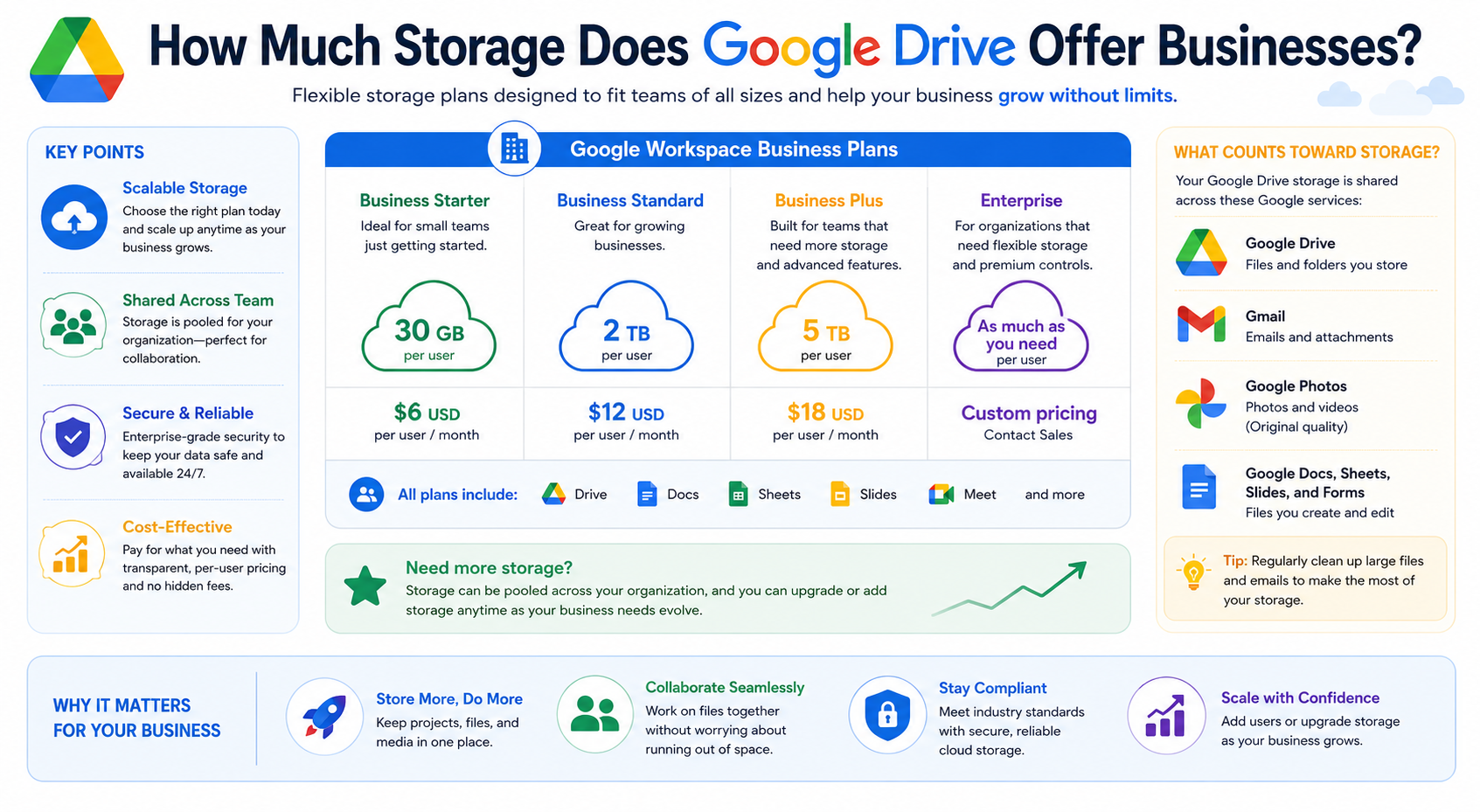
How Much Storage Does Google Drive Offer Businesses?
As businesses grow, storage requirements increase.
Marketing departments may manage videos and design assets. Finance departments store years of records. Operations teams maintain project documentation.
Google Drive is designed to scale alongside organizational growth.
This means businesses can continue expanding their document libraries without relying on external hard drives or local servers.
The ability to access growing amounts of business information from a centralized environment helps support long-term operational efficiency.
Can Google Drive Replace a Traditional File Server?
For many organizations, the answer is yes.
Traditional file servers often require:
- Hardware maintenance
- Physical office infrastructure
- IT administration
- Backup management
- Hardware replacement cycles
Google Drive reduces many of these responsibilities by providing cloud-based access to business documents.
Organizations with distributed teams, remote employees, and multiple office locations often find cloud-based document management more flexible and easier to maintain.
Google Drive Security Features Businesses Should Use
Security should be a priority for every organization.
Google Drive includes several capabilities designed to help protect company information.
Two-Step Verification
Two-step verification adds an additional layer of protection beyond passwords.
Even if credentials become compromised, unauthorized access becomes significantly more difficult.
Access Controls
Administrators can control who can:
- View files
- Edit files
- Share content
- Download documents
This helps protect sensitive information.
Activity Monitoring
Organizations can review activity logs to understand:
- File access
- Sharing actions
- Modifications
- Ownership changes
This visibility improves accountability.
Threat Detection
Google continuously monitors for suspicious activity and unusual login behavior, helping organizations identify potential security risks more quickly.
Google Drive Security Checklist for Businesses
Every business should implement the following security practices.
Account Security
✔ Enable two-step verification
✔ Require strong passwords
✔ Review inactive accounts
✔ Monitor login activity
Sharing Security
✔ Avoid public links when unnecessary
✔ Use specific-user sharing
✔ Review permissions regularly
✔ Remove expired project access
Administrative Security
✔ Use Shared Drives
✔ Establish ownership policies
✔ Define access approval processes
✔ Maintain employee offboarding procedures
Data Protection
✔ Review sensitive folders regularly
✔ Use version history for recovery
✔ Restrict confidential information
✔ Train employees on security awareness
Employee Offboarding and Access Management
One of the biggest risks businesses face occurs when employees leave the organization.
Without proper procedures, former employees may retain access to sensitive information.
A structured offboarding process should include:
- Removing account access
- Transferring ownership when necessary
- Reviewing shared permissions
- Updating team memberships
Organizations that use Shared Drives typically experience fewer ownership-related problems because files remain with the business rather than individual employees.
Business Continuity and Disaster Recovery
Unexpected events happen.
Employees accidentally delete files. Devices fail. Staff members leave the company.
Business continuity planning helps organizations recover quickly from these situations.
Google Drive supports continuity through:
- Cloud-based storage
- Version history
- File recovery capabilities
- Centralized document access
These features help reduce disruption and improve resilience.
Data Governance Best Practices
Data governance refers to how businesses manage information throughout its lifecycle.
Effective governance includes:
Defining Folder Standards
Consistent structures make information easier to find.
Establishing Access Policies
Users should only access information necessary for their roles.
Conducting Periodic Reviews
Permissions should be reviewed quarterly or whenever organizational changes occur.
Training Employees
Technology alone cannot guarantee security.
Employees should understand how to store, share, and protect company information responsibly.
Google Drive for Remote and Hybrid Teams
Remote work has become increasingly common across Pakistan and around the world.
Employees often work from:
- Offices
- Homes
- Client locations
- Field sites
Google Drive allows teams to access important documents from virtually anywhere while maintaining centralized management.
This flexibility helps organizations remain productive regardless of where employees work.
Common Google Drive Mistakes Businesses Should Avoid
Even well-intentioned teams make mistakes.
Common issues include:
Oversharing Documents
Providing unnecessary access increases risk.
Poor Folder Organization
Disorganized structures reduce productivity.
Using Personal Accounts
Business documents should remain under organizational control.
Ignoring Permission Reviews
Outdated access rights create security concerns.
Lack of Employee Training
Many security incidents result from user error rather than technology failures.
Signs Your Business Has Outgrown Basic File Storage
Many businesses begin with simple file-sharing methods.
Eventually, growth creates challenges.
Warning signs include:
- Employees storing files on personal devices
- Multiple versions of documents
- Frequent requests for file access
- Difficulty locating information
- Permission confusion
- Lack of visibility into document activity
These issues often indicate the need for a more structured document management strategy.
At CreativeON, we frequently help organizations implement Google Workspace environments that improve document organization, collaboration, and security while reducing operational inefficiencies.
How Google Drive Supports Businesses in Pakistan
Organizations throughout Pakistan are increasingly adopting digital workflows.
From startups and schools to healthcare providers and enterprises, businesses need secure access to information without relying solely on office-based infrastructure.
Google Drive helps organizations:
- Centralize business documents
- Improve collaboration
- Support remote work
- Strengthen security
- Reduce dependence on physical storage
- Maintain business continuity
When combined with proper governance and security practices, Google Drive becomes more than a storage platform—it becomes a critical component of modern business operations.
Conclusion
Google Drive is far more than a place to save files. For modern businesses, it serves as a document management platform that supports collaboration, organization, governance, security, and operational efficiency.
Organizations that implement structured folder systems, Shared Drives, clear permission policies, regular security reviews, and employee training can significantly improve how information is managed across the business.
As companies continue their digital transformation journeys, effective document management becomes increasingly important. Businesses that establish strong Google Drive practices today will be better positioned to collaborate efficiently, protect sensitive information, support remote work, and scale confidently in the future.