
Choosing a WordPress hosting plan can feel overwhelming. Every provider claims to be “the fastest” or “the most secure,” but not every plan actually delivers the features your WordPress site needs to run smoothly. If you’ve ever compared hosting plans and found yourself confused by the technical jargon, you’re not alone.
This guide breaks down the essential features to look for in WordPress hosting plans, so you can make a confident, informed decision instead of just picking whichever plan looks cheapest.

Why the Right Features Matter More Than the Price Tag
It’s tempting to choose a hosting plan based on price alone. But a cheap plan that lacks the right features can end up costing you more in the long run — through slow load times, security breaches, or downtime that drives visitors and customers away.
The right combination of features protects your site, keeps it fast, and gives you room to grow. Whether you’re running a personal blog, a business website, or an online store, the features below apply directly to how well your WordPress site performs day to day.
Performance-Related Features
SSD or NVMe Storage
SSD storage reads and writes data far faster than traditional hard drives. For WordPress specifically, this translates into quicker page loads, faster database queries, and a smoother backend experience when you’re editing content. Some hosts now offer NVMe SSDs, which are even faster than standard SSDs. Any hosting plan you consider should include SSD storage — preferably NVMe — as standard, not as a paid add-on.
Server-Level Caching
Caching stores a ready-to-serve version of your pages, so the server doesn’t have to rebuild them from scratch every time someone visits. Good WordPress hosting plans typically offer:
- Server-level caching configured by the host
- Object caching for database-heavy sites
- CDN integration to serve content from servers closer to your visitors
If a plan doesn’t mention caching at all, that’s a sign you’ll need to configure and manage it yourself using a plugin — which adds extra work.
CPU, RAM, and Bandwidth Resources
Look closely at the CPU, RAM, and bandwidth allocations for each plan. WordPress sites, especially those running multiple plugins or WooCommerce, need enough resources to avoid slowdowns during traffic spikes. A plan that looks affordable but limits you to minimal resources may not hold up once your site starts growing.
Reliable Uptime
A hosting plan should provide consistently high uptime so your visitors and search engines can access your website whenever they need to. Look for providers that actively monitor their infrastructure and maintain a strong uptime record. Even short periods of downtime can affect customer trust and business operations.
PHP Version Support
Your hosting provider should allow you to switch between supported PHP versions. Running a modern PHP version improves WordPress performance, compatibility, and security, while the ability to change versions helps when testing plugins or themes.
Security Features
Free SSL Certificates
An SSL certificate encrypts the connection between your site and its visitors, and it’s now a baseline requirement — both for visitor trust and for search engine visibility. Reputable WordPress hosting plans include free SSL certificates with automatic renewal, so you never have to worry about it expiring unexpectedly. For a deeper look at how SSL protects your site, check out our dedicated SSL for WordPress guide.
Malware Scanning and Firewalls
WordPress’s popularity makes it a common target for automated attacks. Look for plans that include:
- Regular malware scanning
- A web application firewall (WAF)
- Automatic blocking of suspicious login attempts
These features work quietly in the background, catching threats before they become real problems. For a more complete breakdown of protective measures, our WordPress Security Guide covers this in depth.
Automatic Backups
Backups are your safety net. If something goes wrong — a bad plugin update, a hacking attempt, or accidental deletion — a recent backup lets you restore your site quickly. When comparing plans, check:
- How often backups run (daily is ideal)
- How long backups are retained
- How easy it is to restore a backup yourself, without contacting support
We go into more detail on backup frequency and restoration in our WordPress Backup Best Practices guide.
WordPress-Specific Tools
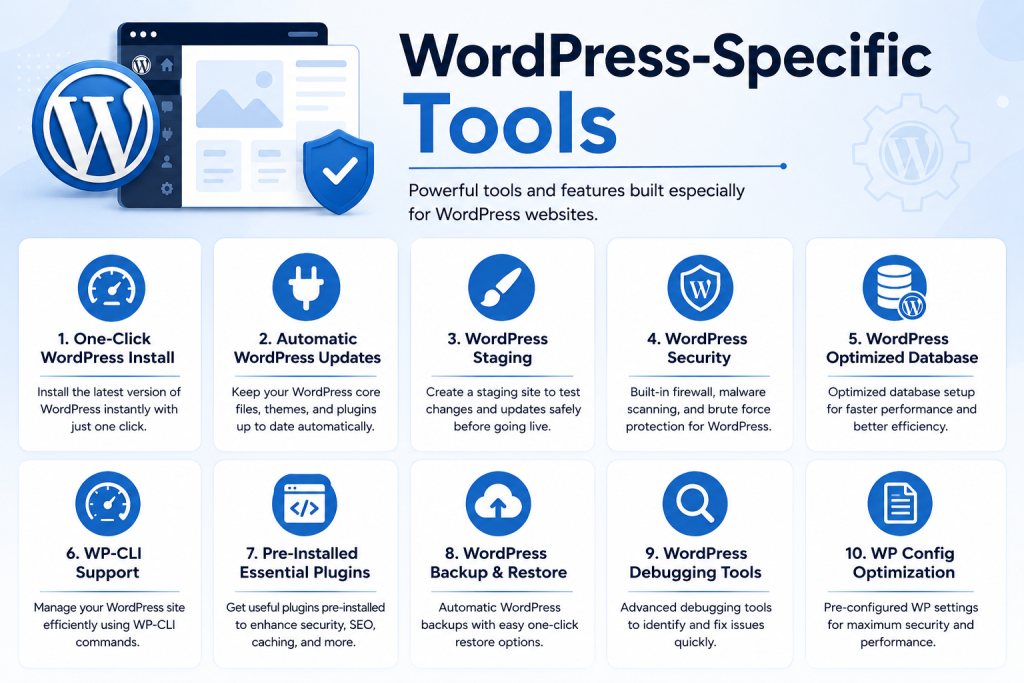
One-Click WordPress Installation
This feature saves you from manually installing WordPress through file transfers and database setup. A good plan lets you launch a fresh WordPress site within a few clicks directly from the hosting dashboard. Many managed hosts go a step further and offer WordPress pre-installed, so your site is ready to configure the moment your account is active.
Staging Environments
A staging environment is a private copy of your site where you can test changes — new themes, plugin updates, design tweaks — before pushing them live. This prevents a broken update from affecting your actual visitors. Not every hosting plan includes this, so it’s worth confirming before you commit, especially if you update your site frequently. Our WordPress Staging Environment Guide explains how to use this feature effectively.
Automatic WordPress Updates
WordPress regularly releases updates for security patches and performance improvements. Some hosting plans handle core updates automatically, reducing the risk of running an outdated, vulnerable version of WordPress.
Support Quality
Technical support can make or break your hosting experience, particularly if you’re not deeply technical yourself. When evaluating a plan, consider:
- Availability: Is support offered 24/7, or only during business hours?
- Channels: Live chat, phone, and ticketing are all useful; relying only on email can slow things down during urgent issues.
- WordPress expertise: General hosting support isn’t the same as WordPress-specific support. Ask whether the support team is trained specifically on WordPress issues, not just server-level problems.
Test response times by asking a pre-sales question before purchasing. Fast, knowledgeable responses often indicate better long-term support.
Scalability Options
Your hosting needs today may not match your needs in a year. A good plan should let you upgrade resources — storage, bandwidth, visitor capacity — without migrating to an entirely new hosting provider. Look for providers that support vertical upgrades, where you simply add more resources to your existing plan rather than moving to a different server or platform. This is particularly important for growing businesses or online stores. If you’re running or planning to run WooCommerce, our WordPress Hosting for WooCommerce guide covers the additional considerations for eCommerce-specific scaling.
Common Mistakes to Avoid When Comparing Plans
- Focusing only on introductory pricing. Many hosting plans offer a low first-year rate that increases significantly on renewal. Always check the renewal price.
- Ignoring resource limits. A plan might advertise “unlimited” storage or bandwidth, but fine print often includes fair-use limits that can affect busier sites.
- Skipping the backup and security fine print. Some providers charge extra for daily backups or advanced security features that other hosts include by default.
- Not checking migration support. If you’re moving from another host, find out whether the new provider offers free migration assistance. Our WordPress Migration Guide walks through what a smooth migration should look like.
How to Match Features to Your Needs
Not every WordPress site needs every feature listed above. A small personal blog may do fine with basic caching and standard backups, while a growing online store or a business site handling customer data will benefit more from advanced security, staging environments, and scalable resources.
Before choosing a plan, it helps to list out:
- Your current traffic level and expected growth
- Whether your site handles sensitive data or transactions
- How often you update your site and test changes
- Your comfort level with technical maintenance
Matching these answers against the features above will narrow your options considerably, whether you’re a UAE-based startup launching your first site or an established business scaling up an existing one.