Disk Space vs Bandwidth – What Do You Really Need?
Introduction When people buy web hosting for the first time, one of the biggest points of confusion is understanding disk space and bandwidth. Hosting plans often advertise things like: Unlimited storage Unlimited bandwidth High-performance hosting Massive SSD space But most website owners still don’t know what they truly need. As a result, many businesses either: […]
Introduction
When people buy web hosting for the first time, one of the biggest points of confusion is understanding disk space and bandwidth.
Hosting plans often advertise things like:
- Unlimited storage
- Unlimited bandwidth
- High-performance hosting
- Massive SSD space
But most website owners still don’t know what they truly need.
As a result, many businesses either:
- Pay for hosting resources they never use
- Or choose hosting plans that become slow and restrictive later
At CreativeON.ae and CreativeON.com, this is one of the most common questions customers ask before launching a website, VPS server, ecommerce store, or business platform.
The good news is that understanding disk space and bandwidth is actually much simpler than hosting companies make it sound.
In this guide, we’ll explain:
- What disk space means
- What bandwidth actually does
- Which one matters more
- How much you realistically need
- What happens when limits are exceeded
- Common mistakes businesses make
- How hosting professionals evaluate resource requirements in real-world environments
Whether you run a startup website in Dubai, a WooCommerce store in Abu Dhabi, or a growing business platform in the UAE, understanding these hosting resources can help you choose better infrastructure without overspending.
What Is Disk Space in Web Hosting?
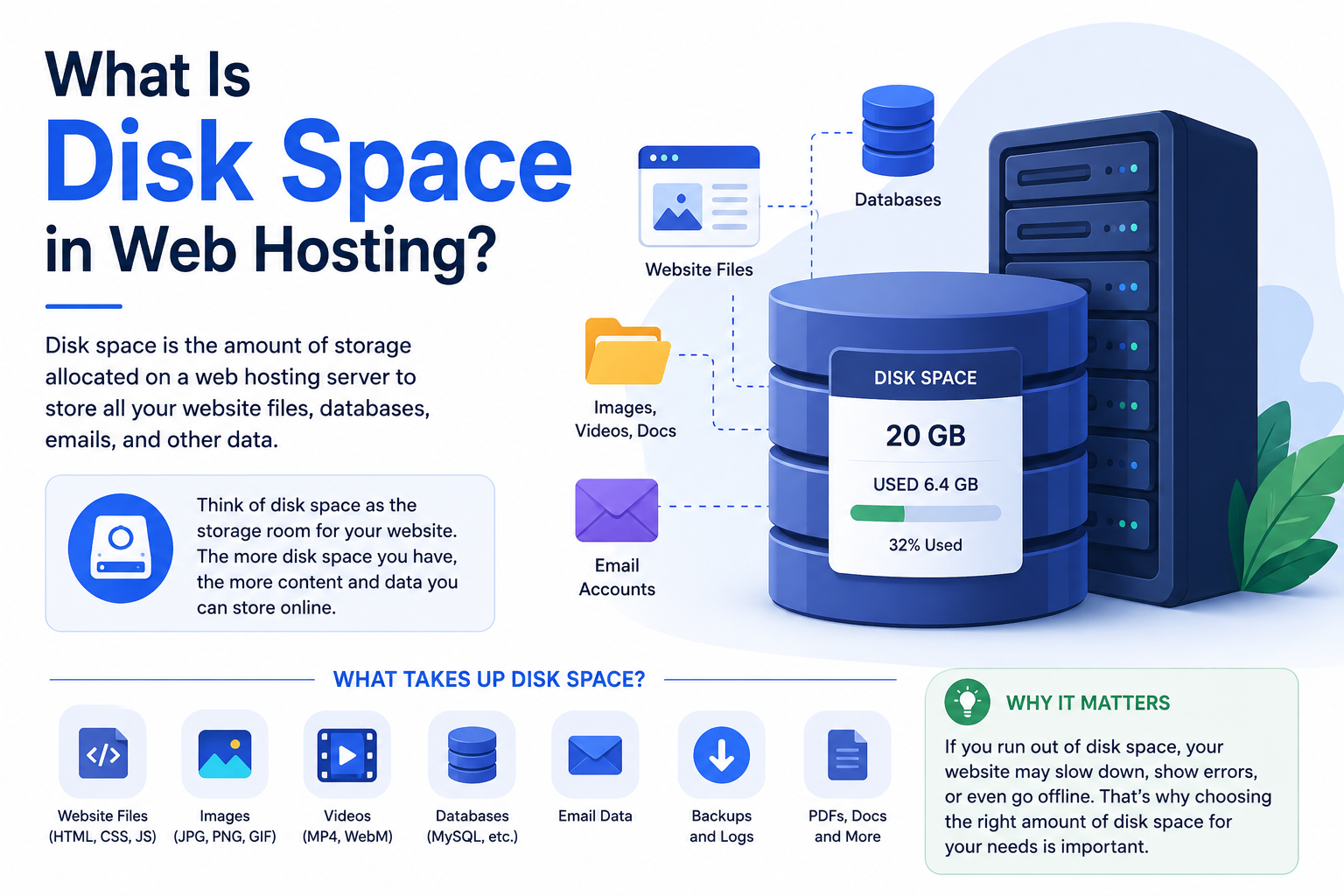
Disk space refers to the amount of storage available on your hosting server.
This storage is used to keep all your website files and hosting data.
Think of it like the storage capacity of your laptop or mobile phone.
Your hosting disk space stores:
- Website files
- WordPress core files
- Images
- Videos
- Emails
- Databases
- Themes and plugins
- Backups
- Cache files
- Server logs
Every file uploaded to your hosting account consumes storage space.
For example:
- A simple webpage may only use a few KB
- A high-quality image may use several MB
- A WooCommerce backup may consume multiple GB
The larger your website becomes, the more disk space you need.
Simple Example of Disk Space
Imagine your website is a warehouse.
- Disk space = warehouse size
- Website files = products inside the warehouse
If your warehouse becomes full, you cannot store additional products.
Similarly, when hosting storage becomes full:
- uploads fail
- backups stop working
- emails may stop receiving
- WordPress updates can fail
- database issues may occur
This is why monitoring disk usage is important for long-term website stability.
What Usually Consumes the Most Disk Space?
Many beginners assume website pages consume the most storage.
In reality, that is rarely true.
Based on real hosting environments, the biggest storage consumers are usually:
High-Resolution Images
Unoptimized images are one of the largest causes of wasted hosting storage.
Many business websites upload:
- 5–10 MB banner images
- oversized product photos
- uncompressed PNG files
Over time, this significantly increases storage usage.
Website Backups
Backups are essential for security, but they silently consume large amounts of disk space.
We commonly see WordPress websites storing:
- daily backups
- staging backups
- plugin-generated backups
- duplicate archives
Some small websites unexpectedly consume 20–30 GB entirely because of unmanaged backups.
Emails
Business email hosting can gradually consume massive storage over time.
Shared hosting accounts often fill because old emails were never archived or cleaned.
Videos
Uploading videos directly to hosting is another common mistake.
Video files consume:
- huge storage
- high bandwidth
- server I/O resources
This is why many businesses use platforms like YouTube or Vimeo instead of hosting videos directly on shared hosting servers.
Cache and Logs
Caching systems improve speed, but cache files can slowly grow over time.
Similarly, server logs and error logs may consume unexpected storage if not maintained properly.

What Is Bandwidth in Web Hosting?
Bandwidth refers to the amount of data transferred between your website server and visitors.
Every time someone visits your website, files are downloaded from the server to the visitor’s browser.
That transfer consumes bandwidth.
For example, when someone opens your homepage, their browser downloads:
- images
- CSS files
- JavaScript
- text content
- videos
- fonts
All of that data transfer counts toward bandwidth usage.
The more visitors your website receives, the more bandwidth your hosting account consumes.
Simple Example of Bandwidth
Using the same warehouse analogy:
- Disk space = warehouse storage size
- Bandwidth = delivery capacity
Even if your warehouse is huge, poor delivery capacity creates delays and congestion.
Similarly, a website with insufficient bandwidth or overloaded server resources may become slow during traffic spikes.
How Bandwidth Is Calculated
Bandwidth depends mainly on two things:
Website Size
Larger webpages consume more bandwidth.
Example:
- One webpage size = 3 MB
- 1,000 monthly visitors
- Total bandwidth usage = around 3 GB
Number of Visitors
Traffic growth dramatically increases bandwidth usage.
Even small websites can consume large bandwidth if they receive:
- ad traffic
- viral social traffic
- ecommerce campaigns
- high-volume visitors
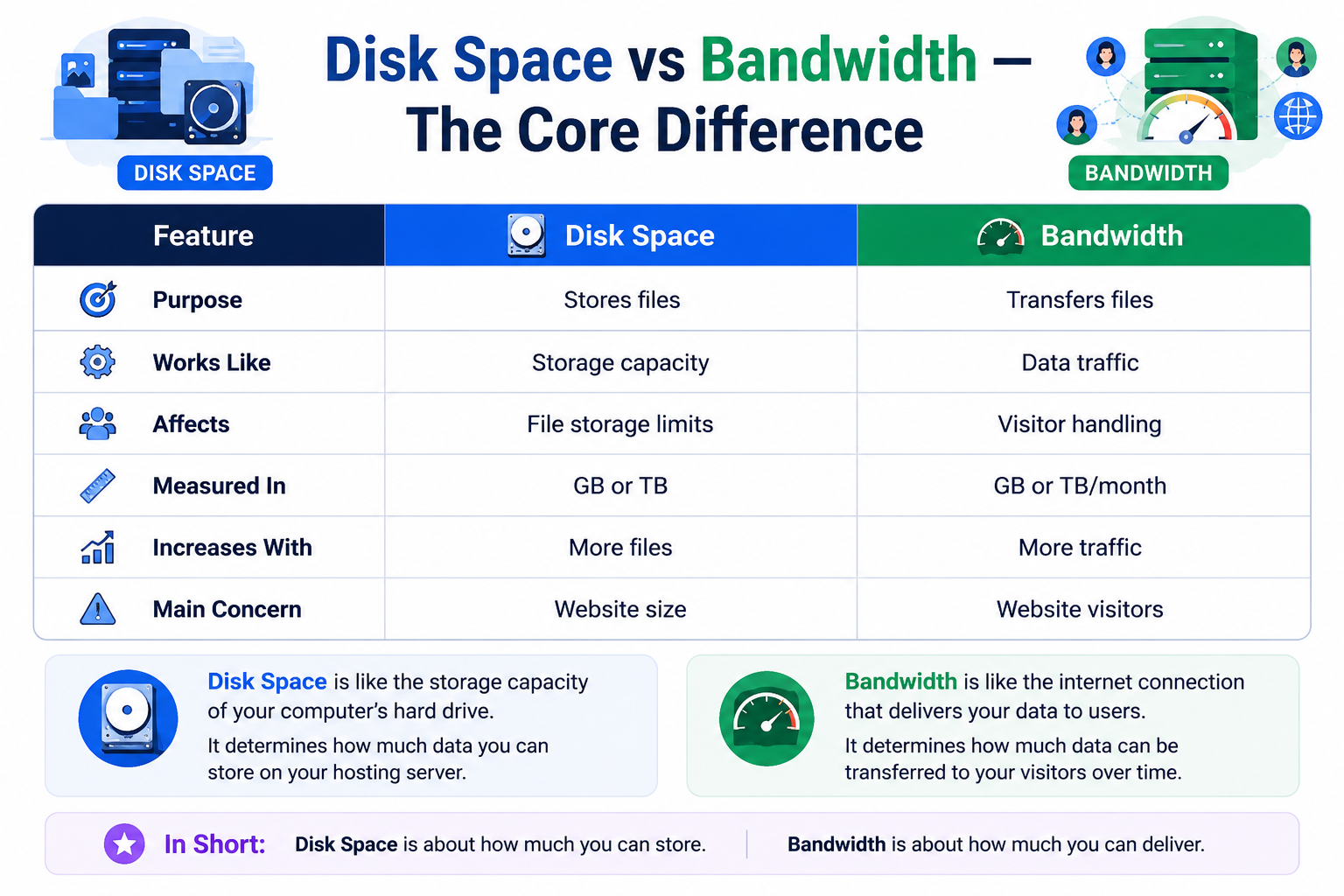
Disk Space vs Bandwidth — The Core Difference
Although both are hosting resources, they solve different problems.
| Feature | Disk Space | Bandwidth |
| Purpose | Stores files | Transfers files |
| Works Like | Storage capacity | Data traffic |
| Affects | File storage limits | Visitor handling |
| Measured In | GB or TB | GB or TB/month |
| Increases With | More files | More traffic |
| Main Concern | Website size | Website visitors |
A website can have:
- low storage usage but high bandwidth usage
- high storage usage but low traffic
- or high usage in both areas
It depends entirely on the website type and traffic behavior.
Which One Usually Runs Out First?
In modern hosting environments, bandwidth or server resources often become a problem before storage.
Why?
Because many hosting providers now offer generous SSD or NVMe storage.
However, growing traffic can quickly stress:
- CPU allocation
- RAM limits
- concurrent connections
- server I/O
- bandwidth capacity
For example:
Traffic-Heavy Websites
News sites or viral blogs may use little storage but consume huge bandwidth.
Media-Heavy Websites
Photography portfolios or ecommerce stores may consume large storage even with moderate traffic.
Shared Hosting Accounts
In real-world hosting environments, shared hosting websites often hit:
- CPU throttling
- inode limitations
- server process limits
before actually exhausting disk space.
This is why hosting performance matters more than just “large numbers.”
How Much Disk Space Do You Actually Need?
Most websites need far less storage than beginners assume.
Here are more realistic estimates based on actual hosting usage patterns.
| Website Type | Estimated Storage |
| Small Business Website | 2–5 GB |
| Portfolio Website | 1–3 GB |
| WordPress Blog | 5–15 GB |
| WooCommerce Store | 20–50 GB |
| Media Website | 100+ GB |
Real Hosting Experience: What We Commonly See
At CreativeON.ae, many small business websites in the UAE initially use less than 5 GB total storage.
However, storage usage grows unexpectedly because of:
- unoptimized product images
- email accumulation
- backup duplication
- plugin-generated files
- staging environments
Interestingly, many websites with “100 GB SSD hosting” only actively use 3–8 GB.
This is why properly optimized hosting infrastructure matters more than simply purchasing the largest plan available.
How Much Bandwidth Do You Actually Need?
Bandwidth needs vary more significantly because traffic can change rapidly.
| Website Type | Estimated Monthly Bandwidth |
| Small Business Website | 50–100 GB |
| Blog Website | 100–300 GB |
| Ecommerce Store | 300 GB–1 TB |
| High-Traffic Platform | 1 TB+ |
UAE Traffic Patterns and Hosting Growth
Businesses in Dubai, Abu Dhabi, and across the UAE increasingly rely on:
- digital marketing
- ecommerce traffic
- social media campaigns
- online ordering systems
This often creates temporary traffic spikes during:
- Ramadan sales
- promotional campaigns
- UAE shopping events
- business launches
In many cases, bandwidth requirements grow much faster than storage requirements.
That is why scalable infrastructure like:
- VPS hosting
- cloud hosting infrastructure
- CDN optimization
becomes important as businesses expand online.
Why “Unlimited Hosting” Can Be Misleading
Many hosting providers advertise:
- unlimited bandwidth
- unlimited storage
- unlimited websites
But in reality, no physical server has unlimited resources.
Most hosting providers still apply restrictions such as:
- inode limits
- CPU throttling
- RAM allocation
- server process limits
- fair usage policies
- I/O restrictions
This means a website consuming excessive server resources may still face:
- temporary slowdowns
- suspension warnings
- upgrade requests
The word “unlimited” is usually more of a marketing term than a literal infrastructure promise.
What Happens If Disk Space Becomes Full?
When hosting storage reaches its limit, websites can experience serious issues.
Common problems include:
- inability to upload files
- WordPress update failures
- failed backups
- email delivery problems
- database instability
- temporary website errors
In severe cases, websites may partially stop functioning.
What Happens If Bandwidth Limits Are Exceeded?
If bandwidth usage exceeds hosting limits, providers may:
- temporarily suspend the website
- charge overage fees
- reduce website performance
- throttle connections
- request plan upgrades
Modern cloud hosting environments handle this more gracefully, but traditional shared hosting may still enforce strict limits.
How to Monitor Disk Space and Bandwidth Usage
One of the most overlooked hosting practices is resource monitoring.
Most modern hosting panels such as:
- cPanel
- Plesk
- DirectAdmin
provide resource statistics.
You should regularly monitor:
- storage usage
- bandwidth usage
- backup growth
- email storage
- inode counts
- CPU usage
- RAM consumption
This helps prevent unexpected hosting issues before they affect website visitors.
Technical Factors That Also Affect Performance
Many beginners focus only on storage and bandwidth numbers.
But hosting performance also depends on:
SSD vs NVMe Storage
NVMe hosting is significantly faster than traditional SSD storage in many workloads.
LiteSpeed vs Apache
LiteSpeed servers often improve WordPress performance and reduce resource usage compared to traditional Apache setups.
CDN Offloading
CDNs reduce bandwidth usage by caching website files closer to visitors.
Popular CDN providers include:
Caching Systems
Proper caching dramatically reduces bandwidth and server load.
Examples include:
- Redis object cache
- LiteSpeed Cache
- server-side caching
Common Hosting Mistakes Businesses Make
Buying Hosting Only Based on Large Storage Numbers
Many people assume bigger storage automatically means better hosting.
In reality, server quality matters more.
Uploading Huge Images
Large images waste:
- bandwidth
- storage
- loading speed
- SEO performance
Hosting Videos Directly on Shared Hosting
This consumes excessive resources quickly.
Ignoring Resource Monitoring
Many businesses never check hosting usage until the website slows down.
Using Cheap Hosting for Growing Ecommerce Stores
Traffic spikes often overload low-quality shared hosting environments.
How to Reduce Disk Space Usage
Compress Images
Use optimized formats such as:
- WebP
- optimized JPEG
Delete Old Backups
Old backups silently consume storage.
Remove Unused Plugins
Unused plugins still occupy space and sometimes create additional logs.
Use External Storage
Cloud storage reduces local hosting load.
How to Reduce Bandwidth Usage
Use a CDN
CDNs reduce server bandwidth consumption significantly.
Enable Compression
GZIP and Brotli compression reduce file transfer sizes.
Optimize Website Speed
Smaller pages consume less bandwidth.
Enable Caching
Caching reduces repeated server requests.
Choosing the Right Hosting Type
Shared Hosting
Best for:
- beginner websites
- small businesses
- low traffic websites
VPS Hosting
Better for:
- growing traffic
- ecommerce stores
- agencies
- business applications
Cloud Hosting
Ideal for:
- scalable businesses
- fluctuating traffic
- business-critical websites
Dedicated Servers
Suitable for:
- enterprise applications
- high-traffic infrastructure
- large-scale platforms
Choosing Hosting Based on Real Usage
One of the biggest mistakes businesses make is choosing hosting based entirely on marketing numbers.
Reliable hosting should focus on:
- performance
- scalability
- uptime
- server quality
- technical support
- infrastructure reliability
At CreativeON.ae, businesses are typically guided toward hosting plans based on:
- actual traffic expectations
- storage requirements
- application type
- ecommerce growth potential
- future scalability
rather than simply pushing oversized plans unnecessarily.
This creates better long-term website performance and more cost-efficient hosting decisions.
Final Thoughts
Disk space and bandwidth are both essential hosting resources, but they serve completely different purposes.
- Disk space stores your website data
- Bandwidth transfers your website data to visitors
Most websites do not need massive “unlimited” hosting resources.
Instead, they need:
- optimized infrastructure
- scalable performance
- reliable uptime
- balanced resource allocation
Understanding how these resources work helps businesses choose hosting more intelligently while avoiding unnecessary costs and performance issues.
Whether you are launching a small business website, a WordPress blog, a WooCommerce store, or a growing UAE ecommerce platform, selecting the right balance of storage, bandwidth, and server performance is far more important than simply chasing the biggest hosting numbers.
For businesses looking for scalable hosting infrastructure, VPS hosting UAE solutions, cloud hosting, business email services, and professional web hosting services in the UAE, both CreativeON.com and CreativeON.ae provide infrastructure-backed hosting solutions built around real business requirements.