
Many people use the terms domain, subdomain, add-on domain, and parked domain interchangeably, but they are not the same thing. In practice, they represent different levels of website structure and hosting behavior.
Confusion usually appears when setting up hosting, managing multiple websites, or connecting domains to a single server. This guide explains each concept clearly, compares them side by side, and shows exactly when to use each one.
Domain (The Primary Website Identity)
A domain is the main web address that represents a website on the internet.
Examples:
- example.com
- company.ae
- brand.net
It is the core identity of any online presence. When users type a domain into a browser, DNS (Domain Name System) translates it into a server where the website is hosted.
What a Domain Actually Does
A domain is responsible for:
- Pointing users to a website server
- Connecting email services (like info@domain.com)
- Serving as the main brand identity online
- Acting as the root for subdomains and other structures
A domain is always unique. Once registered, no one else can use the same name unless it expires.
Key Point
A domain is the foundation of everything else. Every other type (subdomain, add-on, parked) depends on it in some way.
Subdomain (A Section of a Domain)
A subdomain is a child section created under a main domain. It is used to organize or separate parts of a website without buying a new domain.
Structure:
subdomain.domain.com
Examples:
- blog.example.com
- shop.example.com
- support.example.com
Here:
- example.com = main domain
- blog / shop / support = subdomains
How Subdomains Work
A subdomain is configured in DNS and points to a specific folder or application on the server. It can function almost like a separate website.
However, it still remains connected to the main domain.
Common Use Cases
Subdomains are used when a website needs separation without full independence:
- Blogs (blog.company.com)
- Help centers (support.company.com)
- Web applications (app.company.com)
- Regional content (ae.company.com)
Important Technical Note
A subdomain can:
- Have separate content
- Use separate CMS or application
- Be hosted on same or different server
But it is still part of the main domain hierarchy.
Add-On Domain (A Fully Separate Website in One Hosting Account)
An add-on domain is a completely different domain added inside a single hosting account.
Example:
- domain1.com
- domain2.net
Both are hosted under the same hosting plan.
How It Works Internally
When you add an add-on domain, the hosting system typically:
- Creates a new folder (separate directory)
- Assigns the domain to that folder
- Allows independent website content
- Maps DNS to the same hosting server
So even though hosting is shared, the websites behave independently.
What Makes It Different from Subdomains
This is where most confusion happens.
An add-on domain is:
- A separate registered domain
- A fully independent website
- Hosted inside one account
A subdomain is:
- A subsection of one domain
- Not independently registered
- Structurally tied to the main domain
When Add-On Domains Are Used
- Managing multiple small websites
- Running different brands under one hosting plan
- Freelance/client projects
- Testing environments or side projects
Limitation You Must Understand
All add-on domains share the same hosting resources:
- CPU
- RAM
- storage
- bandwidth
So performance is shared across all websites in the account.
Parked Domain (A Pointer or Alias to Another Domain)
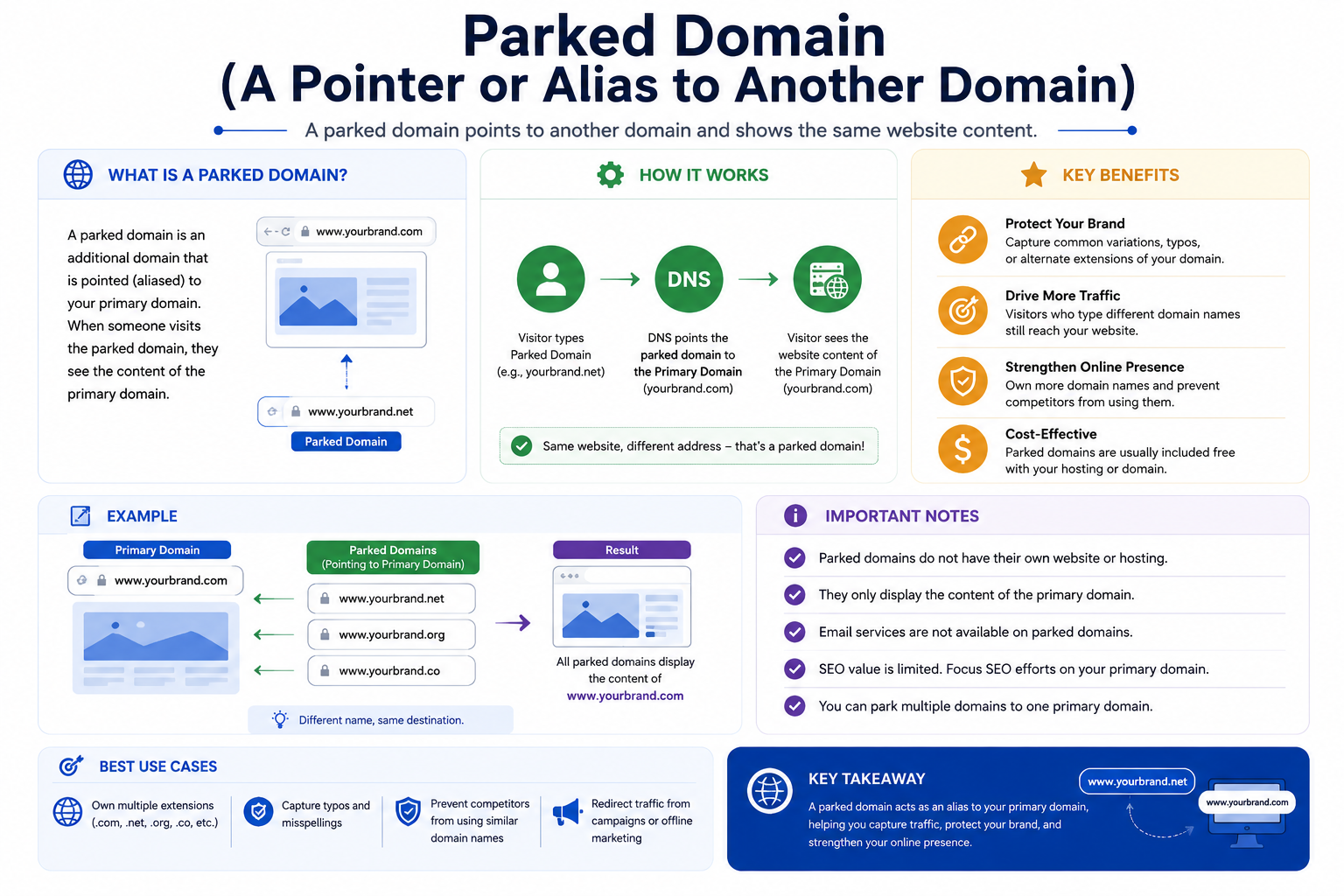
A parked domain is a domain that does not host its own website. Instead, it points to another domain.
Example:
- example.net → example.com
- example.org → example.com
Visitors see the same website, even if they enter different domain names.
How Parked Domains Work
A parked domain typically:
- Redirects to the main domain
- Or displays identical content (depending on hosting setup)
- Does not have separate website files
It is not an independent website.
Why Parked Domains Are Used
1. Brand Protection
Companies register multiple extensions:
- .com
- .net
- .org
- .ae
Then park them to one main website.
2. Typo Protection
Misspelled versions of a domain can be parked to capture lost traffic.
3. Domain Reservation
A domain can be purchased but not used yet, and parked temporarily.
Important Note
A parked domain is not a “second website”. It is simply a pointer or alias.
Direct Comparison (Clear Breakdown)
Feature | Domain | Subdomain | Add-On Domain | Parked Domain |
Identity | Main website | Section of domain | Separate domain | Alias/redirect |
Registration | Required | Not required | Required | Required |
Website files | Yes | Yes | Yes (separate folder) | No |
Hosting independence | Full | Partial | Full (within same hosting) | None |
SEO behavior | Primary authority | Sometimes separate | Fully separate site | Merged with main domain |
Purpose | Main presence | Organization | Multiple sites | Protection/redirect |
The Most Important Differences (Explained Simply)
1. Domain vs Subdomain
A domain is a full website identity.
A subdomain is just a branch inside that identity.
Think of it like:
- Domain = building
- Subdomain = rooms inside the building
2. Domain vs Add-On Domain
A domain is a standalone website.
An add-on domain is another standalone website, but hosted inside the same hosting plan.
Think of it like:
- Domain = separate house
- Add-on domain = another house on the same land plot
3. Add-On Domain vs Parked Domain
This is the most confusing comparison.
Add-On Domain:
- Has its own website
- Has its own folder
- Works independently
Parked Domain:
- Has no separate website
- Points to another domain
- Exists only as an alias
4. Subdomain vs Add-On Domain
- Subdomain = extension of one website
- Add-on domain = separate website entirely
This is the clearest separation in real usage.
Practical Real-World Scenario
Let’s say a business owns:
- mainbrand.com (main site)
- mainbrand.ae (regional version)
- blog.mainbrand.com (content section)
- shop.mainbrand.com (store)
- secondbrand.com (new project)
Setup would be:
- mainbrand.com → Domain
- blog.mainbrand.com → Subdomain
- shop.mainbrand.com → Subdomain
- secondbrand.com → Add-on domain
- mainbrand.net → Parked domain
This structure keeps everything organized and scalable.
SEO Perspective (Important but Simple)
Domain
- Primary ranking authority
- Main source of SEO power
Subdomain
- May be treated separately by search engines
- SEO authority may not fully transfer
Add-On Domain
- Fully separate website
- Independent SEO performance
Parked Domain
- No SEO value on its own
- Usually redirects authority to main domain
Common Mistakes Beginners Make
1. Treating Subdomains as Separate Businesses
Subdomains are not independent domains. They still belong to the main website structure.
2. Overloading Add-On Domains
Adding too many websites on one hosting plan can slow performance due to shared resources.
3. Ignoring Brand Protection
Businesses often forget to park alternate domain extensions, losing control of brand identity.
4. Confusing Parked Domain with Website
A parked domain is not a website. It is only a pointer.
Simple Decision Guide
Use a Domain when:
- Starting a new website
- Building your primary online identity
Use a Subdomain when:
- Organizing sections of one website
- Adding blogs, apps, or support systems
Use an Add-On Domain when:
- Running multiple independent websites
- Managing multiple brands on one hosting account
Use a Parked Domain when:
- Protecting brand name variations
- Redirecting alternate domains to one website
Final Summary
These four terms describe different levels of website structure:
- A domain is the main identity
- A subdomain is a section of that identity
- An add-on domain is a separate website inside one hosting account
- A parked domain is an alias pointing to another domain
Once you understand this hierarchy, managing websites, hosting, and DNS becomes significantly easier and more predictable.