Benefits of Google Workspace for Schools and Teachers
Introduction Modern classrooms have changed a lot in the last few years. Teachers no longer rely only on notebooks, printed worksheets, or face-to-face instructions. Students submit assignments online, group projects happen digitally, and lessons are shared through screens. In this environment, schools need a simple system that keeps everything connected in one place. Google Workspace […]
Introduction
Modern classrooms have changed a lot in the last few years. Teachers no longer rely only on notebooks, printed worksheets, or face-to-face instructions. Students submit assignments online, group projects happen digitally, and lessons are shared through screens.
In this environment, schools need a simple system that keeps everything connected in one place.
Google Workspace is widely used in education because it brings teaching, communication, and collaboration into a single connected system. Instead of juggling different apps, teachers and students can manage everything from one platform.
The real value is not just digital tools—it is how the classroom workflow becomes more organized, clear, and manageable.
What Google Workspace Means in Education
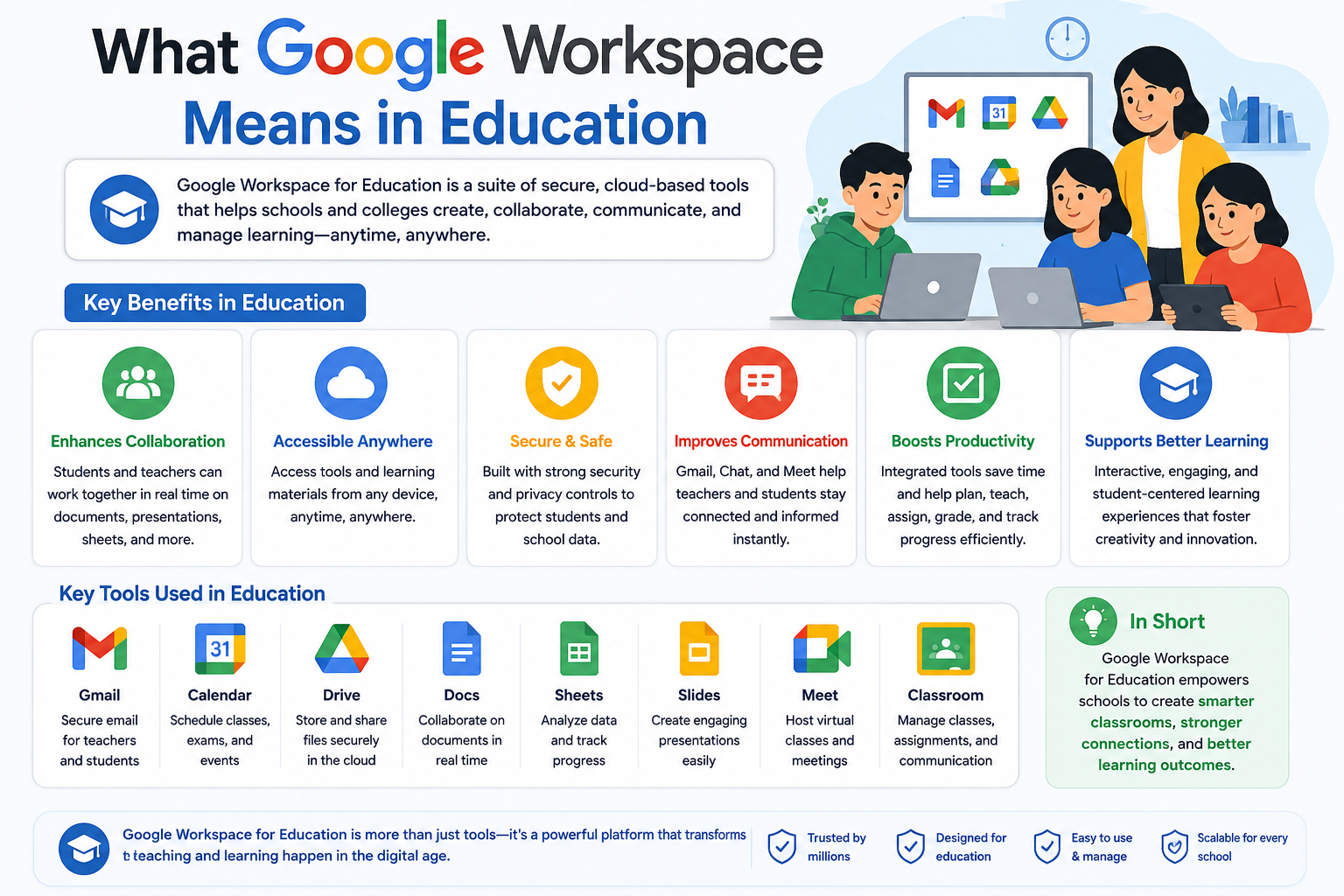
Google Workspace is a set of cloud-based tools that work together. In schools, it is usually used through Google Classroom, which acts as the central hub for teaching activities.
Think of it like a digital classroom board where everything happens in one place:
- Lessons are shared
- Assignments are given
- Student work is submitted
- Feedback is returned
Instead of switching between apps or paper-based systems, everything stays organized in one structure.
Why Schools Need a Connected System
In many schools, the biggest challenge is not teaching—it is managing the process around teaching.
Teachers often face:
- Mixed communication channels (WhatsApp, emails, notices)
- Missing or late assignments
- Difficulty tracking student progress
- Repeating instructions multiple times
- Lack of centralized learning material storage
Google Classroom combined with Google Drive helps reduce these issues by creating one structured digital environment.
How It Works in a Real School Workflow
Here is how a normal classroom activity flows using Google Workspace:
1. Lesson Setup
The teacher prepares notes or instructions using Google Docs and shares them with the class.
2. Assignment Distribution
The task is posted inside Google Classroom where every student can see it instantly.
3. Student Work
Students complete their work using Google Docs or upload files stored in Google Drive.
4. Submission
Work is submitted directly inside the classroom system without printing or physical handover.
5. Review and Feedback
Teachers check submissions, add comments, and return feedback digitally.
6. Optional Live Class
If needed, the teacher conducts a session using Google Meet to explain concepts or discuss mistakes.
This creates a complete teaching cycle without fragmentation.
Before vs After Digital Classroom System
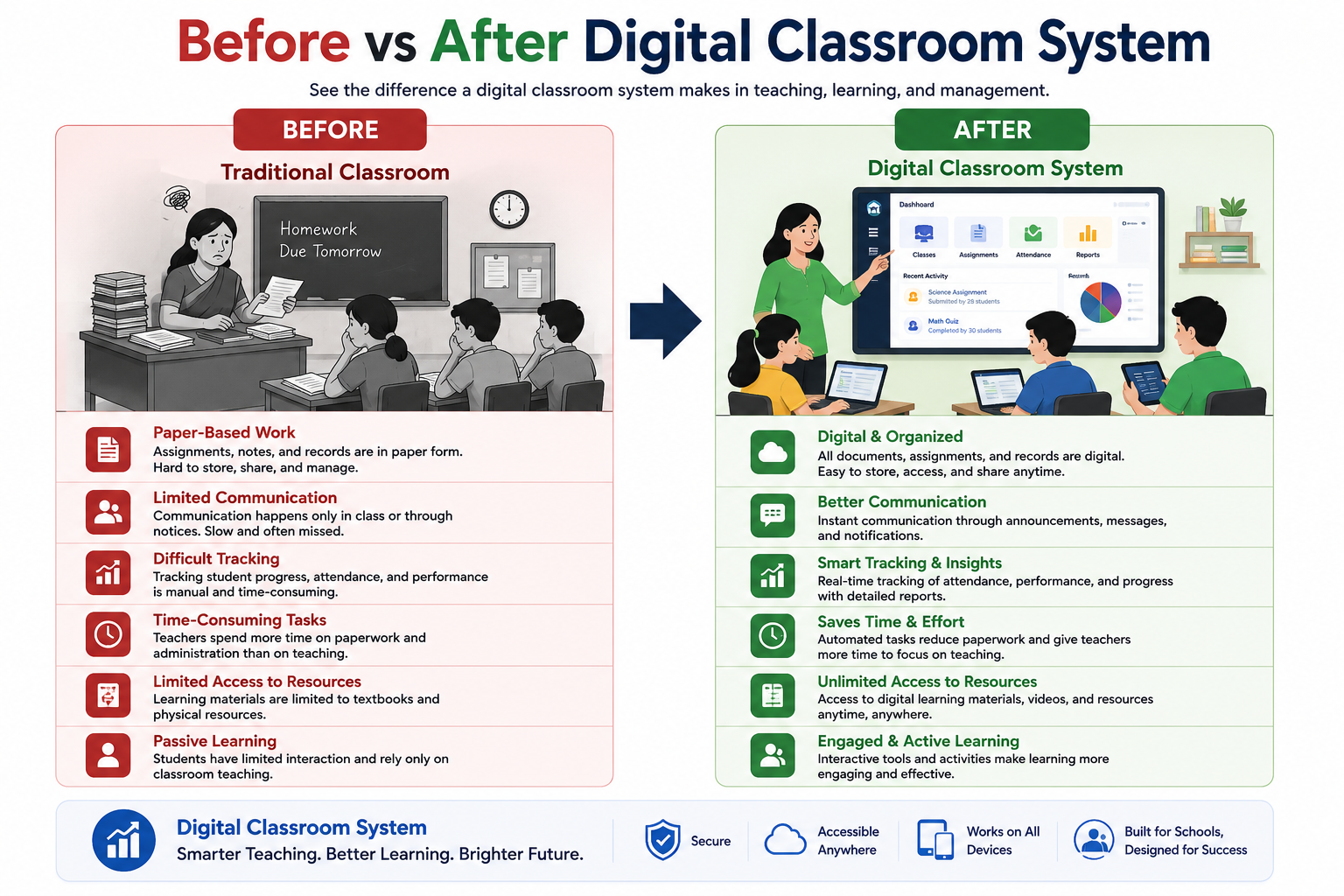
Before Using a Connected System
- Paper assignments get lost
- Students forget submission deadlines
- Teachers repeat instructions multiple times
- Feedback takes days
- Files are scattered across devices
After Using Google Workspace
- Everything is stored in one place
- Students receive instant updates
- Assignments are tracked automatically
- Feedback is faster and organized
- Learning material is always accessible
This shift is not about technology—it is about reducing classroom friction.
Key Benefits for Teachers
1. Easier Class Management
Google Classroom helps teachers manage multiple classes without confusion. Each class has its own space for assignments, announcements, and student work.
2. Faster Feedback Cycle
Instead of collecting notebooks and checking them manually, teachers can review work online and give feedback instantly.
This improves student learning because corrections happen while the topic is still fresh.
3. Better Organization of Teaching Material
Using Google Drive, teachers can store:
- Lesson plans
- Worksheets
- Presentations
- Exam papers
Everything stays structured and accessible anytime.
4. Simple Communication
Announcements and instructions are shared directly in Google Classroom, reducing confusion from multiple communication channels.
Key Benefits for Students
1. Clear Assignment Tracking
Students can see all pending and completed tasks in one dashboard, reducing missed deadlines.
2. Easy Collaboration
Group projects become easier using Google Docs, where multiple students can work together in real time.
3. Anytime Learning Access
Students can open notes and study materials stored in Google Drive from any device, even outside school hours.
4. Live Interaction
With Google Meet, students can attend classes remotely, ask questions, and stay connected even if they are not physically present.
Real Classroom Example (Full Learning Cycle)
Let’s take a complete example of a science lesson:
- Teacher uploads lesson notes in Google Docs
- Assignment is posted in Google Classroom
- Students discuss and complete work in groups using shared documents
- Final submission is uploaded through the classroom system
- Teacher reviews and adds feedback directly on student work
- Students revise based on feedback
- A follow-up discussion is conducted in Google Meet
This full cycle shows how learning becomes continuous instead of disconnected.
Common Challenges Schools May Face
While the system is powerful, schools may need to handle a few practical points:
- Students need stable internet access
- Teachers require basic training at the start
- Schools must organize account setup properly
- Digital discipline must be introduced gradually
Once these are managed, daily usage becomes smooth and natural.
Why This System Works in Modern Education
The strength of Google Workspace is not just individual tools, but how everything works together.
It creates:
- A single classroom structure (Classroom)
- A content system (Drive + Docs)
- A communication system (Meet + Classroom)
- A continuous learning loop
This reduces complexity and helps teachers focus more on teaching rather than managing processes.
Summary
Google Workspace helps schools move from scattered, manual systems to a structured digital classroom environment.
With tools like:
- Google Classroom
- Google Docs
- Google Drive
- Google Meet
teachers and students can manage the full learning cycle in one connected system—from lesson delivery to feedback.
The real benefit is not just convenience, but a more organized and predictable classroom experience.