How to Integrate Google Workspace with Existing School Systems
Introduction Most schools do not start with a completely blank technology environment. Many already use Student Information Systems (SIS), Learning Management Systems (LMS), attendance platforms, library software, communication tools, and identity management systems before adopting Google Workspace for Education. As schools expand their use of digital learning, a common question arises: Can Google Workspace work […]

Introduction
Most schools do not start with a completely blank technology environment.
Many already use Student Information Systems (SIS), Learning Management Systems (LMS), attendance platforms, library software, communication tools, and identity management systems before adopting Google Workspace for Education.
As schools expand their use of digital learning, a common question arises:
Can Google Workspace work with the systems we already use?
In most cases, the answer is yes.
Google Workspace for Education is designed to work alongside many educational platforms through account synchronization, Single Sign-On (SSO), APIs, and third-party integrations. Instead of replacing every existing system, schools can often connect their current tools with Google Workspace to create a more consistent experience for students, teachers, administrators, and IT staff.
This guide explains how schools can integrate Google Workspace with existing systems, the technologies involved, common challenges, security considerations, and best practices for a successful deployment.

Why Integration Matters for Schools
Many schools use separate systems for different tasks.
For example:
- Student records may be stored in a Student Information System.
- Assignments may be managed through a Learning Management System.
- User accounts may be controlled through Active Directory.
- Communication may happen through parent engagement platforms.
- Digital resources may be stored in Google Drive.
When these systems operate independently, administrators often spend time performing repetitive tasks such as:
- Creating user accounts manually
- Updating student information in multiple places
- Managing separate passwords
- Importing and exporting data
- Correcting data inconsistencies
Integration helps reduce these problems by allowing systems to share information automatically.
The result is less manual administration, fewer login issues, improved data accuracy, and a better experience for both staff and students.
Common School Systems That Integrate with Google Workspace
Google Workspace can connect with a wide range of educational technologies.
The exact integration options depend on the vendor and platform being used.
Student Information Systems (SIS)
Student Information Systems store administrative and academic data for schools.
Common examples include:
| System Type | Example Platforms |
| Student Information Systems | PowerSchool, Infinite Campus, Skyward, Veracross |
These systems often contain:
- Student enrollment records
- Teacher assignments
- Attendance information
- Class schedules
- Academic records
Many schools use SIS integrations to automatically create and update Google Workspace accounts.
Learning Management Systems (LMS)
Learning Management Systems help schools manage online learning activities.
Common examples include:
| LMS Platforms |
| Moodle |
| Canvas |
| Blackboard |
| Schoology |
When integrated with Google Workspace, these platforms can support:
- Google Sign-In
- Google Drive file access
- Assignment submissions
- Classroom collaboration
- Shared learning resources
Identity Management Systems
Many schools already manage accounts through directory services.
Examples include:
- Microsoft Active Directory
- Azure Active Directory
- LDAP directories
These systems can synchronize user accounts with Google Workspace, reducing the need for manual account creation.
Communication Platforms
Schools frequently use communication systems to connect with parents and students.
Examples include:
- ParentSquare
- SchoolMessenger
- Remind
These platforms may integrate with Google accounts, calendars, and directory information.
Library and Resource Management Systems
Digital library systems often support authentication through Google accounts.
Examples include:
- Follett Destiny
- Alexandria
- Accessit Library
Students can access resources using their school Google credentials rather than maintaining separate usernames and passwords.
Understanding How Google Workspace Integrations Work
Before connecting systems, it is helpful to understand the technologies commonly used during integration projects.
Most school integrations rely on one or more of the following methods:
Single Sign-On (SSO)
Single Sign-On allows users to access multiple systems using a single account.
Instead of remembering different usernames and passwords for every application, students and staff can sign in using their Google Workspace credentials.
For schools, this often means:
- Fewer password reset requests
- Easier access to learning tools
- Improved user experience
- More centralized authentication management
SSO is often one of the first integrations schools implement.
User Provisioning and Account Synchronization
User provisioning automatically creates, updates, and manages accounts.
When a new student enrolls, information from the school’s directory or SIS can be synchronized with Google Workspace.
This may automatically:
- Create user accounts
- Assign users to groups
- Place users into Organizational Units
- Update profile information
- Suspend inactive accounts
Automation reduces administrative workload and helps keep systems synchronized.
API-Based Integrations
An API (Application Programming Interface) allows software systems to exchange information securely.
Many educational technology vendors use Google APIs to connect their platforms with Google Workspace.
API integrations may support:
- User management
- Classroom data
- Calendar synchronization
- Drive file access
- Reporting functions
- Automated workflows
The capabilities depend on the software being integrated.
Third-Party Integration Platforms
Some schools use specialized integration platforms to connect multiple systems together.
These solutions act as bridges between:
- Student Information Systems
- Learning Management Systems
- Identity Providers
- Google Workspace
- Communication Platforms
This approach can reduce the complexity of managing multiple individual integrations.
Google Workspace Components Commonly Used During School Integrations
Google provides several tools that help schools connect existing systems with Google Workspace.
Understanding these tools helps administrators plan integration projects more effectively.
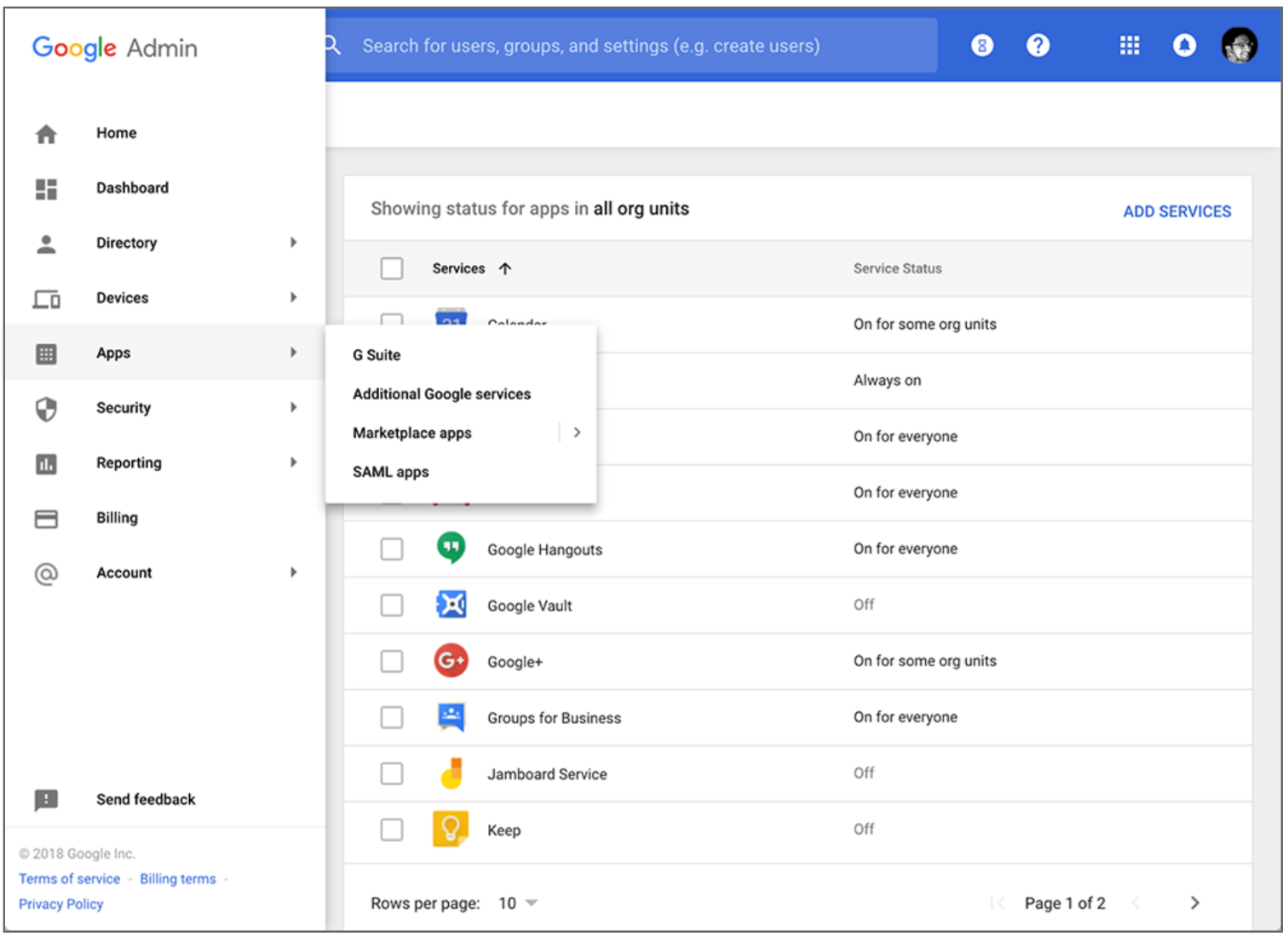
Google Admin Console
The Google Admin Console serves as the central management platform for Google Workspace.
Administrators use it to manage:
- Users
- Groups
- Organizational Units
- Security settings
- Applications
- Device management
Most integration projects involve configuration changes within the Admin Console.
Google Cloud Directory Sync (GCDS)
Google Cloud Directory Sync helps schools synchronize user information from existing directory services into Google Workspace.
Many schools use GCDS when they already manage users through:
- Microsoft Active Directory
- LDAP-based directories
GCDS can automatically create and update:
- Student accounts
- Teacher accounts
- Staff accounts
- Groups
This reduces manual administration and keeps user information consistent.
Google Secure LDAP
Google Secure LDAP allows certain applications to authenticate users through Google Workspace.
This can be useful when older applications require LDAP-based authentication.
Instead of maintaining multiple identity stores, schools can use Google Workspace as part of their authentication strategy.
Google APIs
Google APIs allow software vendors and developers to create integrations between Google Workspace and educational systems.
Common API use cases include:
- User synchronization
- Classroom management
- Drive integration
- Calendar integration
- Reporting automation
Many modern educational applications already use these APIs behind the scenes.
Google Groups
Google Groups can play an important role in integrations.
Schools frequently use groups to manage:
- Classes
- Departments
- Grade levels
- Staff teams
Integrated systems can automatically assign users to appropriate groups based on school records.
This helps simplify access management and communication.