Server Location Impact (Latency): How Hosting Location Shapes Real Website Performance
Introduction When a website feels slow, most people assume the problem is the design, the hosting plan, or the server itself. In reality, one of the most overlooked factors is server location impact on latency. Even with powerful hosting infrastructure, the physical distance between a visitor and the server still affects how fast content appears […]

Introduction
When a website feels slow, most people assume the problem is the design, the hosting plan, or the server itself. In reality, one of the most overlooked factors is server location impact on latency.
Even with powerful hosting infrastructure, the physical distance between a visitor and the server still affects how fast content appears on screen. This delay is called latency, and it plays a direct role in website speed, user experience, and overall performance.
For businesses targeting specific regions such as the UAE or global audiences, understanding how server location influences latency is essential for choosing the right hosting setup and avoiding unnecessary performance loss.
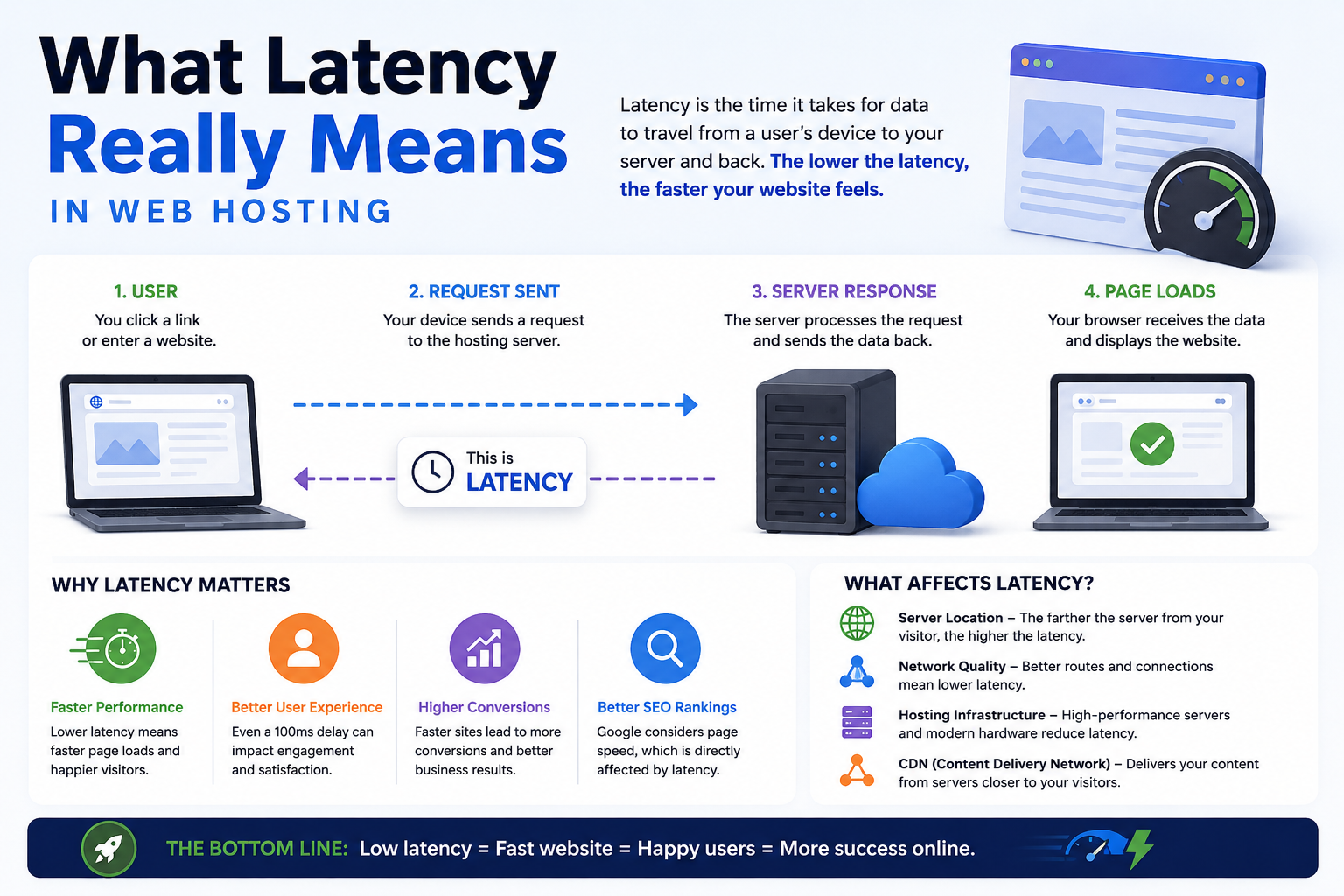
What Latency Really Means in Web Hosting
Latency is the time it takes for data to travel between a user’s device and a hosting server, and then back again.
Every website request follows a round trip:
- The browser requests data
- The server processes it
- The response is sent back
Even though this happens in milliseconds, the journey is affected by:
- Physical distance
- Network routing paths
- Internet service provider quality
- Traffic congestion between networks
Key Insight
Latency is not just “distance delay.” It is a combination of distance + network efficiency.
That means two users at the same distance from a server can still experience different speeds depending on how their data is routed across the internet.
What Actually Happens When You Load a Website
To understand server location impact properly, it helps to see what happens behind the scenes in every page load:
- DNS Lookup
The domain is translated into an IP address. - Connection Establishment (TCP Handshake)
The browser and server establish a secure connection. - TLS Encryption Negotiation
Secure HTTPS encryption is set up. - HTTP Request Sent
Browser requests website data. - Server Processing
Server retrieves files, runs scripts, queries databases. - Response Delivery
Data travels back to the user’s browser.
Each step involves network travel. When the server is geographically far away, each round trip takes longer, increasing total page load time.
This is why server location has a direct impact on perceived website speed.
Real-World Latency Examples (UAE Perspective)
To understand impact clearly, here are approximate latency ranges:
- UAE → UAE server: 10–30 ms
- UAE → nearby GCC region: 20–60 ms
- UAE → Europe: 80–120 ms
- UAE → Asia (far regions): 60–100 ms
- UAE → United States: 180–250 ms
These numbers may look small, but modern websites make dozens to hundreds of requests per page load.
Why this matters
A 150–200ms delay per request can quickly add up, especially for:
- Ecommerce websites
- Booking systems
- SaaS platforms
- Dynamic dashboards

How Server Location Impacts Website Performance
Server location influences performance in multiple layers, not just loading speed.
1. Time to First Byte (TTFB)
TTFB measures how quickly the server responds after a request is made.
Longer distances = higher TTFB = slower perceived performance.
2. Page Load Speed
Every asset (images, scripts, APIs) requires travel time between user and server.
More distance = more cumulative delay.
3. Interactivity Delay
Modern metrics like INP (Interaction to Next Paint) are affected when server responses are delayed.
4. User Experience Perception
Even a 1–2 second delay can significantly increase bounce rates.
Why Server Location Matters for Businesses
For business websites, latency is not just a technical metric—it directly impacts revenue and user behavior.
Faster websites lead to:
- Higher engagement
- Better conversion rates
- Lower bounce rates
- Improved customer satisfaction
Slower websites can cause:
- Abandoned carts
- Reduced lead submissions
- Lower trust perception
- Poor mobile experience
This is especially important for industries like:
- Ecommerce stores
- Corporate service websites
- Online booking platforms
- Educational portals
- SaaS applications
Server Location vs SEO Performance
Server location is not a direct ranking factor in search engines, but it strongly influences SEO performance indirectly.
Search engines evaluate user experience signals such as:
- Page speed (Core Web Vitals)
- Mobile performance
- Stability during load
- User engagement behavior
Core Web Vitals impact:
- LCP (Largest Contentful Paint): delayed if server response is slow
- INP (Interaction latency): affected by slow backend responses
- CLS (Layout stability): indirectly impacted by delayed resources
A poorly placed server can increase response times, which negatively affects these signals.
When Server Location Has the Biggest Impact
Server location matters most when websites involve frequent communication between user and server.
High-impact scenarios:
- Ecommerce checkout systems
- Login-based applications
- Real-time dashboards
- API-heavy platforms
- SaaS tools
- Booking and reservation systems
Lower-impact scenarios:
- Simple informational websites
- Static landing pages
- Minimal interaction blogs
How a CDN Reduces Server Location Limitations
A Content Delivery Network (CDN) helps reduce latency by distributing cached copies of content across multiple geographic locations.
Instead of every request going to a single origin server, a CDN:
- Serves static content from nearby edge locations
- Reduces distance for users
- Offloads traffic from the main server
CDN is especially effective for:
- Images
- CSS and JavaScript files
- Videos
- Static website assets
Important limitation:
Dynamic content (logins, database queries, personalized dashboards) still depends on the origin server location.
What Influences Latency Besides Server Location
Server location is important, but not the only factor.
1. Network Routing Efficiency
Data does not always take the shortest physical path. Poor routing can increase delay even for nearby servers.
2. ISP Peering Quality
Internet service providers influence how efficiently traffic moves between networks.
3. Server Performance
Slow hardware increases response time:
- CPU load
- Storage type (HDD vs SSD vs NVMe)
- Memory availability
4. Website Optimization
Poorly optimized websites increase delay regardless of server location:
- Large uncompressed images
- Heavy JavaScript
- Inefficient database queries
5. Traffic Congestion
Peak usage periods can increase latency due to network load.
How to Choose the Right Server Location
Choosing a server location should always be based on your audience—not assumptions or cost alone.
If your audience is primarily in the UAE:
Choose hosting in:
- UAE or nearby Middle East regions
This ensures:
- Lower latency
- Faster TTFB
- Better mobile performance
If your audience is regional (Middle East):
Use:
- Middle East hosting region + CDN
If your audience is global:
Best approach:
- Cloud hosting with multi-region infrastructure
- CDN-enabled delivery layer
Decision Framework (Simple Guide)
- Audience in one country → Host in that country
- Audience in nearby regions → Choose closest regional data center
- Global audience → Use CDN + multi-region cloud setup
This simple structure prevents overengineering and improves performance alignment.
Common Misconception About Server Location
A common misunderstanding is that “powerful hosting” automatically means “fast website.”
In reality:
- A powerful server far away can still feel slow
- A moderate server close to users can feel faster
Performance is not just about server strength—it is about network distance and delivery efficiency.
Best Practices to Reduce Latency
To improve performance regardless of server location:
- Use a CDN for global reach
- Optimize images and assets
- Enable caching strategies
- Reduce unnecessary server requests
- Use modern protocols (HTTP/2 or HTTP/3)
- Monitor performance using real-user metrics
These practices reduce the dependency on physical distance alone.
Conclusion
Server location plays a critical role in website performance because it directly affects latency, the time it takes for data to travel between users and hosting infrastructure.
While modern technologies like CDNs and cloud networks reduce its impact, physical distance still matters—especially for dynamic and interactive websites.
For businesses targeting specific regions such as the UAE, choosing hosting infrastructure closer to users can significantly improve speed, user experience, and overall digital performance. For global audiences, a combination of distributed hosting and CDN delivery provides the most balanced solution.
In modern web infrastructure, performance is no longer just about server power—it is about how efficiently data reaches users.