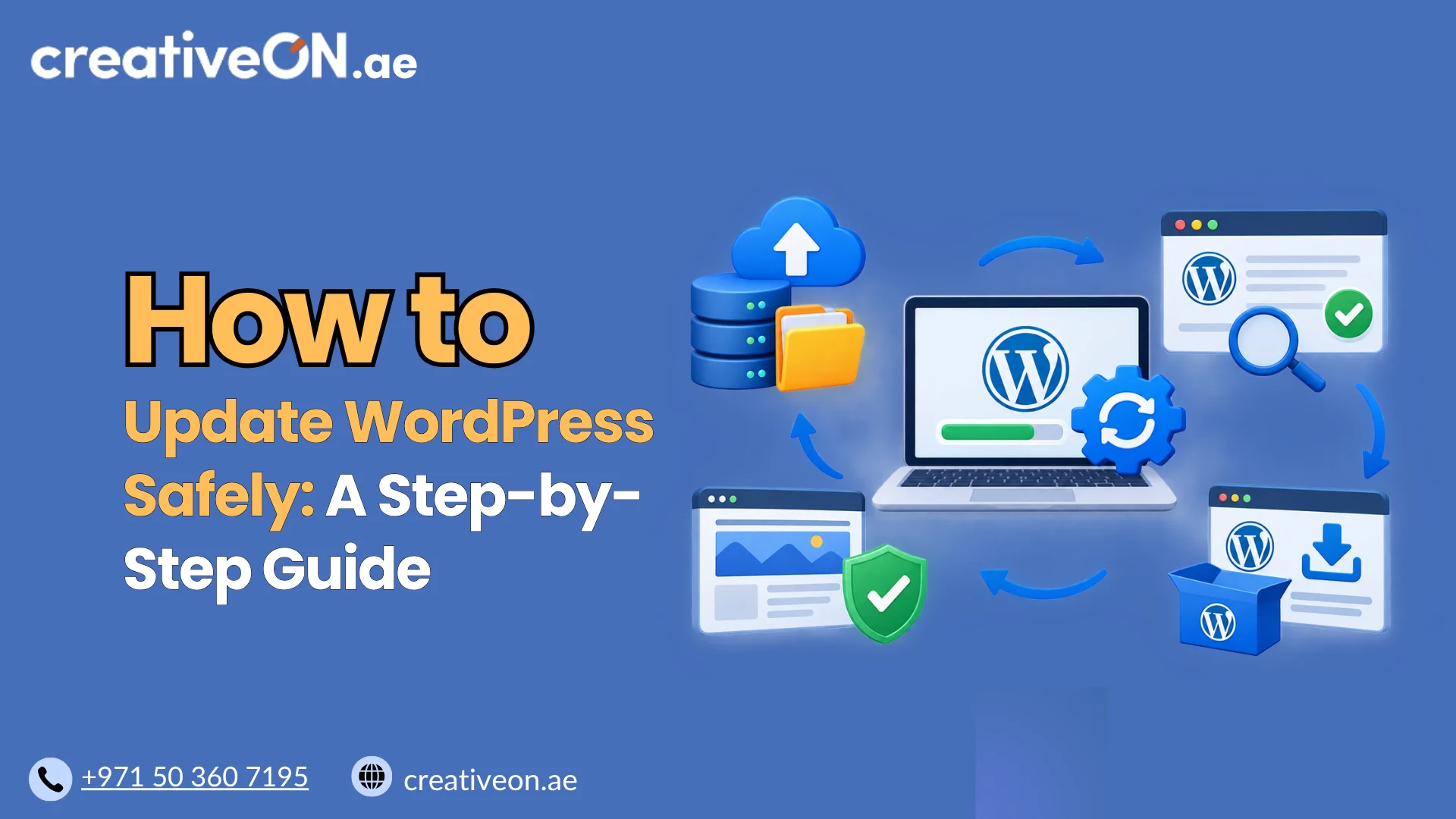
SSD vs NVMe Hosting – Which Is Faster?
Introduction Website speed has become one of the most important factors in online success. Whether you run a personal blog, a business website, an ecommerce store, or a web application, visitors expect pages to load quickly. Even a delay of a few seconds can lead to higher bounce rates, lower conversions, and a poor user […]
Introduction
Website speed has become one of the most important factors in online success. Whether you run a personal blog, a business website, an ecommerce store, or a web application, visitors expect pages to load quickly. Even a delay of a few seconds can lead to higher bounce rates, lower conversions, and a poor user experience.
As hosting technology has evolved, hosting providers have moved away from traditional hard drives and adopted faster storage solutions. Today, most modern hosting plans advertise either SSD storage or NVMe storage. While both technologies are significantly faster than older hard disk drives (HDDs), they are not identical.
This often raises an important question:
Is NVMe hosting actually faster than SSD hosting, and is the upgrade worth it?
The short answer is yes. NVMe hosting is generally faster than traditional SSD hosting. However, understanding why requires looking beyond simple marketing claims and examining how each technology works in real-world hosting environments.
In this guide, we’ll compare SSD and NVMe hosting, explain the differences in simple terms, and help you determine which option is best for your website.
Understanding SSD Hosting
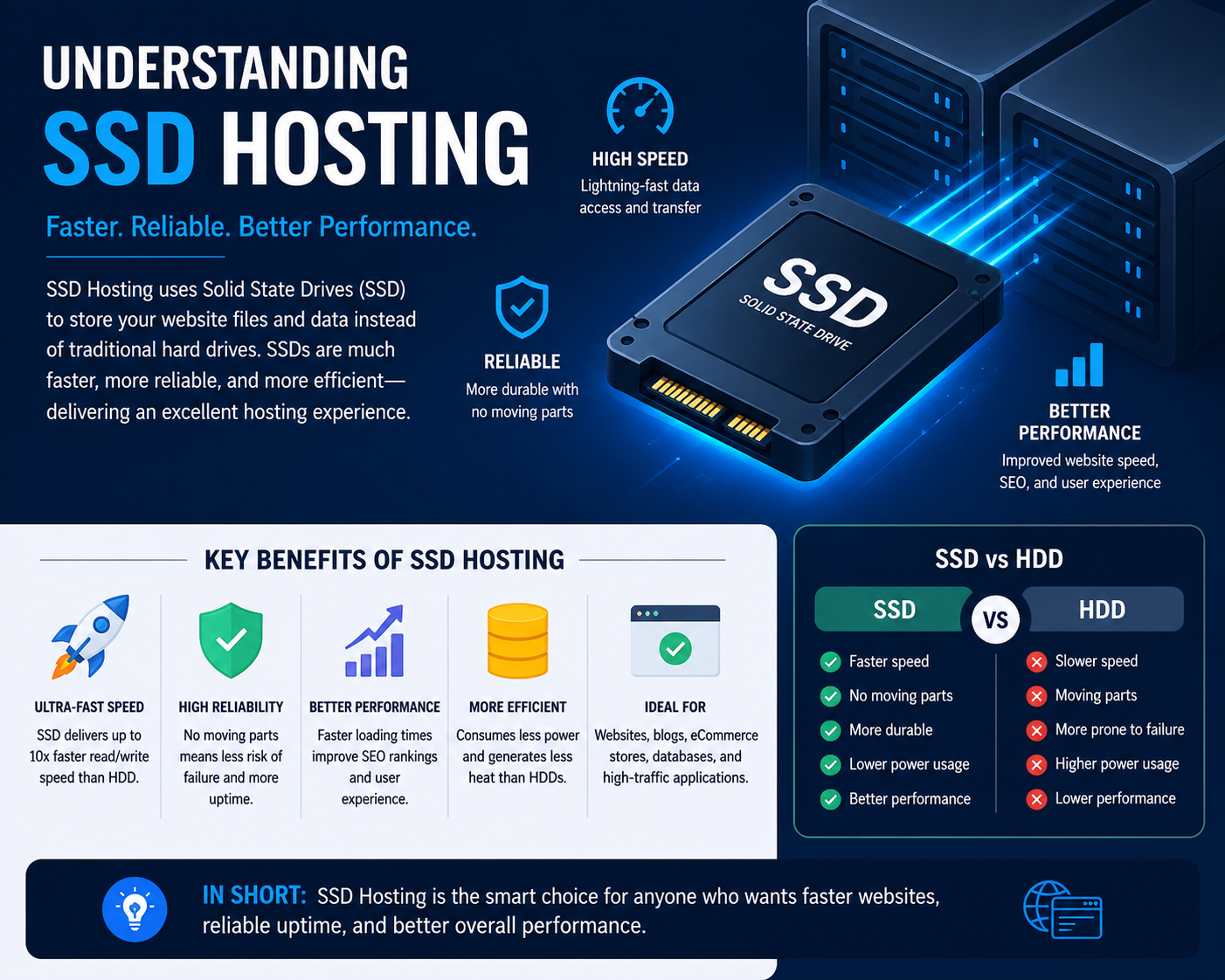
SSD stands for Solid State Drive.
Unlike traditional hard drives that rely on spinning disks and mechanical components, SSDs use flash memory chips to store data electronically. Because there are no moving parts, SSDs can access information much faster and more reliably than conventional hard drives.
When SSD hosting first became widely available, it represented one of the biggest performance improvements in the hosting industry. Websites that previously took several seconds to load suddenly became much more responsive.
Benefits of SSD Hosting
SSD hosting offers several advantages:
- Faster website loading speeds
- Improved server responsiveness
- Better reliability
- Lower hardware failure rates
- Reduced power consumption
- Faster database operations
- Improved overall user experience
For many years, SSD hosting was considered the gold standard for website performance.
Even today, SSD hosting remains a major improvement over traditional HDD-based hosting.
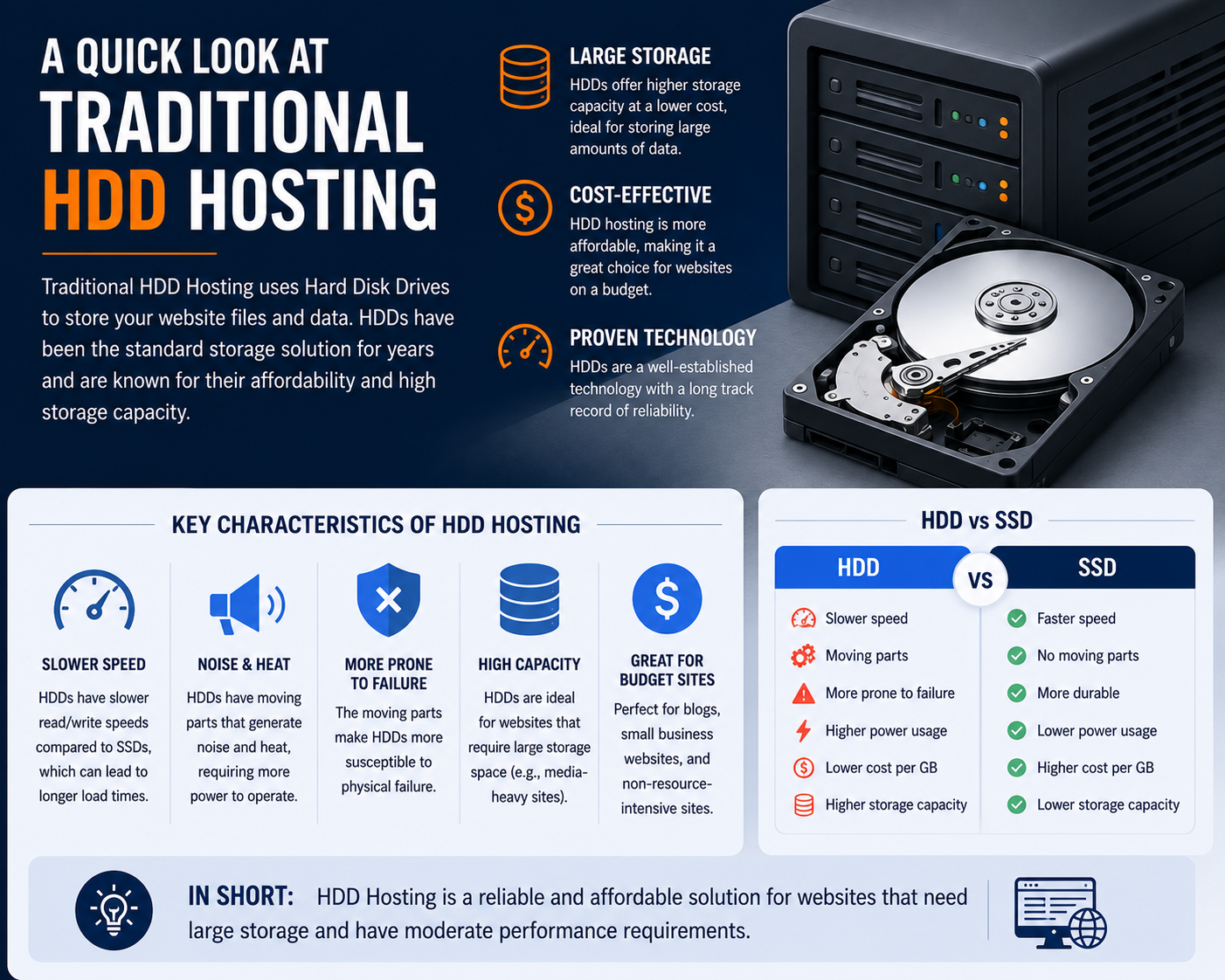
A Quick Look at Traditional HDD Hosting
To understand why SSD and NVMe matter, it helps to know what they replaced.
Traditional hard drives store data on spinning magnetic disks. When data is requested, a mechanical arm must physically move to the correct location on the disk.
This process introduces delays because physical movement takes time.
Think of it like searching through a giant filing cabinet. Every time someone asks for a document, you must walk to a drawer, find the file, and retrieve it.
This worked well years ago, but modern websites generate thousands of requests every day.
As websites became more dynamic and database-driven, traditional hard drives became a major performance bottleneck.
That is why modern hosting providers increasingly moved toward SSD technology.
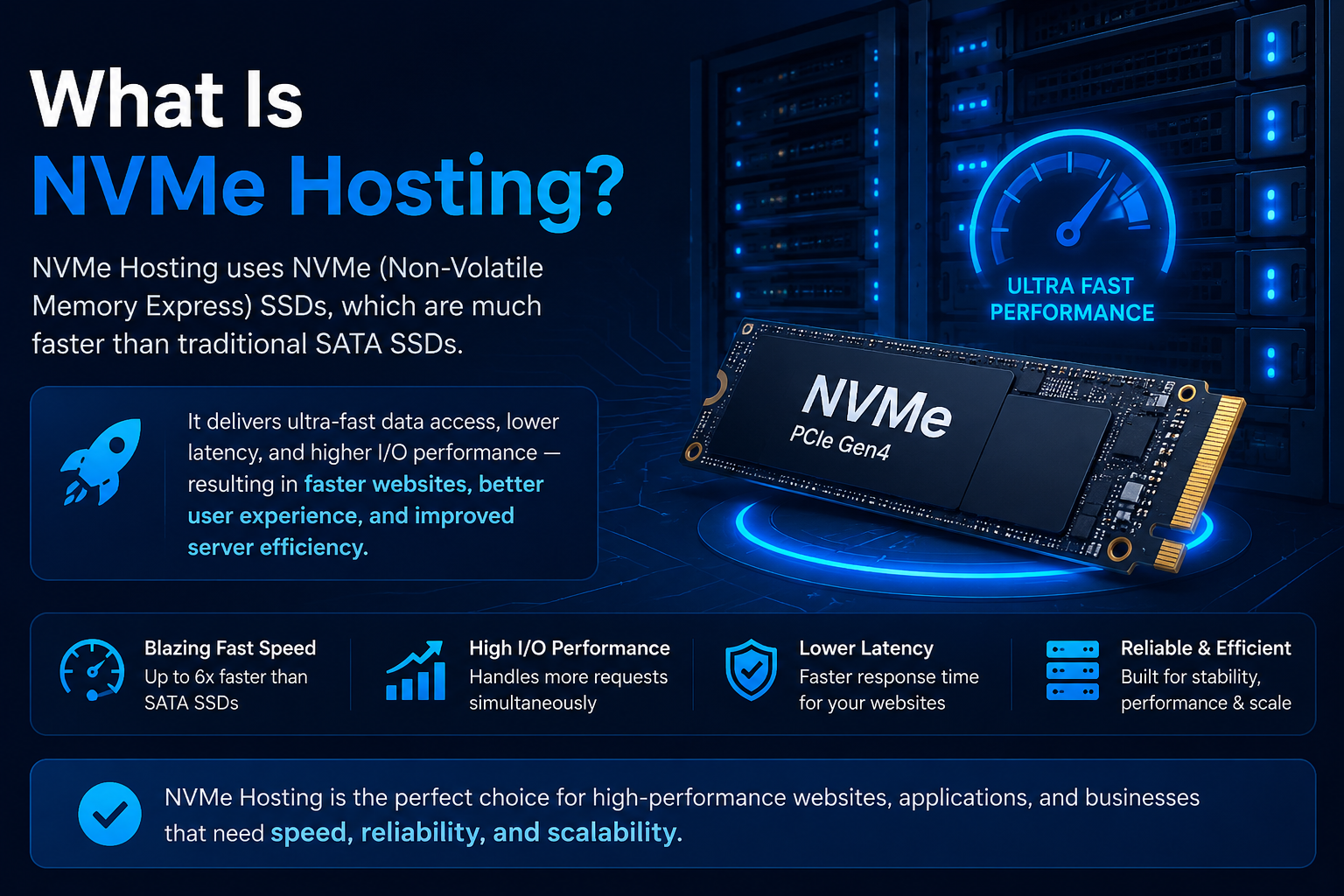
What Is NVMe Hosting?
NVMe stands for Non-Volatile Memory Express.
Although many people think NVMe is a completely different storage technology, NVMe drives are actually a type of SSD.
The difference lies in how the storage communicates with the server.
Traditional SSDs typically use the SATA interface, which was originally designed for older hard drive technology.
NVMe drives use the much faster PCIe (Peripheral Component Interconnect Express) interface, allowing them to communicate directly with the server’s processor.
This removes many of the limitations that affect SATA-based SSDs.
Simple Analogy
Imagine two highways.
A SATA SSD is like a two-lane highway.
An NVMe SSD is like a twelve-lane expressway with multiple fast lanes and fewer traffic bottlenecks.
Both roads reach the same destination, but one can handle far more traffic at significantly higher speeds.
That is essentially the difference between SSD and NVMe hosting.
SSD vs NVMe: The Core Difference
One of the biggest misconceptions in web hosting is that SSD and NVMe are competing technologies.
They are not.
NVMe drives are also SSDs.
The real comparison is:
SATA SSD vs NVMe SSD
The storage medium is similar, but the communication method is dramatically different.
Technical Comparison
| Feature | SATA SSD | NVMe SSD |
| Storage Type | Flash Memory | Flash Memory |
| Interface | SATA | PCIe |
| Protocol | AHCI | NVMe |
| Latency | Higher | Lower |
| Parallel Queues | Limited | Extremely High |
| Throughput | Lower | Much Higher |
| Performance Under Load | Good | Excellent |
The key advantage of NVMe is its ability to process many more commands simultaneously.
This becomes especially important when websites receive large numbers of visitors or perform complex database operations.
How NVMe Hosting Works
To understand why NVMe is faster, it helps to understand how website requests are handled.
When someone visits your website, the server must perform multiple tasks:
- Retrieve website files
- Read database information
- Process application code
- Generate dynamic content
- Deliver content to the visitor
Every one of these actions requires storage access.
Traditional SATA SSDs can handle these requests efficiently, but NVMe drives are designed to handle many more requests simultaneously with far lower latency.
In hosting environments, this means:
- Faster page generation
- Quicker database responses
- Improved application performance
- Better handling of traffic spikes
- Reduced server bottlenecks
This is particularly valuable for websites that rely heavily on databases and dynamic content.
Why Storage Speed Matters in Hosting
Many website owners assume storage only affects file downloads.
In reality, storage performance influences nearly every aspect of a website.
Every time a visitor loads a page, the server may need to:
- Read WordPress files
- Access plugin data
- Retrieve database records
- Process user sessions
- Generate dynamic content
- Create cache files
These operations occur constantly.
The faster the server can access and process data, the faster the website feels to visitors.
For simple websites, the difference may be modest.
For larger websites, the impact can be substantial.
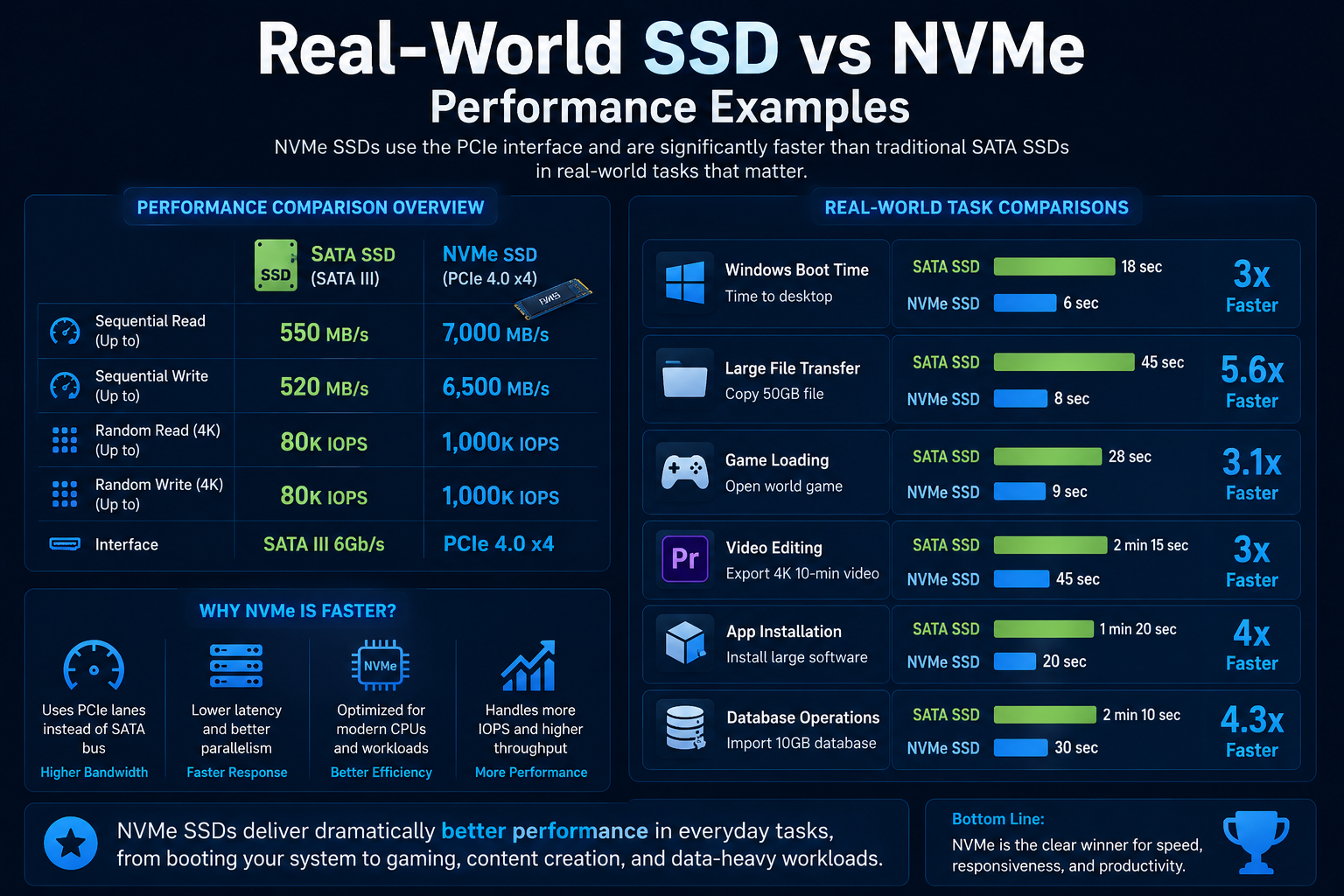
Real-World SSD vs NVMe Performance Examples
Raw speed numbers tell only part of the story.
Website owners care about practical results.
While actual performance varies based on server configuration, website optimization, and traffic levels, NVMe hosting often delivers noticeable improvements in common website tasks.
Example Performance Comparison
| Website Task | SATA SSD Hosting | NVMe Hosting |
| WordPress Dashboard Login | Good | Faster |
| WooCommerce Product Search | Good | Significantly Faster |
| Database Queries | Good | Faster |
| Website Backups | Moderate | Faster |
| High-Traffic Performance | Good | Better |
| Dynamic Page Generation | Good | Faster |
| Cache Creation | Good | Faster |
| File Processing | Good | Faster |
The biggest gains are typically seen on websites that frequently access databases.
This includes:
- WordPress websites
- WooCommerce stores
- Membership sites
- Learning management systems
- Forums
- Customer portals
- SaaS applications
For static websites with minimal database activity, the difference may be less noticeable.
SSD vs NVMe Speed Comparison
To appreciate the difference, let’s compare typical storage speeds.
| Storage Technology | Typical Read Speed |
| HDD | 100–200 MB/s |
| SATA SSD | 500–600 MB/s |
| NVMe Gen3 | 2,000–3,500 MB/s |
| NVMe Gen4 | 5,000–7,500+ MB/s |
These figures represent theoretical performance capabilities.
Real-world website performance depends on many additional factors, but the numbers clearly illustrate why NVMe has become the preferred storage technology for modern hosting environments.
Expert Insight: Where NVMe Makes the Biggest Difference
One common misconception is that every website will experience dramatic speed improvements after moving from SSD hosting to NVMe hosting.
In practice, the largest benefits are usually seen on database-driven websites.
Websites that frequently read and write data gain the most from NVMe’s low latency and high throughput.
Examples include:
- WooCommerce stores
- WordPress websites with many plugins
- Membership platforms
- LMS websites
- Customer dashboards
- Booking systems
- Business applications
By contrast, a simple brochure-style website with only a few pages may not experience a dramatic difference because storage access is not its primary bottleneck.
This is why hosting requirements should always be evaluated based on the specific needs of the website rather than marketing claims alone.
Why More Hosting Providers Are Moving to NVMe
Over the past few years, NVMe storage has become increasingly common across the hosting industry.
Originally, NVMe was mostly found in premium enterprise servers due to higher costs.
As the technology matured, prices became more affordable, making NVMe practical for a wider range of hosting services.
Today, many providers offer NVMe-powered:
- Shared hosting
- WordPress hosting
- VPS hosting solutions
- Cloud hosting infrastructure
- Dedicated server hosting
The shift is driven by one simple fact:
Modern websites are more demanding than ever before.
Faster storage helps providers deliver better performance, improved scalability, and a better user experience.
Key Takeaways So Far
Before deciding which hosting option is right for your website, it’s important to remember these points:
- NVMe drives are also SSDs.
- The real comparison is SATA SSD vs NVMe SSD.
- NVMe uses PCIe connectivity instead of SATA.
- NVMe can process significantly more requests simultaneously.
- Database-driven websites benefit the most from NVMe hosting.
- Modern hosting environments increasingly rely on NVMe storage.
- Storage speed is important, but it is only one part of overall website performance.
In the next section, we’ll look at how SSD and NVMe compare for WordPress websites, WooCommerce stores, VPS hosting, cloud hosting, SEO performance, and real-world business use cases.
SSD vs NVMe for WordPress Hosting
WordPress is one of the most widely used website platforms in the world. From simple blogs to complex business websites, it powers a large portion of the internet.
Because WordPress is dynamic, it constantly interacts with a database. Every page load typically involves:
- Fetching content from the database
- Loading themes and plugins
- Processing PHP code
- Generating pages in real time
This makes storage performance an important factor in overall speed.
SSD Hosting for WordPress
SSD hosting already provides solid performance for WordPress websites. It is significantly faster than older HDD-based hosting and works well for:
- Small blogs
- Portfolio websites
- Low-traffic business sites
For basic WordPress setups, SSD hosting is often more than enough.
NVMe Hosting for WordPress
NVMe hosting improves performance where WordPress needs it most: database access and file operations.
You may notice improvements in:
- Faster admin dashboard loading
- Quicker plugin execution
- Reduced page generation time
- Better performance during traffic spikes
For WordPress sites with heavy plugins or frequent updates, NVMe can make the backend feel noticeably smoother.
However, storage is only one part of WordPress performance. Caching, theme optimization, and plugin quality still play a major role.
SSD vs NVMe for WooCommerce Stores
WooCommerce stores are far more demanding than basic WordPress websites. They involve continuous database activity such as:
- Product searches
- Cart updates
- Checkout processing
- Inventory management
- Customer account handling
These operations are highly sensitive to latency.
Why NVMe Matters for Ecommerce
NVMe hosting can significantly improve responsiveness during critical actions like:
- Searching products
- Adding items to cart
- Loading checkout pages
- Processing orders
Even small delays in ecommerce can impact conversions. A faster checkout experience often leads to better sales performance.
SSD in WooCommerce
SSD hosting can still run WooCommerce stores effectively, especially for:
- Small catalogs
- Low to medium traffic stores
- Early-stage businesses
But as the store grows, database load increases, and SSD storage may become a limiting factor.
SSD vs NVMe for VPS Hosting
Virtual Private Servers (VPS) share physical hardware but operate in isolated environments. This means storage performance is shared among virtual instances.
SSD-Based VPS
SSD VPS hosting provides:
- Stable performance
- Good general responsiveness
- Suitable for small to medium workloads
However, performance can slow down during peak usage if multiple VPS instances are competing for I/O resources.
NVMe-Based VPS
NVMe VPS hosting delivers:
- Lower latency under load
- Faster data processing
- Better handling of simultaneous tasks
- More consistent performance
This makes NVMe VPS a better option for:
- Growing businesses
- SaaS applications
- High-traffic websites
- Development environments
In VPS environments, NVMe often improves not just speed but also stability under pressure.
SSD vs NVMe for Cloud Hosting
Cloud hosting distributes resources across multiple servers to improve scalability and uptime.
In this environment, storage speed affects how quickly data can be accessed across distributed systems.
SSD in Cloud Hosting
SSD-based cloud hosting is:
- Reliable
- Cost-effective
- Suitable for general workloads
However, performance may vary depending on cluster load.
NVMe in Cloud Hosting
NVMe enhances cloud performance by:
- Reducing data retrieval time
- Improving distributed database operations
- Handling high concurrency more efficiently
- Supporting faster scaling operations
This is especially important for modern applications that rely on microservices or real-time data processing.
Why NVMe Hosting Matters for UAE Businesses
In competitive digital markets like the UAE, website speed is not just a technical detail—it directly impacts business performance.
Users in regions like Dubai, Abu Dhabi, and Sharjah expect fast-loading websites, especially for:
- Ecommerce platforms
- Service-based businesses
- Travel and booking websites
- Corporate websites
Business Impact of Faster Hosting
NVMe hosting can support:
- Faster customer journeys
- Lower bounce rates
- Better mobile experience
- Higher conversion rates
In industries where competition is strong, even a small performance advantage can make a noticeable difference.
For UAE businesses scaling online, NVMe hosting is increasingly becoming the preferred infrastructure choice.
Does NVMe Improve SEO?
NVMe hosting does not directly improve rankings, but it supports factors that influence SEO.
Search engines consider user experience signals such as:
- Page loading speed
- Core Web Vitals
- Interaction delay
- Mobile performance
Indirect SEO Benefits
NVMe hosting can help improve:
- Faster Time to First Byte (TTFB)
- Better page load times
- Reduced bounce rates
- Improved crawl efficiency
However, it is important to understand that:
Hosting speed alone will not rank a website.
SEO success still depends on:
- Content quality
- Technical SEO
- Backlinks
- Website structure
- Optimization practices
NVMe simply strengthens the performance foundation.
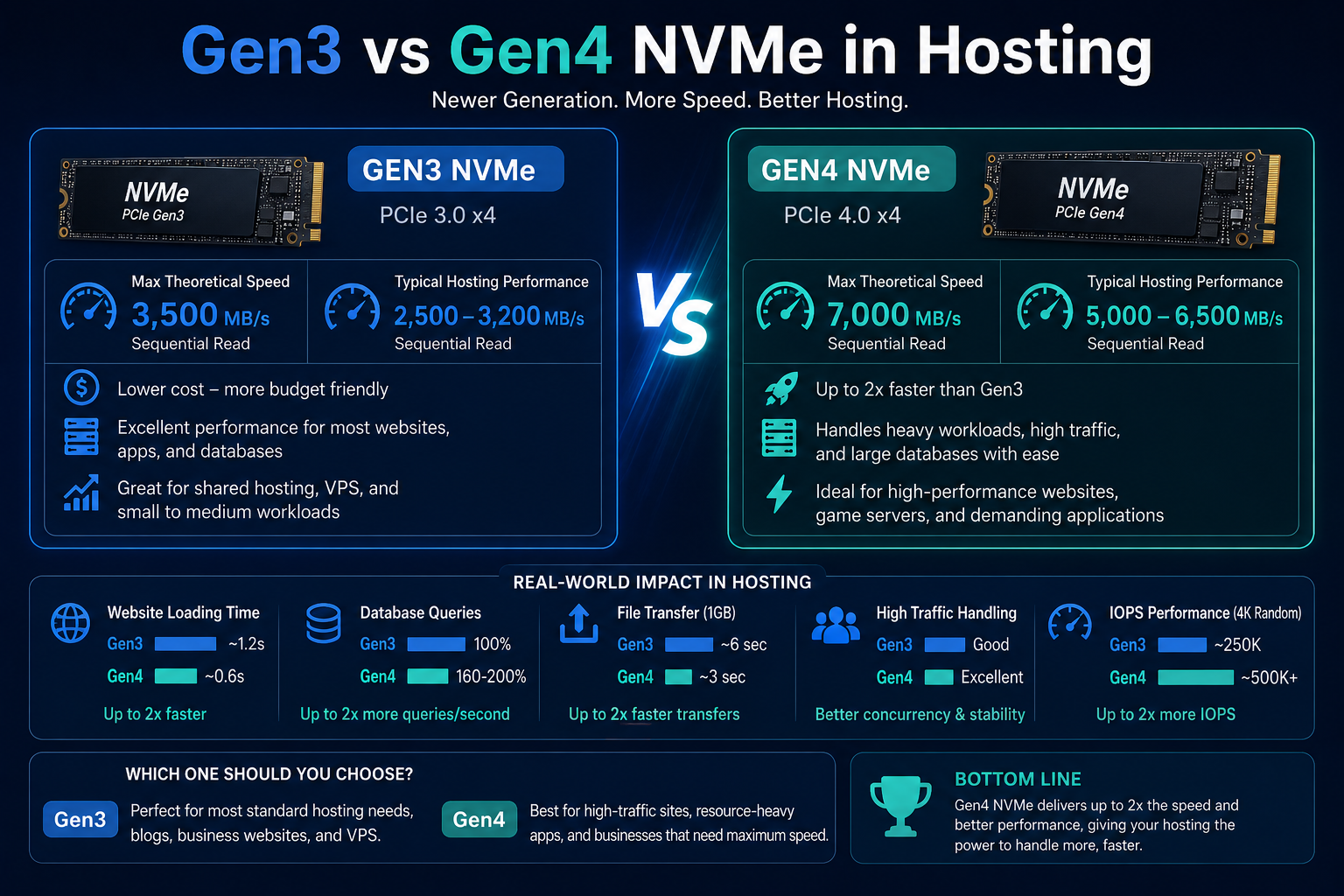
Gen3 vs Gen4 NVMe in Hosting
Not all NVMe storage is the same.
There are different generations:
NVMe Gen3
- Widely used in most hosting environments
- Excellent performance for most websites
- Cost-effective balance between speed and price
NVMe Gen4
- Faster theoretical speeds
- Improved bandwidth
- Better for enterprise workloads
Do You Need Gen4 NVMe?
For most websites, including:
- WordPress sites
- WooCommerce stores
- Business websites
- Blogs
Gen3 NVMe is already more than sufficient.
Gen4 becomes useful mainly for:
- Large-scale applications
- High-performance computing
- Heavy database systems
In hosting, infrastructure quality matters more than generation alone.
NVMe Is Not a Magic Speed Solution
One common misunderstanding is that upgrading storage alone will instantly make a website fast.
In reality, website performance depends on multiple layers:
- Server CPU performance
- RAM availability
- Caching systems
- Code efficiency
- Database optimization
- CDN usage
- Theme and plugin quality
NVMe improves one critical layer—storage speed—but cannot fix poor website optimization.
For example:
A poorly optimized WordPress site on NVMe can still be slow.
A well-optimized site on SSD can still perform well.
The best results come from combining:
- NVMe storage
- Proper caching
- Optimized code
- Strong hosting infrastructure
When SSD Hosting Is Still Enough
NVMe hosting is faster, but that does not automatically mean every website needs it.
SSD hosting is still a solid and cost-effective choice for many use cases. The key is understanding your website’s actual performance demands.
SSD hosting is usually enough when:
- Your website is small and mostly informational
- You run a personal blog with low to moderate traffic
- Your site does not rely heavily on database operations
- You are just starting a business or testing an idea
- Budget is a primary consideration
For these scenarios, SSD hosting already delivers strong performance compared to traditional HDD hosting. In many real-world cases, users will not notice a major difference between SSD and NVMe because the website itself is not resource-intensive.
In simple terms, if your website is light, SSD hosting is still perfectly practical.
When NVMe Hosting Is Worth It
NVMe hosting becomes valuable when performance starts affecting user experience, conversions, or revenue.
You should strongly consider NVMe hosting if you are running:
1. Ecommerce Stores (WooCommerce or Similar)
Online stores depend on speed during critical actions like:
- Product searches
- Cart updates
- Checkout processing
Even a small delay can reduce conversions. NVMe helps keep these processes fast and responsive.
2. High-Traffic Websites
As traffic grows, the number of simultaneous storage requests increases.
NVMe handles:
- Multiple concurrent users
- Heavy database queries
- Peak traffic loads
more efficiently than SATA SSD.
3. WordPress Websites with Heavy Plugins
If your WordPress site uses:
- Page builders
- SEO plugins
- Analytics tools
- Membership systems
then database activity increases significantly. NVMe reduces backend lag.
4. Membership, LMS, or Portal Websites
These websites rely on constant user interaction:
- Logins
- Profile updates
- Content access control
- Real-time database reads
NVMe improves responsiveness in these dynamic environments.
5. Business-Critical Applications
If your website directly supports revenue, leads, or operations, NVMe provides a stronger performance foundation.
Common Mistakes When Choosing Between SSD and NVMe
Many website owners make decisions based only on marketing terms instead of actual requirements.
Here are common mistakes to avoid:
1. Assuming NVMe Automatically Fixes Slow Websites
NVMe improves storage speed, but it cannot fix:
- Poorly coded themes
- Unoptimized plugins
- Heavy scripts
- Lack of caching
If your website is inefficient, NVMe alone will not solve performance issues.
2. Overpaying for NVMe Without Real Need
Some websites simply do not generate enough load to benefit from NVMe. Paying extra in such cases does not provide measurable value.
3. Ignoring Other Hosting Factors
Storage is important, but not the only factor. CPU, RAM, caching systems, and server optimization often have equal or greater impact.
4. Confusing Marketing Labels
Some providers label hosting as “NVMe-powered” but still use shared resources that limit real performance gains.
Always consider the full hosting stack, not just storage type.
Website-Type Recommendation Guide
To make the decision easier, here is a practical breakdown:
| Website Type | Recommended Storage |
| Personal Blog | SSD |
| Portfolio Website | SSD |
| Small Business Website | SSD or NVMe |
| Corporate Website | NVMe Preferred |
| WordPress Blog (Low Traffic) | SSD |
| WordPress Blog (High Traffic) | NVMe |
| WooCommerce Store | NVMe |
| LMS / Membership Site | NVMe |
| SaaS / Web App | NVMe |
| High-Traffic News Portal | NVMe |
This table reflects real-world usage rather than theoretical performance.
SSD vs NVMe: Final Comparison Summary
SSD Hosting
- Reliable and widely used
- Great for low to medium traffic websites
- More affordable
- Strong upgrade from HDD hosting
- Suitable for simple websites
NVMe Hosting
- Significantly faster storage access
- Lower latency under load
- Better for databases and dynamic content
- Ideal for modern applications
- Strong performance during traffic spikes
Core Conclusion
NVMe is faster, but SSD is still sufficient for many websites.
The right choice depends on workload, not just technology.
Final Verdict: Which Is Faster?
There is no ambiguity here:
NVMe hosting is faster than SSD hosting.
However, the real decision is not about speed alone. It is about whether that speed difference actually impacts your website’s performance.
If your website is small or simple, SSD hosting delivers excellent value.
If your website is growing, dynamic, or business-critical, NVMe hosting provides a more future-ready foundation.
In modern hosting environments, NVMe is becoming the standard for performance-focused infrastructure, while SSD remains a reliable option for general use.