

Every employee account in Google Workspace represents a digital identity that provides access to your organization’s email, documents, calendars, meetings, cloud storage, and other business resources. Without clear account management practices, organizations can face unnecessary security risks, wasted software licenses, inconsistent permissions, and administrative challenges that become more difficult to manage as the business grows.
Managing employee accounts is about much more than creating a Gmail address. It involves overseeing the entire user lifecycle—from onboarding new employees and managing role changes to securely removing access when someone leaves the organization. A structured approach helps businesses maintain security, improve productivity, and simplify day-to-day administration.
This guide explains the best practices for managing employee accounts in Google Workspace while highlighting practical recommendations that help administrators build a secure and well-organized environment.
Why Employee Account Management Matters
Employee accounts are the foundation of your Google Workspace environment. Every account grants access to company information, collaboration tools, and business applications. If accounts are not managed consistently, businesses can quickly encounter problems that affect both security and operational efficiency.
Some of the most common challenges include:
- Former employees retaining access to company data
- Inactive accounts consuming paid Google Workspace licenses
- Employees receiving unnecessary permissions
- Inconsistent user naming conventions
- Lost business files after employee departures
- Difficulty auditing user access and administrative activity
Establishing clear account management standards helps reduce these risks while making it easier to support employees throughout their time with the organization.
Understand the Employee Account Lifecycle
Effective employee account management follows a structured lifecycle rather than treating user accounts as one-time administrative tasks. Every employee account moves through several stages, and each stage requires different administrative actions.
Joiner
When a new employee joins the company, administrators should create the user account, assign the appropriate Google Workspace license, place the user in the correct Organizational Unit (OU), add them to relevant Google Groups, and apply the organization’s security policies. A consistent onboarding process ensures employees receive the right access from their first day.
Mover
Employees often change roles, departments, or responsibilities during their time with an organization. These changes may require updates to Google Groups, Shared Drive access, Organizational Units, administrator roles, or service permissions. Reviewing access whenever responsibilities change helps maintain security and supports the principle of least privilege.
Leaver
When an employee leaves the organization, administrators should immediately suspend account access, preserve business data where required, transfer ownership of files and emails, recover any assigned licenses, and remove the account according to the organization’s retention policies. A structured offboarding process protects company information while ensuring important business data remains available.
Viewing employee accounts as part of an ongoing lifecycle helps administrators manage users more consistently and reduces the likelihood of security gaps.
Establish a Standardized User Provisioning Process
Creating employee accounts manually without following a standard process often results in inconsistent configurations, forgotten permissions, and additional administrative work later.
Instead, organizations should develop a documented provisioning process that every administrator follows. Standardization ensures that every employee receives the appropriate access while reducing setup errors.
A typical Google Workspace user provisioning checklist includes:
- Creating the user account
- Assigning the appropriate Google Workspace license
- Placing the employee in the correct Organizational Unit
- Adding the employee to required Google Groups
- Applying security policies
- Configuring business email settings
- Sharing required calendars
- Granting access to Shared Drives
- Assigning additional services when required
Having a repeatable process not only improves efficiency but also ensures every employee starts with a secure and consistent configuration.
Use Consistent Naming Conventions
As organizations grow, inconsistent usernames can make administration unnecessarily complicated. Establishing a standard naming convention from the beginning improves directory management, reporting, and automation.
Common naming formats include:
- firstname.lastname
- firstinitiallastname
- firstname.department (when appropriate)
- Employee identification numbers for larger enterprises
Whatever naming convention you choose, apply it consistently across the entire organization.
Avoid creating usernames that rely on temporary job titles or department names, as these frequently change over time. Consistent naming also makes it easier for employees to locate colleagues within the company directory and helps administrators manage accounts more efficiently.
Organize Users with Organizational Units
Organizational Units (OUs) allow administrators to apply Google Workspace policies to groups of users rather than configuring settings for each employee individually. As organizations expand, this becomes one of the most effective ways to simplify administration.
For example, separate Organizational Units might be created for:
- Finance
- Human Resources
- Sales
- Marketing
- Customer Support
- Information Technology
- Executive Management
Instead of manually configuring security settings for every employee, administrators can apply policies at the Organizational Unit level. This helps maintain consistency across departments while reducing administrative overhead.
For example:
- Finance teams may require stricter sharing restrictions.
- Contractors may have limited access to Google Workspace services.
- Executives may require enhanced security protections.
- Customer support teams may need different collaboration settings than engineering teams.
Using Organizational Units also makes future policy changes easier because updates can be applied to an entire department with a single administrative action.
Manage Access with Google Groups Instead of Individual Permissions
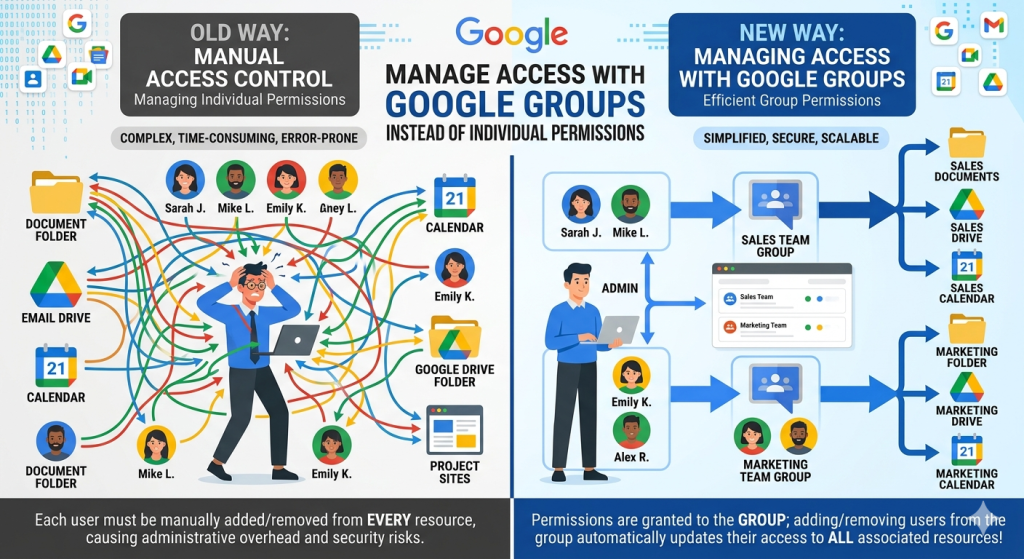
One of the most effective ways to simplify employee account management is by using Google Groups to manage permissions rather than assigning access individually.
Groups allow administrators to organize users based on departments, teams, or business functions. Instead of updating permissions every time an employee joins or leaves a team, administrators simply adjust the user’s group membership.
Common examples include:
- sales@
- marketing@
- finance@
- hr@
- support@
- management@
Google Groups can be used to manage access to:
- Shared Drives
- Shared folders
- Google Docs
- Google Sheets
- Google Sites
- Google Calendar
- Email distribution lists
This approach significantly reduces administrative work while ensuring permissions remain consistent across departments.
For example, when a new salesperson joins the company, adding them to the Sales group automatically provides access to the appropriate shared resources without requiring administrators to configure each permission individually.
Similarly, when an employee changes departments, removing them from one group and adding them to another updates much of their access in a single step. This reduces the likelihood of employees retaining unnecessary permissions after changing roles.
Apply the Principle of Least Privilege
Every employee should have access only to the information and Google Workspace services required to perform their job. This security approach is known as the Principle of Least Privilege and is widely regarded as one of the most effective methods for reducing organizational risk.
Rather than granting broad permissions by default, administrators should carefully evaluate what each role actually requires.
Good practices include:
- Assign standard user accounts whenever possible.
- Limit Super Administrator accounts to essential personnel only.
- Use delegated administrator roles for specific responsibilities.
- Review permissions whenever employees change roles.
- Remove unnecessary access that is no longer required.
For example, if an employee transfers from the Finance department to Sales, they should no longer retain access to confidential financial reports or finance-related Shared Drives. Instead, their access should be updated to match their new responsibilities.
Applying the principle of least privilege helps reduce the impact of compromised accounts while protecting sensitive business information.
Build a Consistent Employee Onboarding Checklist
A structured onboarding checklist helps ensure every new employee receives the tools and access they need without compromising security or missing important configuration steps.
A typical onboarding process may include:
- Create the Google Workspace user account.
- Assign the correct license.
- Place the employee in the appropriate Organizational Unit.
- Add them to department-specific Google Groups.
- Configure Gmail settings.
- Enable required Google Workspace services.
- Share company calendars.
- Grant access to Shared Drives.
- Configure email signatures where applicable.
- Review security settings and Multi-Factor Authentication requirements.
Standardized onboarding reduces administrative errors, improves employee productivity from day one, and creates a consistent experience for every new team member.
Store Team Documents in Shared Drives
Business documents should remain with the business—not with individual employee accounts. One of the best ways to achieve this is by using Google Shared Drives for department files, project documentation, and collaborative resources.
Unlike files stored in an employee’s My Drive, files in Shared Drives are owned by the team rather than an individual user. This means important business documents remain accessible even if an employee changes roles or leaves the organization.
Shared Drives offer several advantages:
- Business retains ownership of files.
- Teams can collaborate more efficiently.
- Administrators spend less time transferring files during offboarding.
- Department documents remain organized and accessible.
- The risk of losing critical business information is significantly reduced.
For example, a Sales Shared Drive can contain proposals, contracts, presentations, and customer documentation that remain available to the entire sales team regardless of staffing changes.
When combined with Google Groups, Shared Drives become even easier to manage because access can be granted or removed simply by updating group membership.
Protect Every Employee Account with Strong Security
Employee accounts often contain sensitive business information, making them a common target for phishing attacks, password theft, and unauthorized access attempts. Protecting these accounts should be one of every Google Workspace administrator’s highest priorities.
Rather than relying solely on passwords, organizations should implement multiple layers of security.
Recommended security measures include:
- Enforce Multi-Factor Authentication (MFA) for all users.
- Require strong password policies.
- Monitor suspicious login attempts.
- Enable security alerts for administrators.
- Review account recovery options regularly.
- Manage trusted devices where appropriate.
- Educate employees about phishing and social engineering attacks.
These controls work together to reduce the likelihood of unauthorized access while helping administrators respond quickly if suspicious activity is detected.
Regularly Review User Permissions
As businesses grow, employee responsibilities naturally evolve. Promotions, department transfers, and project assignments often require changes to account permissions. Without regular reviews, users may accumulate unnecessary access over time.
Administrators should periodically verify:
- Google Group memberships
- Shared Drive permissions
- Organizational Unit assignments
- Administrator privileges
- Third-party application access
- Assigned Google Workspace licenses
Regular permission reviews help maintain the principle of least privilege while reducing security risks associated with outdated access rights.
Many organizations schedule these reviews quarterly, although businesses operating under regulatory or compliance requirements may choose to perform them more frequently.
Update Accounts When Employees Change Roles

Not every employee lifecycle event involves joining or leaving the company. Internal promotions, transfers, and departmental changes also require careful account management.
When an employee changes roles, administrators should review:
- Google Group memberships
- Shared Drive access
- Organizational Unit placement
- Google Workspace license requirements
- Administrative roles
- Department mailing lists
- Calendar permissions
For example, if a finance employee moves into a sales role, they may no longer require access to financial reports or payroll documents. Instead, they should receive access to sales resources, customer collaboration tools, and department-specific Shared Drives.
Reviewing permissions whenever responsibilities change helps ensure employees retain access only to the resources needed for their current role.
Build a Secure Employee Offboarding Process
Offboarding should be handled with the same level of care as onboarding. Delays in removing access can expose business data, while deleting accounts too quickly may result in the loss of important information.
A structured offboarding process typically includes the following steps:
- Suspend the employee’s account immediately.
- Recover company-owned devices if applicable.
- Review recent account activity if necessary.
- Transfer ownership of Google Drive files.
- Transfer Gmail data where business continuity requires it.
- Remove the user from Google Groups.
- Reclaim the Google Workspace license.
- Delete the account only after confirming organizational retention policies.
Suspending the account before deletion provides administrators with time to preserve important business information while immediately preventing further access.
Manage Google Workspace Licenses Efficiently
Google Workspace licenses represent an ongoing business expense, making regular license management an important administrative responsibility.
Organizations should periodically identify:
- Inactive users
- Suspended accounts
- Former contractors
- Temporary employees
- Duplicate user accounts
- Unused premium licenses
Recovering licenses that are no longer needed helps reduce unnecessary subscription costs while keeping user records accurate.
As organizations grow, regular license audits become increasingly valuable for maintaining operational efficiency.
Monitor Administrative Activity and Audit Logs
Even with strong security policies, administrators should routinely monitor account activity to identify unusual behavior or configuration changes.
Google Workspace provides audit logs and reporting tools that help administrators review important events, including:
- User sign-in activity
- Administrative actions
- Password resets
- Group membership changes
- File sharing activity
- Suspicious login attempts
For example, an audit review might reveal that a suspended account was accidentally reactivated or that an administrator unintentionally granted elevated permissions to the wrong user.
Reviewing administrative activity on a regular basis allows organizations to detect issues early and maintain better control over their Google Workspace environment.
Document Administrative Procedures
Many organizations rely on one experienced administrator who understands every aspect of the Google Workspace environment. While this may work initially, it can create challenges if responsibilities change or additional administrators join the team.
Documenting standard procedures helps ensure consistency across the organization.
Important processes to document include:
- User account creation
- License assignment
- Password recovery
- Organizational Unit management
- Google Group administration
- Shared Drive permissions
- User suspension
- User deletion
- Data transfer procedures
- Emergency security response
Well-documented procedures reduce mistakes, simplify administrator training, and improve business continuity.
Educate Employees About Account Security
Technology alone cannot protect business data. Employees also play a vital role in maintaining account security.
Organizations should provide regular security awareness training that covers topics such as:
- Recognizing phishing emails
- Creating strong passwords
- Using Multi-Factor Authentication
- Secure file sharing practices
- Safe remote working habits
- Reporting suspicious activity
A well-informed workforce complements technical security controls and significantly reduces the likelihood of successful cyberattacks.
Regular reminders and short security awareness sessions are often more effective than one-time training during employee onboarding.
Common Mistakes to Avoid
Even experienced administrators can make mistakes when managing employee accounts, particularly as an organization grows. Identifying and correcting these issues early helps improve security, reduce administrative overhead, and maintain a well-organized Google Workspace environment.
Avoid these common mistakes:
- Sharing one Google Workspace account between multiple employees.
- Leaving former employee accounts active after they leave the organization.
- Assigning Super Administrator privileges when standard user permissions are sufficient.
- Managing permissions individually instead of using Google Groups.
- Ignoring Organizational Unit assignments as departments evolve.
- Failing to review user permissions after promotions or role changes.
- Storing critical business files only in an employee’s My Drive instead of Shared Drives.
- Forgetting to reclaim unused Google Workspace licenses.
- Skipping periodic reviews of audit logs and administrator activity.
- Delaying the implementation of Multi-Factor Authentication (MFA).
Establishing documented administrative processes and performing regular account reviews can prevent most of these issues before they become security or operational problems.
Visual Content Recommendations
Adding visual content can make this guide easier to understand while improving user engagement.
Recommended visuals
- Employee account lifecycle diagram (Joiner → Mover → Leaver)
- Google Workspace onboarding workflow
- Organizational Units hierarchy example
- Google Groups permission management workflow
- Shared Drives ownership illustration
- Employee offboarding checklist
- User account review process flowchart
Suggested image ALT text
- Best practices for managing employee accounts in Google Workspace
- Google Workspace employee account lifecycle
- User onboarding process in Google Workspace
- Managing Google Groups for employee permissions
- Shared Drives for business file management
- Employee offboarding checklist in Google Workspace
Frequently Asked Questions
Employee account management is the process of creating, maintaining, securing, updating, suspending, and removing Google Workspace user accounts throughout an employee’s lifecycle while protecting business data and ensuring appropriate access.
Google Groups simplify permission management by allowing administrators to grant access to multiple users at once. Instead of updating permissions for each employee individually, administrators can simply add or remove users from the appropriate group, making onboarding, role changes, and offboarding much more efficient.
Most organizations benefit from reviewing employee accounts at least once every quarter. Businesses with regulatory or compliance requirements may choose to perform monthly reviews to ensure permissions, licenses, and administrator roles remain appropriate.
Not always. A common best practice is to suspend the account first to immediately block access while preserving business data. After transferring ownership of files and emails and confirming data retention requirements, the account can be deleted according to your organization’s policies.
Unlike individual My Drive storage, Shared Drives keep file ownership with the organization rather than a specific employee. This ensures important business documents remain accessible even when team members change roles or leave the company.
The Principle of Least Privilege means employees should receive only the permissions necessary to perform their current job responsibilities. Limiting unnecessary access reduces security risks and helps protect sensitive business information.
Conclusion
Managing employee accounts effectively is an ongoing responsibility that extends well beyond creating new user accounts. By following consistent practices throughout the employee lifecycle—from onboarding and role changes to secure offboarding—organizations can improve security, simplify administration, and protect valuable business information.
Google Workspace provides the tools needed to manage users efficiently, but long-term success depends on establishing clear processes, regularly reviewing permissions, using Organizational Units and Google Groups effectively, and encouraging employees to follow good security practices. As your organization grows, these best practices will help create a scalable and well-governed Google Workspace environment.
If you’re looking to expand your knowledge of Google Workspace administration, explore our related guides on user management, administrator roles, account recovery, and data migration. Together, these resources form a practical knowledge library designed to help businesses get the most from Google Workspace.