

When you open a website, you’re usually seeing something simple on the surface—pages, images, text, and buttons. But behind that simplicity, there is a powerful system constantly working in the background to store, fetch, and organize data in real time.
That system is called a database, and in web hosting, it is one of the most important parts of how modern websites function.
Whether you’re running a WordPress blog, an online store, or a business portal, your website depends on a database to stay dynamic, fast, and interactive. And among all database systems used in hosting, MySQL is the most widely adopted.
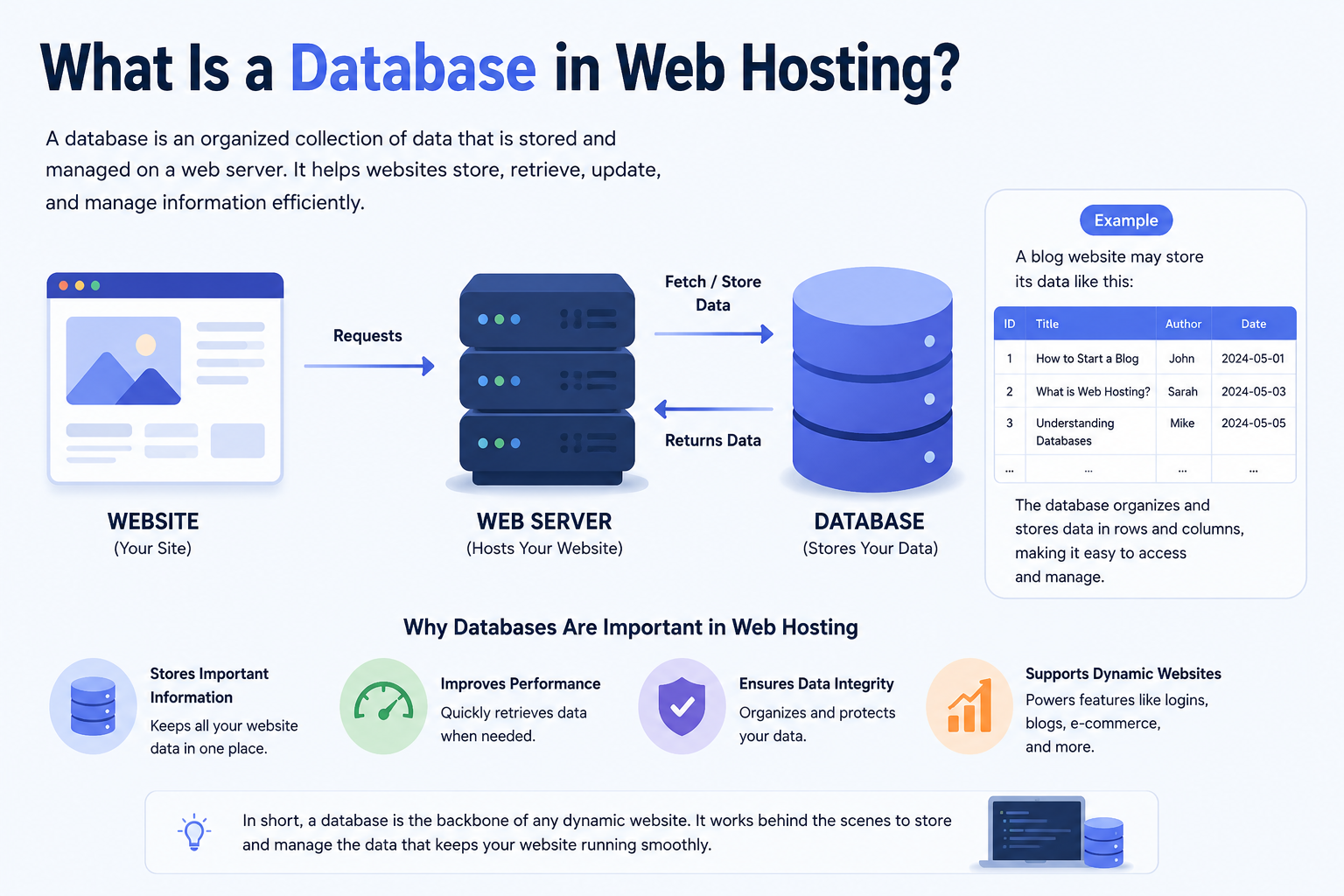
What Is a Database in Web Hosting?
A database in web hosting is a structured system that stores website data in an organized format so it can be quickly accessed, updated, and managed when needed.
Instead of saving everything in static files, a database stores information in tables made of rows and columns, similar to spreadsheets—but far more powerful and optimized for real-time applications.
In a typical web hosting environment, a database stores:
- User accounts and login details
- Blog posts, pages, and content
- Product data for eCommerce websites
- Comments, reviews, and interactions
- Website settings and configurations
So whenever a user interacts with your website—logging in, searching, or buying something—the database is working in the background to make it happen.
How Databases Work in a Web Hosting Environment
To understand how databases work, it helps to look at how a web request flows.
When someone visits your website:
- Their browser sends a request to your hosting server
- The web server (like Apache or Nginx) processes the request
- If dynamic data is needed, the server communicates with the database
- The database searches and retrieves the required information
- The data is sent back and displayed on the website
This entire process usually happens in milliseconds.
A simple way to understand it is:
- Website files = Front office (what users see)
- Database = Back office (where all data is managed)
Both must work together for a website to function properly.
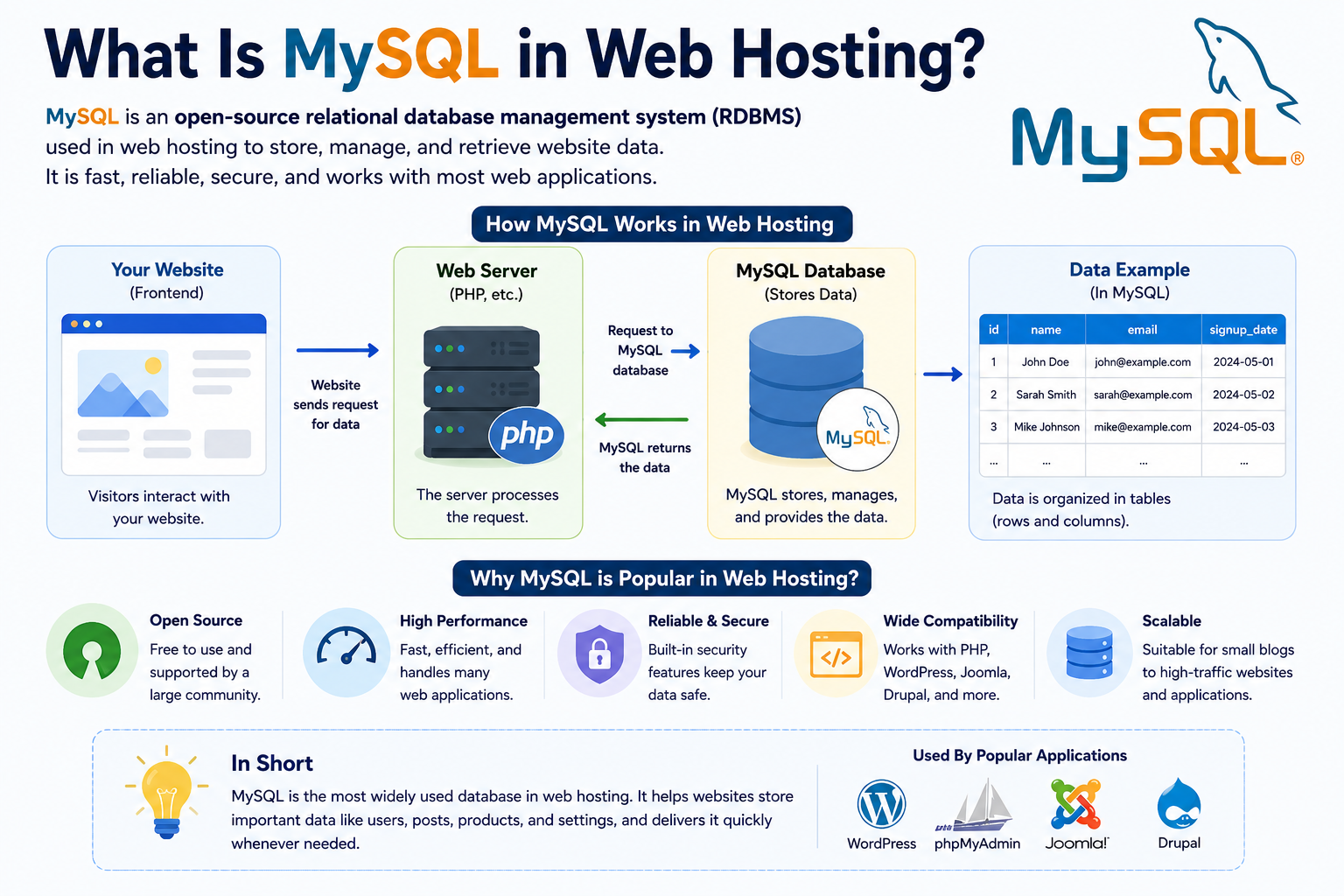
What Is MySQL in Web Hosting?
MySQL is a relational database management system (RDBMS) used to store and manage structured website data using SQL (Structured Query Language).
In simpler terms, MySQL organizes data into structured tables and allows websites to retrieve or modify that data using queries.
For example, in a WordPress website:
- MySQL stores posts, users, comments, and settings
- WordPress sends a request using SQL queries
- MySQL processes the request and returns the data instantly
This tight integration is why MySQL powers millions of websites worldwide.
How MySQL Actually Stores Data (Simple Explanation)
Unlike basic file storage, MySQL uses a structured system:
- Tables → store different types of data (users, posts, products)
- Rows → individual records (one user, one product)
- Columns → attributes (name, email, price, date)
For example:
A “Users” table might look like:
- ID
- Name
- Password
When a user logs in, MySQL checks the table, finds the matching record, and verifies access.
This structured approach makes websites fast, reliable, and scalable.
Why Databases Are Essential in Modern Web Hosting
Modern websites are not static pages anymore—they are interactive systems. Databases make that possible.
Without a database:
- You cannot have user logins
- You cannot store orders in an online store
- You cannot manage blog content dynamically
- You cannot build dashboards or dashboards-based systems
In short, no database = no modern website functionality.
This is why every professional hosting plan—whether shared hosting, VPS hosting, or cloud hosting—includes database support.
Why MySQL Is the Most Popular Choice in Hosting
MySQL became the default choice in web hosting because it balances performance, simplicity, and reliability.
Key reasons include:
1. High Performance
MySQL is optimized for fast read operations, making it ideal for websites with heavy traffic.
2. Compatibility
It works seamlessly with PHP-based systems like WordPress, Joomla, and Magento.
3. Lightweight and Stable
Even on limited resources like shared hosting, MySQL performs efficiently.
4. Scalable for Growth
From small websites to enterprise systems, MySQL can scale with proper infrastructure.
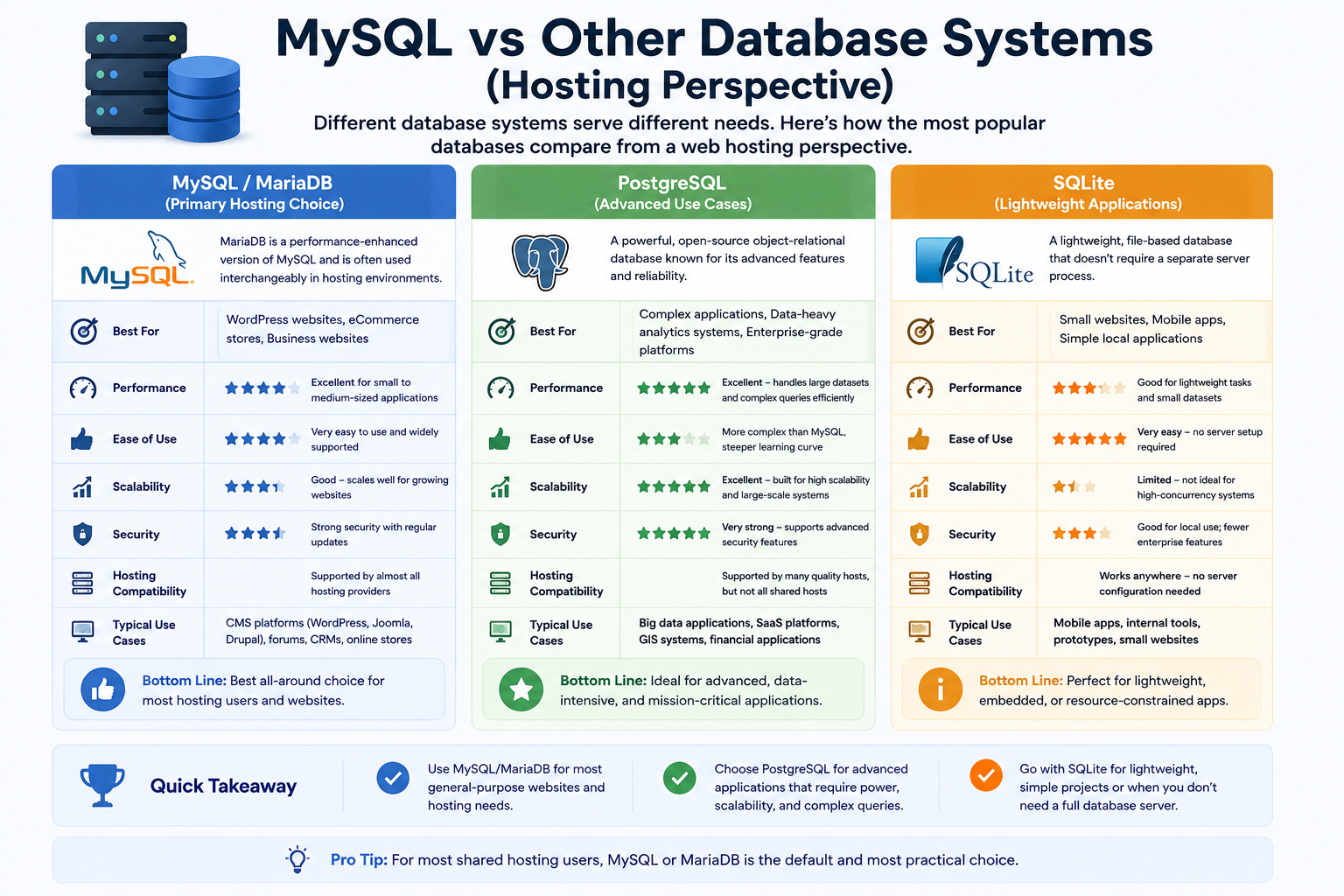
MySQL vs Other Database Systems (Hosting Perspective)
While MySQL is dominant, other databases are also used in web hosting environments.
MySQL / MariaDB (Primary Hosting Choice)
Best for:
- WordPress websites
- eCommerce stores
- Business websites
MariaDB is a performance-enhanced version of MySQL and is often used interchangeably in hosting environments.
PostgreSQL (Advanced Use Cases)
Best for:
- Complex applications
- Data-heavy analytics systems
- Enterprise-grade platforms
SQLite (Lightweight Applications)
Best for:
- Small websites
- Mobile apps
- Simple local applications
In most real-world hosting setups, MySQL or MariaDB remains the default.
How Hosting Type Impacts Database Performance
Not all hosting environments handle databases the same way. The performance of your database depends heavily on your hosting infrastructure.
Shared Hosting
- Limited database resources
- Suitable for small websites
- Performance can slow during traffic spikes
VPS Hosting
- Dedicated database resources
- Better performance and isolation
- Ideal for growing businesses
Cloud Hosting
- Scalable database performance
- Handles traffic spikes efficiently
- High availability and redundancy
For businesses targeting growth—especially SMEs in regions like the UAE—VPS and cloud hosting provide significantly better database performance compared to basic shared hosting.
Common Database Issues in Web Hosting
Even a well-designed database can face issues if not properly managed.
Some common problems include:
- Slow queries due to lack of optimization
- High server load from inefficient plugins
- Connection errors between website and database
- Corrupted tables after improper shutdowns
- Overloaded shared hosting environments
Most of these issues are not caused by MySQL itself, but by poor optimization or limited hosting resources.
Database Performance Optimization Tips
A well-optimized database can significantly improve website speed and user experience.
Best practices include:
1. Use Caching Systems
Reduces repeated database queries and improves speed.
2. Optimize Database Tables
Cleaning and optimizing tables improves efficiency.
3. Use Proper Hosting Infrastructure
Upgrading from shared hosting to VPS or cloud hosting reduces database strain.
4. Limit Unnecessary Plugins
Especially important for WordPress websites.
5. Regular Backups
Protects against data loss and corruption.
6. Use Indexing (Advanced)
Speeds up data retrieval for large datasets.
Real-World Use Cases of MySQL in Hosting
MySQL is used in almost every type of modern web application:
- WordPress blogs and corporate websites
- Online shopping platforms (orders, inventory, payments)
- Learning management systems (courses, students, results)
- Booking and reservation systems
- CRM and business dashboards
If a website stores user-generated or dynamic content, it almost certainly relies on a database.
Why Databases Matter for Business Websites
For businesses, a database is not just technical infrastructure—it is the backbone of operations.
It enables:
- Customer management systems
- Online transactions
- Automated workflows
- Real-time data access
- Scalable digital services
This is why hosting providers like CreativeON.com and CreativeON.ae focus heavily on stable database performance across VPS, cloud, and dedicated hosting environments.