Best WordPress Hosting for E-commerce Websites (WooCommerce Guide)
If you’re running or planning an online store on WordPress, your hosting choice matters more than most business owners realize. An e-commerce site isn’t just a blog with a shopping cart bolted on — it handles payments, customer data, product catalogs, and traffic spikes during sales. This guide breaks down what to look for in […]

If you’re running or planning an online store on WordPress, your hosting choice matters more than most business owners realize. An e-commerce site isn’t just a blog with a shopping cart bolted on — it handles payments, customer data, product catalogs, and traffic spikes during sales. This guide breaks down what to look for in the best WordPress hosting for e-commerce websites, so you can pick a plan that keeps your WooCommerce store fast, secure, and reliable.
This article focuses specifically on choosing WordPress hosting for WooCommerce stores. If you’re still deciding between hosting types in general, CreativeON’s Managed WordPress Hosting guide covers the broader basics.
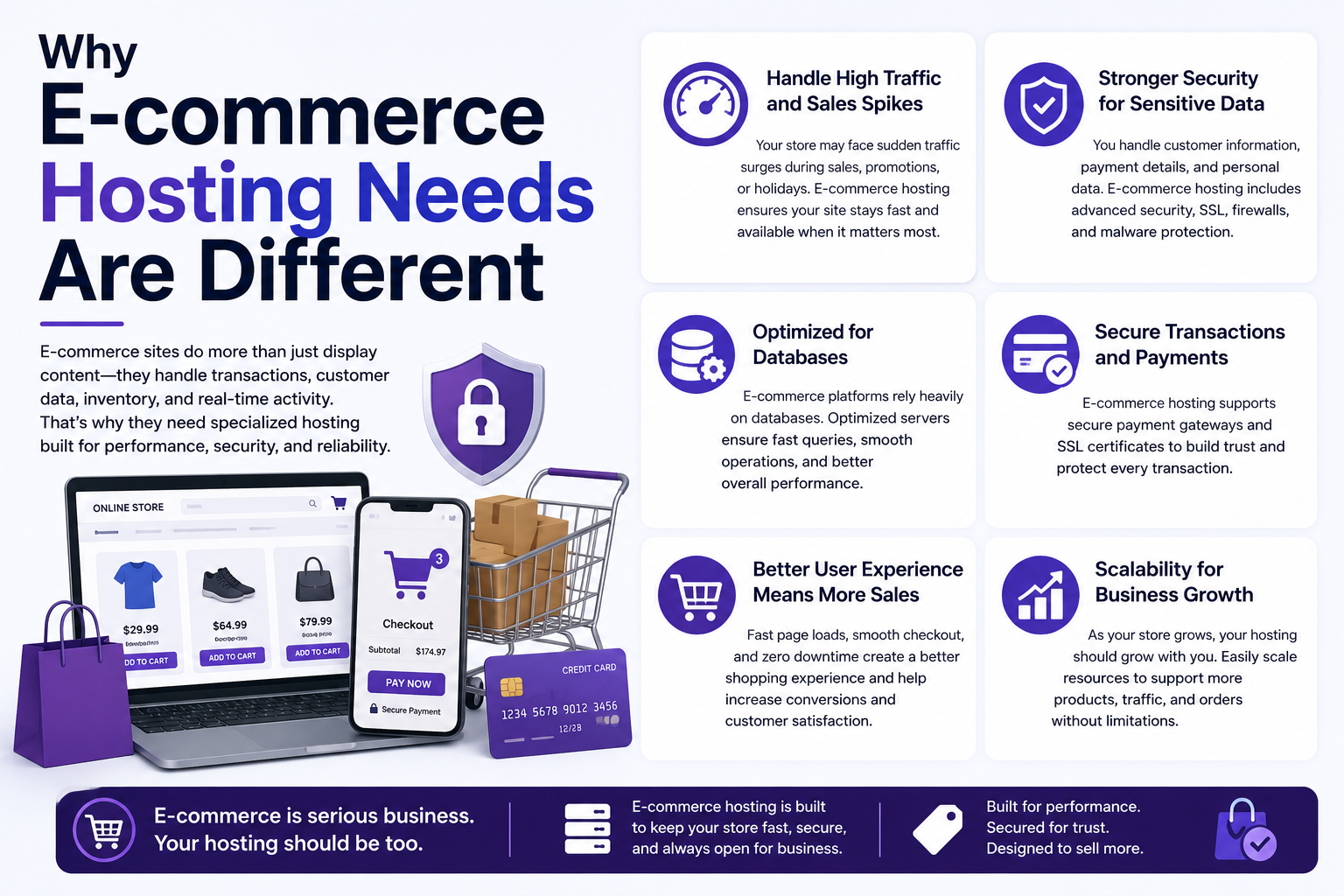
Why E-commerce Hosting Needs Are Different
A standard WordPress site loads static pages and serves content to visitors who mostly just read. A WooCommerce store is doing far more work behind the scenes on every single visit:
- Checking product stock levels in the database
- Processing cart and checkout sessions
- Communicating with payment gateways
- Calculating taxes and shipping in real time
- Sending order confirmation emails
Each of these adds server load that a typical blog never sees. That’s why hosting built for content doesn’t always hold up once you add WooCommerce and real transaction volume.
Key Hosting Requirements for WooCommerce Stores
1. Server Resources and Performance
WooCommerce relies heavily on database queries — every product page, cart update, and checkout step touches your database. Look for hosting that offers:
- SSD or NVMe storage for faster database read/write speeds
- Adequate dedicated RAM and CPU resources (avoid heavily oversold shared plans)
- Server-level caching designed for dynamic content, not just static pages
Generic caching setups can actually break WooCommerce if they cache cart or checkout pages incorrectly, so hosting with WooCommerce-aware caching rules is a real advantage.
2. SSL and WooCommerce Security
Every e-commerce store needs an SSL certificate — not optional, since browsers flag unsecured checkout pages and payment processors require it. Beyond a basic certificate, e-commerce hosting should support:
- Free, auto-renewing SSL (usually via Let’s Encrypt)
- PCI-DSS-friendly server configurations
- Web application firewalls to filter malicious traffic before it reaches your store
For a deeper look at certificate setup, CreativeON’s SSL for WordPress guide walks through installation and renewal.
3. Uptime and Reliability
A blog going down for ten minutes is annoying. A store going down during checkout is lost revenue and, potentially, lost customer trust. When comparing hosts, check for:
- A published uptime guarantee (99.9% or higher)
- Redundant server infrastructure
- Transparent status reporting or monitoring tools
4. Scalability for Traffic Spikes
Sales events, seasonal promotions, and viral moments can multiply your traffic overnight. Hosting for e-commerce should let you scale resources up without migrating to a new provider mid-campaign. Look for plans with:
- Easy resource upgrades (CPU, RAM, storage) without downtime
- Support for a content delivery network (CDN) to handle traffic from different regions
- Auto-scaling options on higher-tier plans
5. Backup and Recovery
Order data, customer records, and product catalogs are too valuable to risk. E-commerce hosting should include:
- Automated daily backups, stored offsite
- One-click restore functionality
- Backup retention that covers at least several weeks
CreativeON’s WordPress Backup Guide covers how to configure and test backups properly — a step many store owners skip until it’s too late.
6. WooCommerce-Aware Technical Support
Most store owners underestimate how much support quality matters. When an issue affects checkout, payment gateways, or order processing, generic hosting support may not understand the problem. Hosting providers with real WordPress and WooCommerce expertise can usually identify plugin conflicts, caching issues, or database bottlenecks much faster than general-purpose support teams — and for a live store, that speed matters.
7. Staging Environments
Updating plugins, themes, or WooCommerce itself directly on a live store is risky — a broken checkout page during business hours can cost sales. Good e-commerce hosting includes a staging environment where you can test changes safely before pushing them live. CreativeON’s Staging Environment Guide explains how to set this up step by step.
Modern PHP and Database Performance
WooCommerce performance benefits from running on current PHP versions and a well-optimized MySQL or MariaDB database. Newer PHP releases generally process requests more efficiently, which can improve store responsiveness without requiring any changes to your products, theme, or design. Good WooCommerce hosting gives you easy control over which PHP version your site runs, along with a database configured to handle frequent, small queries efficiently.
Front-End Performance Matters Too
Even excellent hosting can’t fully compensate for oversized images, a poorly optimized theme, or too many plugins running at once. Alongside choosing solid WooCommerce hosting, store owners should regularly monitor page speed and Core Web Vitals to make sure the shopping experience stays smooth from click to checkout.
Managed WordPress Hosting vs Standard Hosting for WooCommerce
Managed WooCommerce hosting is generally the stronger fit for e-commerce because it’s built with WordPress-specific optimizations — server-level caching tuned for dynamic content, automatic core updates, and built-in security monitoring. Standard shared hosting can technically run WooCommerce, but it often lacks the resource isolation and specialized support that stores need once order volume grows.
If you’re weighing this decision in more depth, CreativeON’s Managed vs Unmanaged WordPress Hosting guide covers the tradeoffs beyond the e-commerce use case.
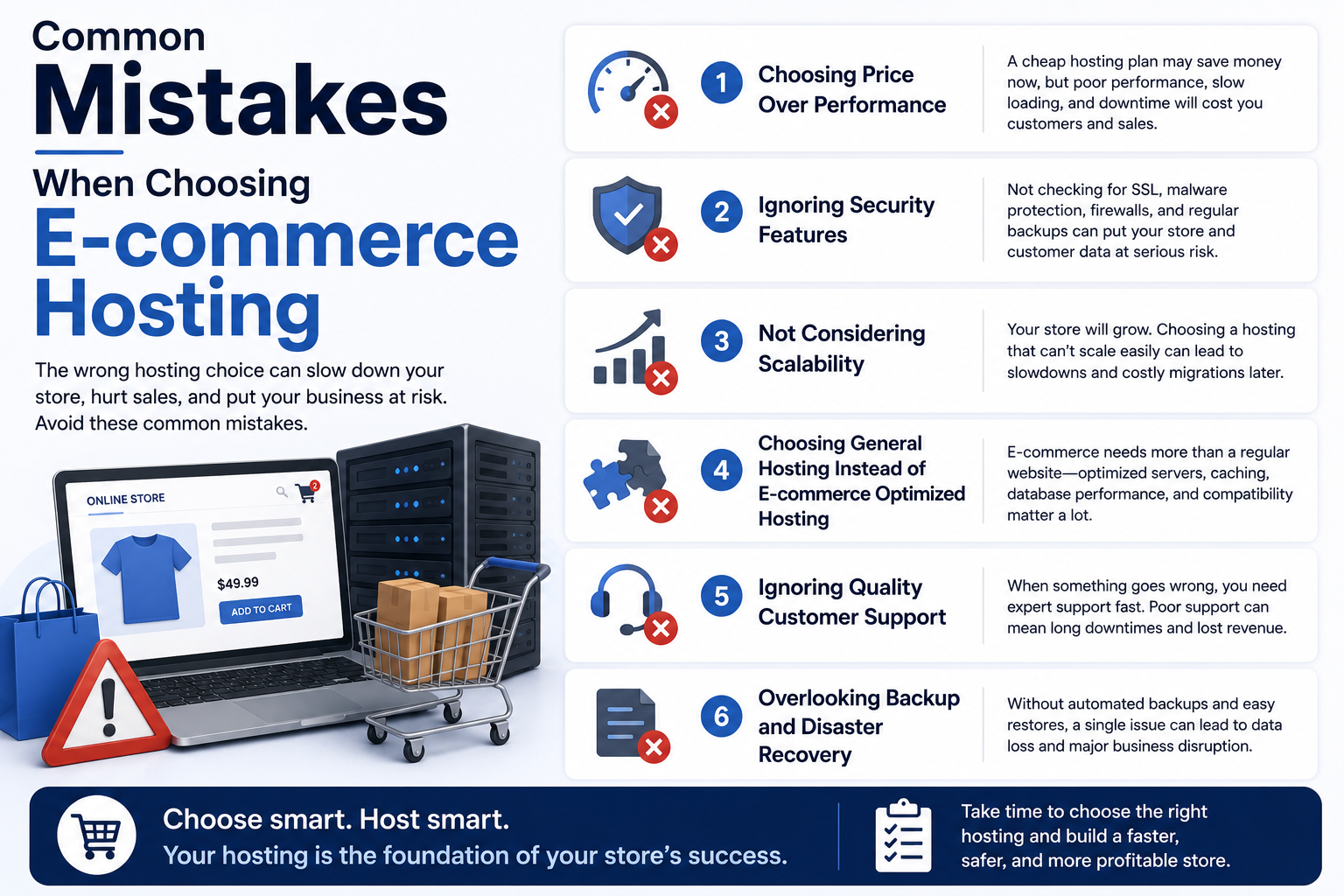
Common Mistakes When Choosing E-commerce Hosting
Choosing based on price alone. The cheapest shared plan usually means shared resources with hundreds of other sites, which shows up as slow load times right when you need speed most — during checkout.
Ignoring plugin compatibility. Some hosts restrict server configurations in ways that conflict with popular WooCommerce extensions (payment gateways, shipping plugins, subscription tools). Confirm compatibility before committing.
Skipping backups until after a problem. Many store owners only think seriously about backups after losing data. Set up automated backups from day one.
Underestimating traffic spikes. A host that works fine on a normal Tuesday may buckle during a Black Friday sale. Choose hosting with room to scale before you need it, not during the event.
Overlooking regional server location. If most of your customers are in the UAE, hosting with servers or CDN coverage in the region can meaningfully reduce load times for local shoppers — a detail that’s easy to miss when comparing plans on paper.
Best Practices for WooCommerce Store Speed and Checkout Performance
- Keep WordPress core, your theme, and WooCommerce itself updated regularly
- Use a caching plugin designed to work with WooCommerce, not a generic one
- Monitor site speed periodically, especially on product and checkout pages
- Test your checkout flow after any plugin or theme update
- Review backup logs monthly to confirm backups are actually completing
WooCommerce Hosting Features Checklist
Use this quick checklist when comparing WooCommerce hosting plans:
- ✔ NVMe or SSD storage
- ✔ Free, auto-renewing SSL certificate
- ✔ Daily automated backups
- ✔ Staging environment
- ✔ WooCommerce-compatible caching
- ✔ Malware protection and firewall
- ✔ CDN support
- ✔ Easy PHP version management
- ✔ 99.9%+ uptime guarantee
- ✔ WooCommerce-aware technical support