How CDN Improves WordPress Hosting Performance
Website speed has a direct impact on user experience, engagement, and conversions. Even with well-configured WordPress Hosting, visitors located far from your server can experience slower load times simply due to network latency. A Content Delivery Network (CDN) solves this by delivering your site’s static content from servers physically closer to each visitor. This article […]
Website speed has a direct impact on user experience, engagement, and conversions. Even with well-configured WordPress Hosting, visitors located far from your server can experience slower load times simply due to network latency. A Content Delivery Network (CDN) solves this by delivering your site’s static content from servers physically closer to each visitor.
This article focuses specifically on the performance role of a CDN. For a full breakdown of everything that affects WordPress speed — hosting, caching, images, themes, and plugins working together — see our [WordPress Hosting Performance Guide].
In short: A CDN stores copies of your static files (images, CSS, JS, fonts) on servers around the world, so visitors load them from the nearest location instead of your origin server. This reduces latency, lowers server load, and improves consistency for global audiences. A CDN works alongside WordPress caching, not instead of it — and it can’t fix a poorly coded theme, plugin, or database.
What Is a CDN for WordPress?
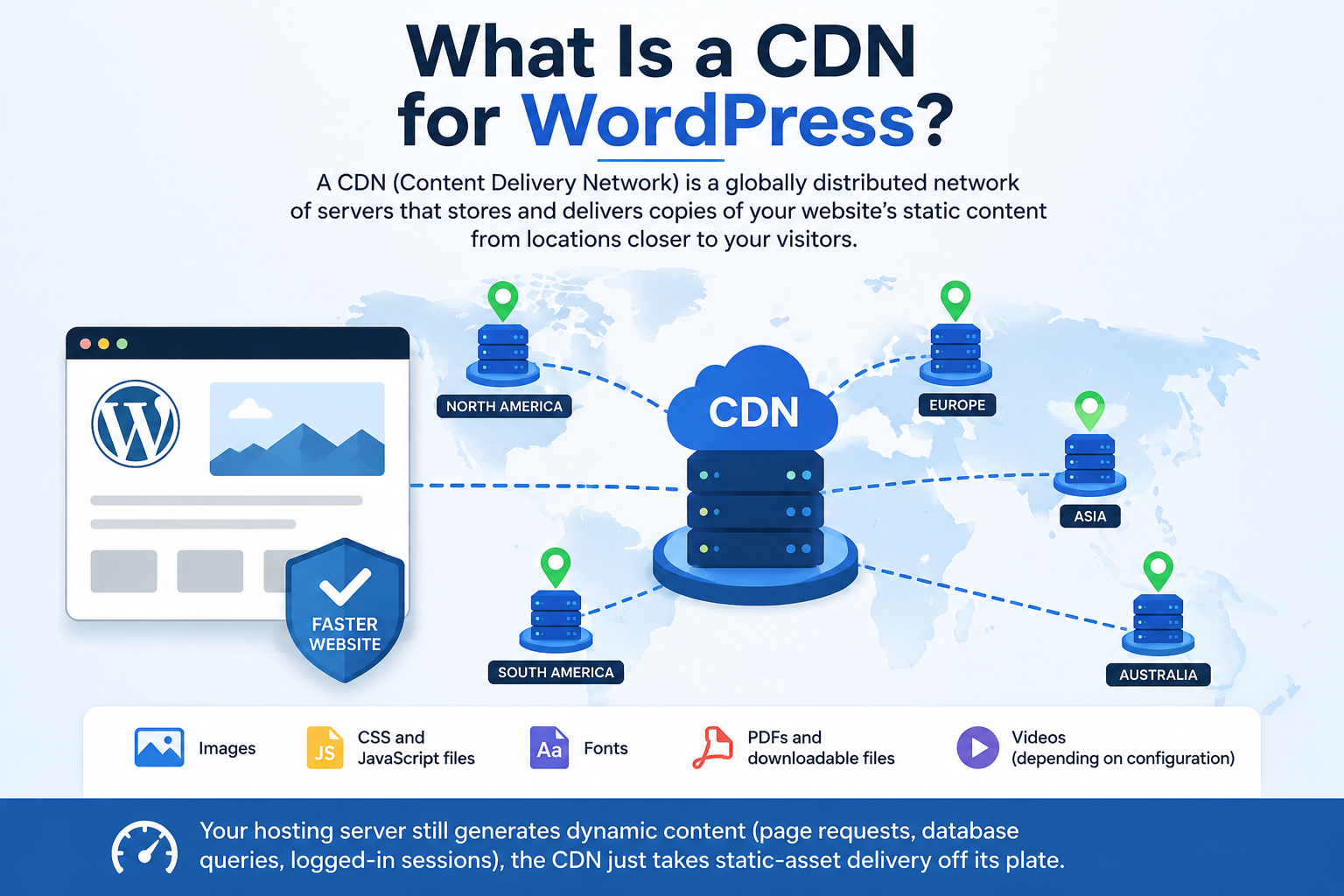
A CDN is a globally distributed network of servers that stores and delivers copies of your website’s static content from locations closer to your visitors, instead of every request traveling to your WordPress Hosting server.
For most WordPress sites, a CDN typically delivers:
- Images
- CSS and JavaScript files
- Fonts
- PDFs and downloadable files
- Videos (depending on configuration)
Your hosting server still generates dynamic content (page requests, database queries, logged-in sessions); the CDN just takes static-asset delivery off its plate.

Origin Server vs. Edge Servers
- Origin server — your WordPress Hosting server. It holds the original files, database, and generates fresh content whenever the CDN doesn’t have a cached copy.
- Edge servers — the CDN’s global network of servers that cache copies of your static files close to visitors.
Example: if your site is hosted in Dubai, a visitor in Karachi may be served from a nearby regional edge server, a visitor in London from a European one, and a visitor in Singapore from an Asian one — each getting the files from a much shorter distance than a direct trip to Dubai.
How a CDN Improves Performance
Shorter distance, less latency. Instead of every image, stylesheet, and script traveling from one origin server, visitors pull them from the nearest edge server. For an international audience, this is usually the single biggest speed win a CDN provides — and it’s a meaningful contributor to Core Web Vitals like Largest Contentful Paint (LCP) when combined with proper caching.
Less load on your hosting server. Static-asset requests no longer hit your origin server directly, which frees up CPU, memory, and bandwidth for the dynamic WordPress processing that actually needs it.
More resilience during traffic spikes. When a campaign, viral post, or product launch drives a surge of visitors, a CDN spreads the resulting static-file requests across its global network instead of funneling them all to one server.
More efficient image delivery. Images are usually the heaviest assets on a page. Most modern CDNs automatically compress images, serve modern formats like WebP/AVIF where supported, and cache device-appropriate sizes — reducing page weight without manual work.
How Content Actually Gets Delivered
Visitor requests a file
│
▼
Nearest CDN edge server checks its cache
│
┌────┴────┐
Yes No
│ │
▼ ▼
Served Request sent to origin server →
instantly origin returns file → CDN caches
it → file served to visitor
Cache hit — the file is already on the edge server and is served immediately (fast, no origin load). Cache miss — the file isn’t cached yet, so the CDN fetches it from the origin once, caches it, and serves it. Every subsequent request for that file becomes a cache hit. Misses are normal right after publishing new content or assets — they resolve on their own as the cache fills in.
Best Practices When Using a CDN
- Cache the right things. Static assets that change rarely — images, CSS, JS, fonts, PDFs — are ideal candidates.
- Exclude dynamic pages like carts, checkout, and account dashboards from CDN caching, or you risk serving stale or incorrect content.
- Pair it with WordPress caching, which reduces server-side processing rather than delivery distance. The two solve different problems and work best together — see our [WordPress Caching Guide].
- Keep optimizing the site itself (compressed images, updated plugins/themes, a lean theme) — a CDN can’t compensate for an inefficient WordPress install.
- Purge the cache after major updates (new design, replaced images, edited CSS/JS) so visitors don’t see outdated versions.
- Monitor results — track page load time, TTFB, and Core Web Vitals before and after enabling the CDN to confirm it’s actually helping.
What a CDN Can’t Fix
A CDN speeds up delivery of static content — it doesn’t fix problems inside the WordPress application itself, such as poorly coded themes, resource-heavy plugins, bloated databases, or excessive PHP processing. If those are the bottleneck, address them directly rather than expecting the CDN to compensate.
When You Might Not Need One
A CDN adds the least value if nearly all your visitors are in the same region as your host, your site is lightweight with few static assets, your audience is small, or your host already provides edge caching close to your visitors. As traffic grows or becomes more geographically spread out, the case for a CDN gets stronger.
Quick Checklist
- ✔ Enable CDN caching for static assets only
- ✔ Exclude carts, checkout, and account pages from caching
- ✔ Optimize images and use modern formats (WebP/AVIF)
- ✔ Combine with WordPress caching
- ✔ Purge the cache after major updates
- ✔ Track load time and Core Web Vitals to confirm impact