Why Daily Backups Are Important for WordPress Hosting
Your WordPress website is constantly evolving. Whether you’re publishing blog posts, updating pages, processing WooCommerce orders, or receiving contact form submissions, your website data changes every day. While these updates help your business grow, they also increase the importance of having a reliable backup strategy. Daily backups are one of the most valuable features of […]
Your WordPress website is constantly evolving. Whether you’re publishing blog posts, updating pages, processing WooCommerce orders, or receiving contact form submissions, your website data changes every day. While these updates help your business grow, they also increase the importance of having a reliable backup strategy.
Daily backups are one of the most valuable features of quality WordPress hosting because they allow you to recover your website quickly if something goes wrong. A failed plugin update, accidental deletion, malware infection, or unexpected server issue can disrupt your website within minutes. Without a recent backup, restoring lost content or customer data can be difficult—or even impossible.
This guide explains why daily backups are important for WordPress hosting, how they protect your website, and what features to look for when evaluating a WordPress hosting provider. Rather than covering WordPress backups in general, this article focuses specifically on the role that daily backups play within a WordPress hosting environment.
Why Daily Backups Matter in WordPress Hosting
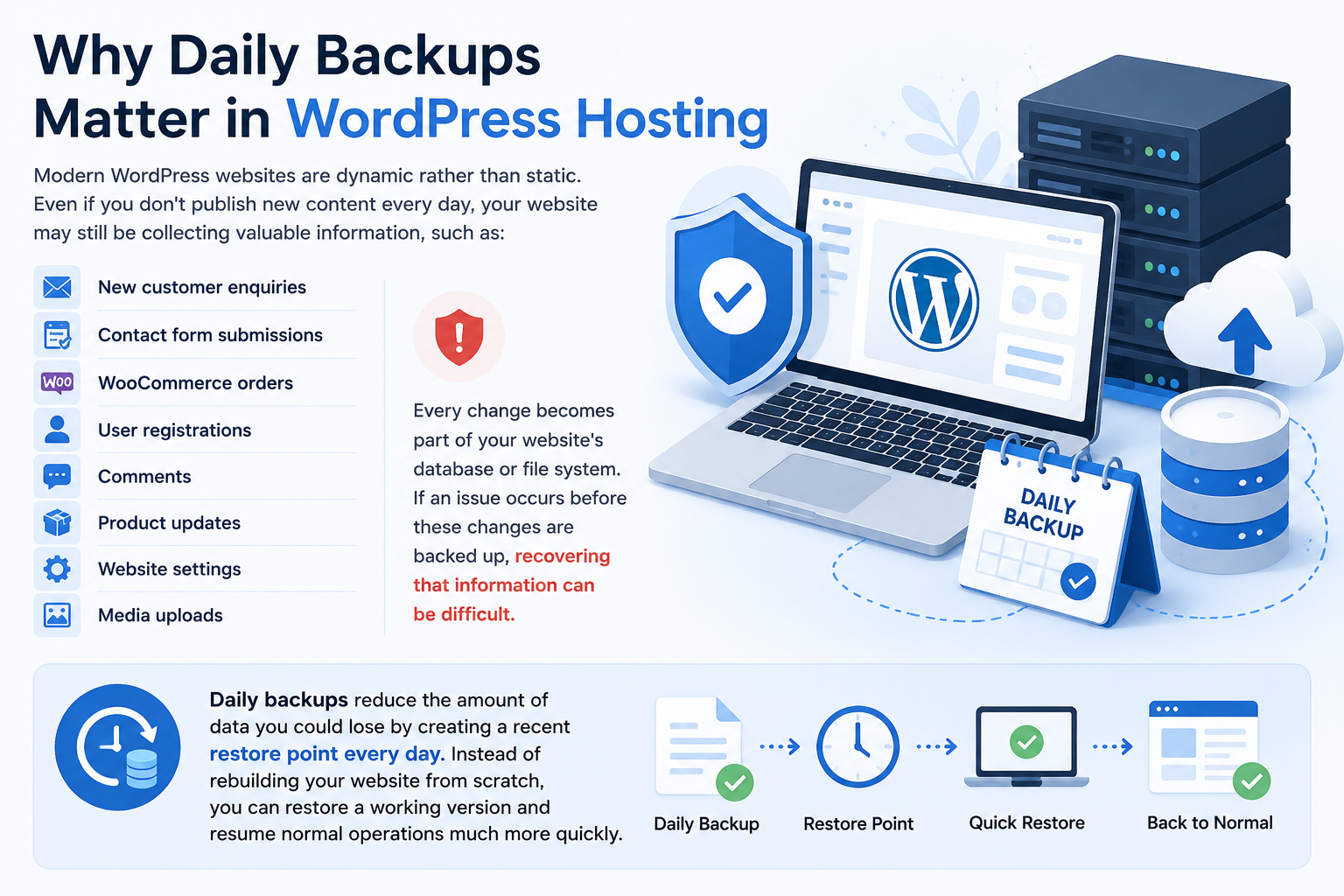
Modern WordPress websites are dynamic rather than static. Even if you don’t publish new content every day, your website may still be collecting valuable information, such as:
- New customer enquiries
- Contact form submissions
- WooCommerce orders
- User registrations
- Comments
- Product updates
- Website settings
- Media uploads
Every change becomes part of your website’s database or file system. If an issue occurs before these changes are backed up, recovering that information can be difficult.
Daily backups reduce the amount of data you could lose by creating a recent restore point every day. Instead of rebuilding your website from scratch, you can restore a working version and resume normal operations much more quickly.
Common Situations Where Daily Backups Become Essential
Many website owners assume backups are only useful during major server failures. In reality, they are far more likely to be needed because of everyday website management tasks.
Plugin Update Problems
WordPress plugins receive frequent updates that improve security, add features, or fix bugs. Occasionally, however, an update may conflict with another plugin, your theme, or the current version of WordPress.
For example, imagine updating a WooCommerce payment plugin just before a busy sales period. If customers suddenly cannot complete purchases, restoring yesterday’s backup allows you to get your online store working again while you investigate the compatibility issue.
This significantly reduces downtime and helps protect your revenue.
Theme Changes and Customization Errors
Switching themes or making design changes can sometimes produce unexpected results, including:
- Broken layouts
- Missing menus
- Display errors
- Widget problems
- Mobile responsiveness issues
A recent backup allows you to reverse unwanted changes quickly without manually rebuilding your website.
Human Error
Even experienced website administrators make mistakes.
Examples include:
- Accidentally deleting important pages
- Removing media files
- Deleting WooCommerce products
- Editing the wrong configuration
- Changing settings that affect website functionality
With daily backups, these mistakes are usually reversible within minutes.
Malware and Website Compromise
Cybersecurity threats remain one of the biggest risks for WordPress websites.
If malicious software gains access to your site, attackers may:
- Inject harmful code
- Delete files
- Modify website content
- Redirect visitors
- Damage your website’s reputation
Although backups do not prevent malware attacks, they play a critical role in the website recovery process after the website has been cleaned and secured.
For guidance on preventing attacks, see our WordPress Security Best Practices guide.
Failed WordPress Core Updates
WordPress core updates improve security and performance, but occasionally compatibility issues arise with older plugins or themes.
If your website experiences problems after updating WordPress, restoring a recent backup provides a reliable way to recover while you identify the underlying issue.
Unexpected Server Issues
Reliable WordPress hosting providers invest in stable infrastructure, but no technology is completely immune to unexpected problems.
Possible issues include:
- Hardware failures
- Storage corruption
- File system errors
- Unexpected maintenance issues
Daily backups provide an additional layer of protection beyond the hosting infrastructure itself.

How Daily WordPress Backups Work
A complete WordPress backup normally contains two essential components.
Website Files
These include:
- Themes
- Plugins
- Images
- Videos
- Uploads
- Configuration files
- WordPress system files (where applicable)
Without these files, your website’s appearance and functionality cannot be fully restored.
WordPress Database
The database contains the information that powers your website, including:
- Posts
- Pages
- Comments
- User accounts
- Website settings
- WooCommerce orders
- Products
- Categories
- Tags
- Form submissions
A successful website restoration requires both the website files and the database to work together.
Benefits of Daily Backups for WordPress Hosting
Minimize Website Downtime
When your website experiences a serious issue, restoring a recent backup is often much faster than manually repairing every problem.
Many managed WordPress hosting providers offer one-click restore tools that allow administrators to recover a website in just a few minutes.
For businesses that rely on their websites every day, this faster recovery process can help reduce operational disruption.
Protect Valuable Business Data
Your website often stores valuable business information, including:
- Customer enquiries
- Online orders
- Membership registrations
- Booking requests
- Product catalogues
- Blog content
Losing even one day’s worth of information may affect customer experience and business operations.
Daily backups help minimize that risk.
Support Safer WordPress Updates
Regular updates are an important part of WordPress maintenance.
Knowing that you have a recent backup encourages you to keep your:
- WordPress core
- Plugins
- Themes
up to date without worrying that a failed update will permanently damage your website.
Improve Disaster Recovery
Every business should have a disaster recovery strategy.
Daily backups provide one of the most important components of that strategy by allowing you to restore your website after:
- Malware infections
- Human error
- Failed updates
- File corruption
- Hosting-related incidents
The quicker your website can be restored, the lower the impact on your visitors and business.
Reduce Business Risk
Rather than simply providing peace of mind, daily backups actively reduce business risk.
A recent restore point helps protect:
- Sales
- Customer trust
- Brand reputation
- Business continuity
For websites that generate revenue online, this protection is especially valuable.
Why Backup Frequency Matters
Not every WordPress website changes at the same pace.
The right backup schedule depends largely on how frequently your website’s content and data change.
Backup Frequency | Best Suited For |
Weekly | Personal websites with very few updates |
Daily | Business websites, blogs, company websites, portfolios, agencies |
Multiple Backups Per Day | WooCommerce stores, membership websites, booking systems, high-traffic websites |
For most businesses using WordPress hosting, daily backups provide the right balance between protection and efficiency.
Websites that process online orders or receive frequent customer interactions may benefit from more frequent backup schedules if their hosting provider supports them.
Backup Retention Is Just as Important as Backup Frequency
Creating a backup every day is valuable, but how long those backups are retained is equally important.
Imagine malware infects your website without being detected for several days. If your hosting provider stores only yesterday’s backup, that backup may already contain the infection.
A good WordPress hosting provider typically keeps multiple restore points so you can recover an earlier clean version if needed.
Common backup retention periods include:
- 7-day backup history
- 14-day backup history
- 30-day backup history
Longer backup retention gives website owners greater flexibility when recovering from issues that aren’t discovered immediately.
Incremental Backups: A Smarter Way to Protect Your Website
Many modern managed WordPress hosting providers use incremental backups rather than creating a complete copy of the website every day.
Instead of backing up every file repeatedly, incremental backups record only the changes made since the previous backup.
This approach offers several advantages:
- Faster backup completion
- Reduced server resource usage
- Lower storage requirements
- Efficient backup automation
- Consistent daily protection
Website owners usually don’t notice the difference, but incremental backups help hosting providers deliver reliable daily backups without placing unnecessary load on the server.
One-Click Restore Makes Recovery Faster
Creating backups is only part of the recovery process.
Equally important is how easily those backups can be restored.
Many quality WordPress hosting providers include one-click restore, allowing administrators to recover a website directly from the hosting control panel.
This feature can dramatically reduce downtime because it eliminates complicated manual recovery procedures.
Some hosting providers also allow websites to be restored to a staging environment for testing before replacing the live website. If you’d like to learn more, see our WordPress Staging Environment Guide.
What to Look for in WordPress Hosting with Daily Backups
Not all WordPress hosting plans offer the same level of backup protection.
When comparing providers, consider whether they include:
- Automated daily backups
- One-click website restoration
- Multiple restore points
- Backup retention policies
- Secure off-site backup storage
- Backup status monitoring
- Easy access to backup history
- Incremental backup technology
These features help ensure your backups are not only created consistently but are also available when you need them most.
Best Practices for Daily Backups in WordPress Hosting
Having daily backups is an excellent start, but following a few best practices will make your backup strategy far more effective. These recommendations help ensure that your backups are available, reliable, and useful when you need them most.
Verify That Backups Are Running Successfully
Many website owners assume backups are being created simply because their hosting provider advertises daily backups. However, backups can occasionally fail due to storage issues, configuration changes, or unexpected errors.
Periodically check your hosting control panel to confirm that:
- Daily backups are completing successfully.
- New restore points are being created regularly.
- Backup history is available.
- There are no failed backup notifications.
A backup that doesn’t exist—or cannot be restored—provides little protection.
Test the Restore Process Occasionally
Creating backups is only half of the recovery process. You should also know that your website can actually be restored.
Many managed WordPress hosting providers allow you to restore a backup with just a few clicks. If your hosting plan includes a staging environment, consider testing a restoration there before restoring your live website.
Regular testing helps you:
- Confirm backups are complete.
- Verify that the restoration process works correctly.
- Reduce uncertainty during an emergency.
- Improve your disaster recovery planning.
Testing doesn’t need to be frequent, but doing it occasionally can prevent unpleasant surprises when you need a backup most.
Keep Multiple Restore Points
Problems aren’t always discovered immediately.
For example:
- Malware may remain hidden for several days.
- A plugin conflict might not appear until after several updates.
- Content may be accidentally deleted without anyone noticing.
If only one backup is available, it may already contain the problem.
Multiple restore points give you greater flexibility when recovering your website.
Create Manual Backups Before Major Changes
Even if your hosting provider performs automated daily backups, creating an additional manual backup before significant changes is a good practice.
Examples include:
- Updating multiple plugins
- Installing a new theme
- Upgrading WordPress
- Importing large amounts of content
- Changing WooCommerce settings
- Editing website code
A manual backup provides an additional recovery point if the scheduled backup occurred before your planned changes.
Store Backups Securely
Backups often contain your entire website, including customer information, media files, and configuration settings.
Quality WordPress hosting providers typically store backups securely and separately from the live website to reduce the risk of data loss if the primary server experiences an issue.
Secure backup storage is an important part of an overall website protection strategy.
Common Mistakes Website Owners Make
Daily backups are highly effective—but only when they’re managed properly. Here are some of the most common mistakes to avoid.
Assuming Backups Are Always Available
Never assume your hosting provider is successfully creating backups without checking.
Review your backup schedule periodically and make sure recent restore points are available.
Keeping Only One Backup
A single backup provides limited protection.
If malware, corrupted files, or database errors existed before that backup was created, restoring it may not solve the problem.
Multiple backup versions significantly improve recovery options.
Ignoring Backup Failure Notifications
Some hosting providers notify customers when scheduled backups fail.
Ignoring these alerts can leave your website without a usable recovery point.
Address backup failures as soon as possible to maintain continuous protection.
Waiting Until Something Breaks
Backups are often overlooked until an emergency occurs.
Instead of reacting after data loss, make backup monitoring part of your regular WordPress maintenance routine.
A proactive approach is always more effective than an emergency response.
Relying Solely on Backups for Website Security
Backups are an important part of website protection, but they should not replace good security practices.
A well-maintained WordPress website should also include:
- Regular WordPress updates
- Plugin and theme updates
- Strong administrator passwords
- Multi-factor authentication where available
- Malware scanning
- SSL encryption
- Security monitoring
Backups help you recover from problems—they do not prevent them.
For additional guidance, see our WordPress Security Best Practices guide.
How Daily Backups Fit Into WordPress Website Maintenance
Daily backups work best when combined with other routine maintenance activities.
A healthy WordPress maintenance plan typically includes:
- Keeping WordPress core updated.
- Updating themes and plugins regularly.
- Monitoring website performance.
- Reviewing security logs.
- Checking website uptime.
- Optimizing the database when appropriate.
- Verifying backup completion.
Each of these tasks supports the others. Together, they improve website reliability, security, and long-term stability.
If you’re planning major website changes, our WordPress Migration Guide explains how to move a website safely while minimizing downtime.