Domain Name Search Tools & Availability (Complete Guide)
Introduction Choosing a domain name is usually easy until you actually try to register it. Many people find the perfect name in their mind, but when they search for it, they discover it’s already taken. This is where domain name search tools become essential. A domain search tool helps you instantly check whether a domain […]
Introduction
Choosing a domain name is usually easy until you actually try to register it. Many people find the perfect name in their mind, but when they search for it, they discover it’s already taken. This is where domain name search tools become essential.
A domain search tool helps you instantly check whether a domain is available, taken, or offered in different extensions like .com, .net, or .ae. It removes guesswork and helps you make faster decisions when building a website.
For users who want a quick and simple check, domain availability can also be checked directly on the homepage of CreativeON.ae, where you can search and see results instantly without any technical steps.
This article explains how domain search tools work, how to interpret results correctly, and how to choose the right domain with confidence.
What Is a Domain Name Search Tool?
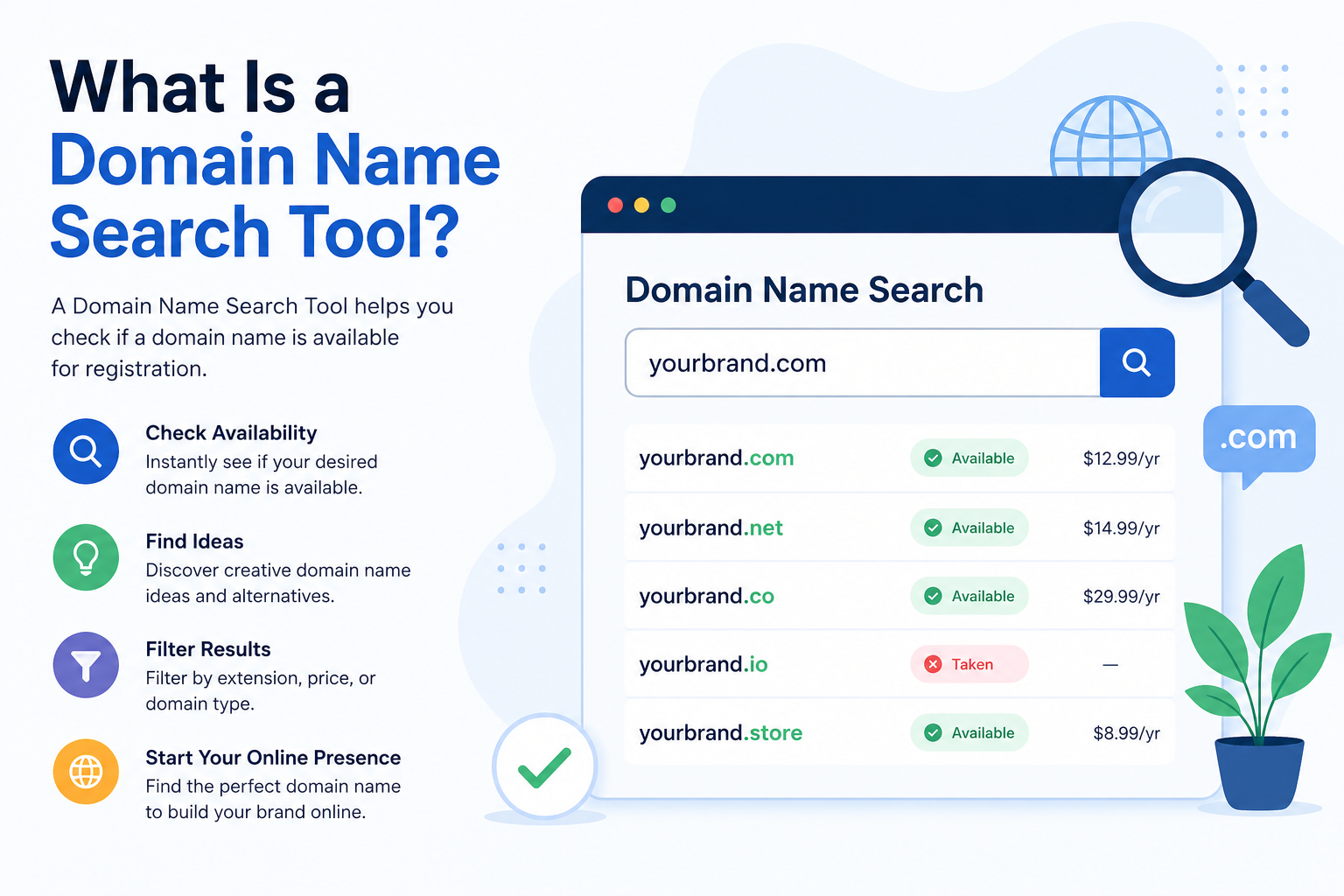
A domain name search tool is an online system that checks whether a specific domain name is available for registration.
When you enter a name like:
- yourbrand.com
- yourbusiness.ae
The tool connects to global domain registries and returns real-time availability information.
In simple terms, it answers three key questions:
- Is this domain available to register?
- Is it already owned by someone?
- What alternatives are available?
Most domain registrars and hosting providers offer these tools, and they are usually the first step in starting a website.
How Domain Availability Actually Works
Domain availability is not just a simple yes or no answer—it depends on the global registration system.
A domain is considered available when:
- It is not currently registered by anyone
- It is not reserved by a registry authority
- It is open for public registration
A domain is considered unavailable when:
- It is already owned by an individual or company
- It is parked (owned but not actively used)
- It is restricted or reserved
For example:
- example.com → may already be owned
- example.ae → might still be available
This is why checking multiple extensions is always important.
Step-by-Step: How Domain Search Tools Work
To understand domain search properly, it helps to know what happens behind the scenes.
Step 1: You Enter a Domain Name
You type a name like:
“bluewaveagency.com”
Step 2: The Tool Queries Global Registries
The system checks domain databases in real time to see if the name is registered.
Step 3: It Returns Results
You will usually see:
- Available → You can register it immediately
- Taken → Someone already owns it
- Premium → Available but priced higher
- Suggested alternatives → Similar names or extensions
Step 4: You Compare Options
At this stage, users often explore variations like:
- different extensions (.net, .ae, .org)
- added keywords (studio, online, group)
- shorter brand variations
This flow is the core of how every domain decision is made.
Types of Domain Search Results Explained
Understanding results helps you avoid confusion and make better decisions.
1. Available Domains
These are open for registration immediately.
Example:
- mybrand.ae → Available
2. Taken Domains
These are already registered by someone else.
Example:
- mybrand.com → Taken
You cannot register it unless it becomes available again.
3. Premium Domains
These domains are technically available but come with a higher price due to demand or branding value.
Usually they are:
- short names
- keyword-rich names
- highly brandable names
4. Suggested Alternatives
When your preferred name is not available, tools often suggest:
- similar spellings
- different extensions
- creative variations
This is often where better branding ideas come from.
Real Example of a Domain Search Process
Let’s say a user wants:
“swiftdesign.com”
They search it and find:
- ❌ Taken
The tool then suggests:
- swiftdesign.net
- swift-design.com
- swiftdesignstudio.com
- swiftdesign.ae
Now the user evaluates:
- Which one feels easier to remember?
- Which one matches their audience?
- Which extension fits their business?
This simple flow is how most real-world domain decisions are made.
Why Domain Availability Matters Before Building a Website
Checking domain availability early prevents future problems.
It helps you:
- Secure your brand identity online
- Avoid naming conflicts
- Ensure consistency across platforms
- Prevent delays in website launch
For businesses, especially startups, the domain name often becomes the long-term brand name, so this step should not be rushed.
Common Mistakes When Using Domain Search Tools
Many users make predictable mistakes that limit their options.
1. Checking Only One Extension
Most people only check .com, but ignore:
- .net
- .org
- .ae
This reduces available choices unnecessarily.
2. Ignoring Variations
If a domain is taken, users often stop instead of exploring:
- synonyms
- prefixes/suffixes
- short brand versions
3. Choosing Overly Complex Names
Even if a domain is available, long or confusing names:
- are hard to remember
- reduce brand recall
- increase typing errors
4. Delaying Registration
Good domains are often registered quickly. Waiting too long can mean losing the name permanently.

Domain Search Tools vs WHOIS vs Registrars (Simple Difference)
Many beginners confuse these tools.
Domain Search Tool
Used to check availability instantly.
WHOIS Lookup
Used to find ownership details of a domain.
Domain Registrar
A platform where you actually purchase and manage domains.
Each tool serves a different purpose, but domain search tools are usually the starting point.
UAE Domain Search Considerations (.ae Domains)
For businesses targeting the UAE market, .ae domains are often preferred because they represent local identity.
However, they are more limited in availability compared to global extensions like .com because:
- shorter namespace
- high demand among UAE businesses
- limited registration pool
This makes fast and accurate domain searching even more important when targeting UAE audiences.
Why Quick Domain Checking Matters
Domain names are registered globally on a first-come, first-served basis.
This means:
- once a domain is taken, it may not return for years
- popular names are often registered quickly
- hesitation can result in losing a good name
This is why having a simple and fast search process is important before making branding decisions.
Choosing the Right Domain After Search
Once you have a list of available domains, the decision should be based on clarity—not complexity.
A good domain is:
- easy to spell
- easy to pronounce
- short and clean
- relevant to your brand
- free from unnecessary symbols
Instead of chasing the “perfect” name, focus on the most practical one that fits your identity.
Where to Check Domain Availability Quickly
Most users rely on domain registrar tools, but the simplest method is using a direct search interface.
You can quickly check domain availability using the search tool on the homepage of CreativeON.ae, which allows you to instantly search and see whether a domain is available without navigating multiple pages.
This makes the process faster, especially for users who are still exploring name ideas and want quick comparisons.
Conclusion
Domain name search tools are the foundation of every website project. They help you quickly understand whether your chosen name is available and guide you toward better alternatives when it is not.
A good domain decision is not about finding the first available name—it’s about finding a name that is simple, relevant, and easy to build a brand around.
With the right search approach and quick availability checking, you can secure a domain that supports your long-term online presence without unnecessary delays or confusion.