Why Fast Hosting Matters for SEO Rankings in WordPress
If your WordPress site loads slowly, it’s not just visitors who notice — Google notices too. Site speed is one of the clearest signals search engines use to judge whether a page deserves a top ranking, and where your site is hosted plays a bigger role in that speed than most WordPress owners realize. This […]
If your WordPress site loads slowly, it’s not just visitors who notice — Google notices too. Site speed is one of the clearest signals search engines use to judge whether a page deserves a top ranking, and where your site is hosted plays a bigger role in that speed than most WordPress owners realize.
This guide focuses on one thing: how fast WordPress hosting affects SEO rankings, and what you can do about it. If you’re looking for a broader introduction to WordPress hosting itself, check out our What Is WordPress Hosting? guide first, or see Managed WordPress Hosting Explained if you’re comparing hosting types.
Why Hosting Speed Affects SEO
Google’s ranking systems include Core Web Vitals — a set of metrics that measure real-world loading performance, interactivity, and visual stability. Two of the three Core Web Vitals are directly tied to how fast your server responds:
- Largest Contentful Paint (LCP): how quickly the main content of a page becomes visible.
- Time to First Byte (TTFB): how long it takes your server to start sending data after a request.
No amount of on-page SEO — good keywords, solid content, clean structure — can fully offset a slow server. If your hosting takes 2–3 seconds just to respond before the browser can even start rendering the page, you’re already behind competitors on faster infrastructure.
There’s also a business impact that indirectly supports SEO: slow sites have higher bounce rates and shorter session durations. Search engines don’t ignore user behavior signals, even if they’re not the primary ranking factor. A visitor who leaves after three seconds because the page hasn’t loaded is a signal that something isn’t working.
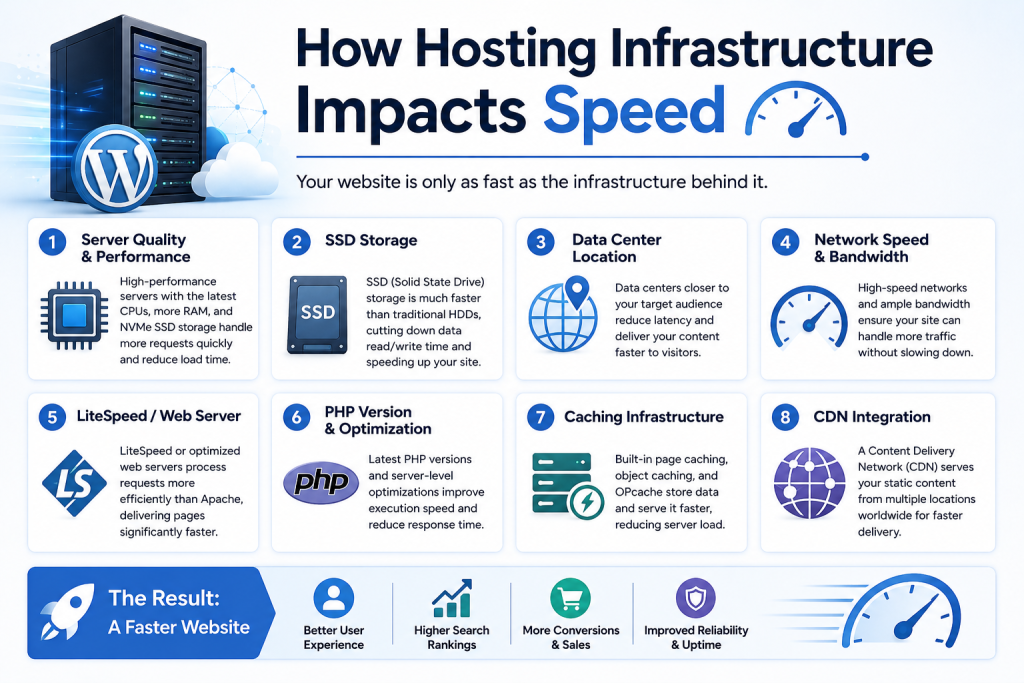
How Hosting Infrastructure Impacts Speed
Not all WordPress hosting is built the same way, and the differences show up directly in load times.
Server resources and contention On lower-tier or oversold hosting, your site shares CPU and memory with many other accounts. During traffic spikes — yours or a neighboring site’s — everyone slows down. Managed WordPress hosting environments typically allocate resources more predictably, which keeps response times stable.
Server-level caching Fast WordPress hosts often include caching built into the server itself (not just a plugin), serving pre-generated pages instantly instead of rebuilding them from PHP and database queries on every request. This is one of the single biggest speed factors for WordPress specifically, since WordPress is database-driven by default.
Database performance WordPress relies heavily on MySQL/MariaDB for nearly everything — posts, settings, plugin data. Hosting with optimized database configurations (proper indexing support, sufficient memory allocation) reduces query times, which directly reduces TTFB. This becomes increasingly important on WooCommerce stores, membership sites, and content-heavy WordPress websites, where every page request depends on multiple database queries running at once.
Uptime and reliability Speed isn’t the only hosting factor that matters here. Even a fast server can’t help if it’s frequently unavailable. Reliable uptime ensures both visitors and search engines can consistently access your content — a site that’s intermittently down loses ranking momentum just as easily as one that’s simply slow.
Server location and network routing Physical distance between your server and your visitor adds latency. If most of your audience is in the UAE, for example, a server located far away — even a technically fast one — will still feel slower due to network round-trip time. Hosting with regional data centers or a properly configured CDN closes that gap.
PHP version and configuration Modern PHP versions (8.x) process WordPress requests significantly faster than older versions. Hosting providers that keep PHP updated and properly configured give every WordPress site a measurable speed advantage without any extra work from the site owner.
What This Means for Rankings in Practice
Google has confirmed that page experience, including Core Web Vitals, is a ranking factor — particularly relevant when multiple pages are otherwise similar in relevance and quality. In competitive niches, speed can be the tiebreaker between page one and page two.
For WordPress sites specifically, this matters more than it might for a static HTML site, because WordPress has more moving parts by default: plugins, themes, database calls, and dynamic content generation. Hosting that’s optimized for WordPress specifically — rather than generic hosting adapted to run it — tends to close this gap.
Faster servers also allow search engine crawlers to request more pages within the same crawl budget. Crawl budget is mainly a concern for larger websites, but efficient server responses still help Google discover and refresh content more consistently, even on smaller WordPress sites.

Best Practices for Speed-Focused WordPress Hosting
- Choose hosting with server-level caching, not just a caching plugin layered on top of generic infrastructure.
- Confirm PHP version support. Your host should support current PHP versions and let you upgrade easily.
- Check server location relative to your audience. If most of your traffic is regional (e.g., UAE-based customers), hosting with a nearby data center or CDN integration matters.
- Look for resource guarantees, not just “unlimited” marketing language. Dedicated CPU/RAM allocations prevent slowdowns caused by other accounts.
- Monitor Core Web Vitals regularly using tools like Google Search Console or PageSpeed Insights, and treat hosting-related metrics (TTFB especially) as a baseline health check.
For deeper, WordPress-specific speed tactics beyond hosting — image optimization, plugin audits, caching configuration — see our How to Speed Up WordPress Hosting guide. For a closer look at server-level caching specifically, our WordPress Caching Guide covers how it works and how to configure it well.
Since reliability and security also play a role in sustained SEO performance, our WordPress Backup Best Practices and WordPress Security Best Practices guides are worth reviewing alongside your hosting choice.
Common Mistakes to Avoid
- Assuming a caching plugin fixes everything. Plugins help, but they can’t compensate for a server that’s slow to respond in the first place.
- Ignoring TTFB while chasing page weight optimization. Reducing image sizes matters, but if your server takes 1.5 seconds just to respond, that’s the bigger bottleneck.
- Choosing hosting based on price alone. Cheap, oversold hosting almost always trades away consistent performance, which shows up in both speed and rankings over time.
- Not testing from the visitor’s actual location. Speed tests run from a random global location can look fine while your real regional audience experiences lag.