How WordPress Hosting Works (Behind the Scenes Explained)
If you’ve ever wondered what actually happens after someone visits your WordPress website, you’re not alone. Understanding how WordPress hosting works helps you make smarter hosting decisions, troubleshoot performance issues, and understand why a well-optimized hosting environment can make a noticeable difference to your website’s speed and reliability. Every time someone enters your website address, […]
If you’ve ever wondered what actually happens after someone visits your WordPress website, you’re not alone. Understanding how WordPress hosting works helps you make smarter hosting decisions, troubleshoot performance issues, and understand why a well-optimized hosting environment can make a noticeable difference to your website’s speed and reliability.
Every time someone enters your website address, several technologies work together in milliseconds to deliver the requested page. Although visitors only see the finished webpage, there’s an entire process happening behind the scenes.
This guide explains that process in simple terms without diving into unrelated hosting topics.
The Journey of a Website Request
The easiest way to understand how WordPress hosting works is to follow the journey of a single visitor.
Visitor
│
▼
Domain Request
│
▼
Web Server (LiteSpeed, Apache, or Nginx)
│
▼
WordPress Files
│
▼
MySQL Database
│
▼
PHP Processes the Page
│
▼
Cache (if available)
│
▼
Images, CSS & JavaScript
│
▼
Visitor’s Browser
This entire process usually happens in less than a second on a properly optimized WordPress hosting platform.
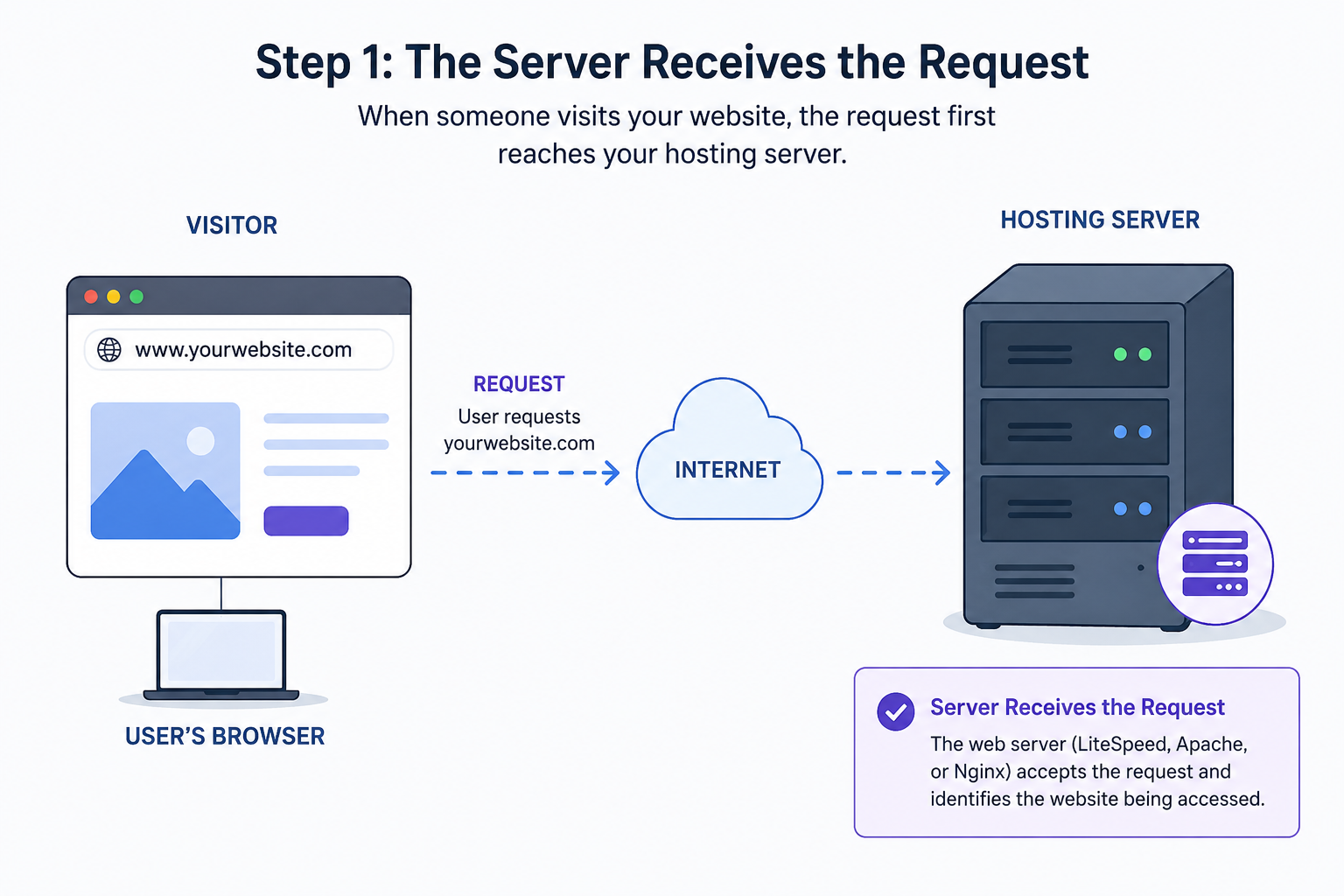
Step 1: The Server Receives the Request
When someone visits your website, the request first reaches your hosting server.
The web server software—such as LiteSpeed, Apache, or Nginx—accepts the request and determines which website the visitor is trying to access.
Its job is to begin gathering everything required to display the requested page.
Your hosting account stores resources including:
- WordPress core files
- Themes
- Plugins
- Images
- Videos
- CSS files
- JavaScript files
- Configuration files
Without these files, WordPress cannot build your website.
Step 2: WordPress Determines What Needs to Be Displayed
Unlike a static website, WordPress doesn’t usually store ready-made HTML pages.
Instead, it creates pages dynamically.
When the request reaches WordPress, it determines:
- Which page the visitor requested
- Which theme should display it
- Which plugins need to run
- Whether the visitor is logged in
- Whether special content needs to be shown
WordPress acts like a coordinator, bringing together multiple components before the page is displayed.
Step 3: The Database Provides the Content
Most of your website’s information isn’t stored inside the page itself.
Instead, WordPress retrieves it from its database.
The database contains:
- Blog posts
- Pages
- Products
- Categories
- Menus
- Comments
- User accounts
- Website settings
Whenever someone opens a page, WordPress requests the necessary information from the database and combines it with your website’s design.
Without the database, WordPress wouldn’t know what content belongs on each page.

Step 4: PHP Builds the Webpage
Once the content has been retrieved, PHP gets to work.
PHP is the programming language that powers WordPress behind the scenes.
Its responsibilities include:
- Loading themes
- Running plugins
- Processing forms
- Displaying widgets
- Managing user sessions
- Generating the final HTML page
Visitors never see PHP itself. They only receive the completed webpage after PHP finishes processing.
Step 5: Caching Makes Everything Faster
Without caching, WordPress would repeat the entire process every time someone visited a page.
That means:
- Loading WordPress
- Running PHP
- Querying the database
- Building the page again
Caching avoids this repetition.
Instead, it stores a ready-to-serve version of the page. When another visitor requests the same page, the server can often deliver the cached version immediately, significantly reducing processing time.
Benefits of caching include:
- Faster loading speeds
- Lower server workload
- Better visitor experience
- Improved performance during traffic spikes
This is one of the biggest reasons why optimized WordPress hosting often feels much faster than standard hosting.
Related Guide: WordPress Caching Guide
Step 6: Images, CSS, and JavaScript Complete the Page
Even after the webpage has been generated, the browser still needs additional resources.
These include:
- Images
- Stylesheets (CSS)
- JavaScript files
- Fonts
- Icons
The browser downloads these resources and combines them with the HTML page to display the finished website.
Large or poorly optimized files can slow this stage, even if your hosting performs well.
What Determines Server Response Time?
One of the most important performance factors is server response time.
This measures how quickly your hosting server begins responding after receiving a visitor’s request.
Several factors influence response time, including:
- Server hardware
- SSD or NVMe storage
- PHP version
- Server optimization
- Number of websites sharing server resources
- Overall server workload
A fast response time helps your pages begin loading sooner, improving both user experience and website performance.
What Are PHP Workers?
Modern WordPress hosting platforms often use PHP workers to process multiple requests simultaneously.
Imagine several visitors opening your website at the same time.
Instead of making each visitor wait in a long queue, PHP workers allow multiple requests to be processed in parallel.
For busy blogs, business websites, and WooCommerce stores, having enough PHP workers helps maintain smooth performance during periods of increased traffic.
Security Works Quietly in the Background
Good WordPress hosting does much more than simply store website files.
Behind the scenes, your hosting environment may continuously perform tasks such as:
- Firewall protection
- Malware scanning
- Login monitoring
- File integrity checks
- Automatic updates
- SSL encryption
These security measures help protect your website without affecting the visitor experience.
Related Guide: WordPress Hosting Security Best Practices
Automatic Backups Protect Your Data
Reliable WordPress hosting also performs regular backups.
These backups allow you to restore your website if something goes wrong, including:
- Failed updates
- Plugin conflicts
- Malware infections
- Accidental file deletion
Regular backups are one of the simplest ways to reduce downtime and recover quickly from unexpected issues.
Related Guide: WordPress Backup Best Practices
Real-World Performance Considerations
Many website owners assume their hosting is responsible whenever a website feels slow.
In reality, hosting is only one part of the equation.
Other common causes of poor performance include:
- Too many plugins
- Poorly coded plugins
- Heavy themes
- Large image files
- Excessive database queries
- Third-party scripts
- Unoptimized JavaScript
Even the fastest hosting platform can’t completely compensate for an inefficient website.
A balanced approach—combining quality hosting with good website optimization—usually delivers the best results.
Best Practices for Better WordPress Hosting Performance
To help your hosting perform at its best:
- Keep WordPress updated.
- Remove unused plugins and themes.
- Optimize images before uploading.
- Enable caching.
- Use trusted plugins only.
- Keep PHP updated.
- Monitor website performance regularly.
- Perform regular backups.
These simple habits improve speed, security, and long-term stability.
Common Misconceptions
“The server only stores my website.”
Not quite.
It also processes requests, runs PHP, communicates with the database, serves cached pages, manages security, and delivers website assets.
“Every visitor sees the exact same page.”
Not always.
Shopping carts, logged-in dashboards, membership websites, and personalized content often generate different pages for different users.
“Better internet automatically means a faster website.”
A visitor’s internet connection matters, but hosting quality, server optimization, caching, and website efficiency usually have a much greater impact on loading speed.
Conclusion
Understanding how WordPress hosting works helps you appreciate everything happening behind the scenes whenever someone visits your website. From the moment a request reaches the server to the final webpage appearing in the browser, WordPress relies on web server software, PHP, databases, caching, and optimized file delivery to create a fast and reliable experience.
While most of these processes happen automatically, choosing quality WordPress hosting and following good maintenance practices can significantly improve your website’s performance, security, and reliability.
If you’d like to explore related topics such as caching, backups, security, or migrations, CreativeON offers dedicated guides that cover each subject in greater detail.