What Is a Hypervisor? Types, How It Works, and Its Role in VPS Hosting
A hypervisor is a software layer that creates and manages virtual machines (VMs) on physical hardware. It allows multiple operating systems to run independently on the same physical server by allocating resources such as CPU, RAM, storage, and network capacity. Hypervisors are a fundamental part of modern server virtualization. They are widely used in VPS […]

A hypervisor is a software layer that creates and manages virtual machines (VMs) on physical hardware. It allows multiple operating systems to run independently on the same physical server by allocating resources such as CPU, RAM, storage, and network capacity.
Hypervisors are a fundamental part of modern server virtualization. They are widely used in VPS hosting, cloud computing, and enterprise data centres to run multiple virtual server environments on shared physical infrastructure.
Understanding what a hypervisor is, how it works, and the different types available helps businesses and IT professionals understand the technology behind Virtual Private Servers.
What Is a Hypervisor?
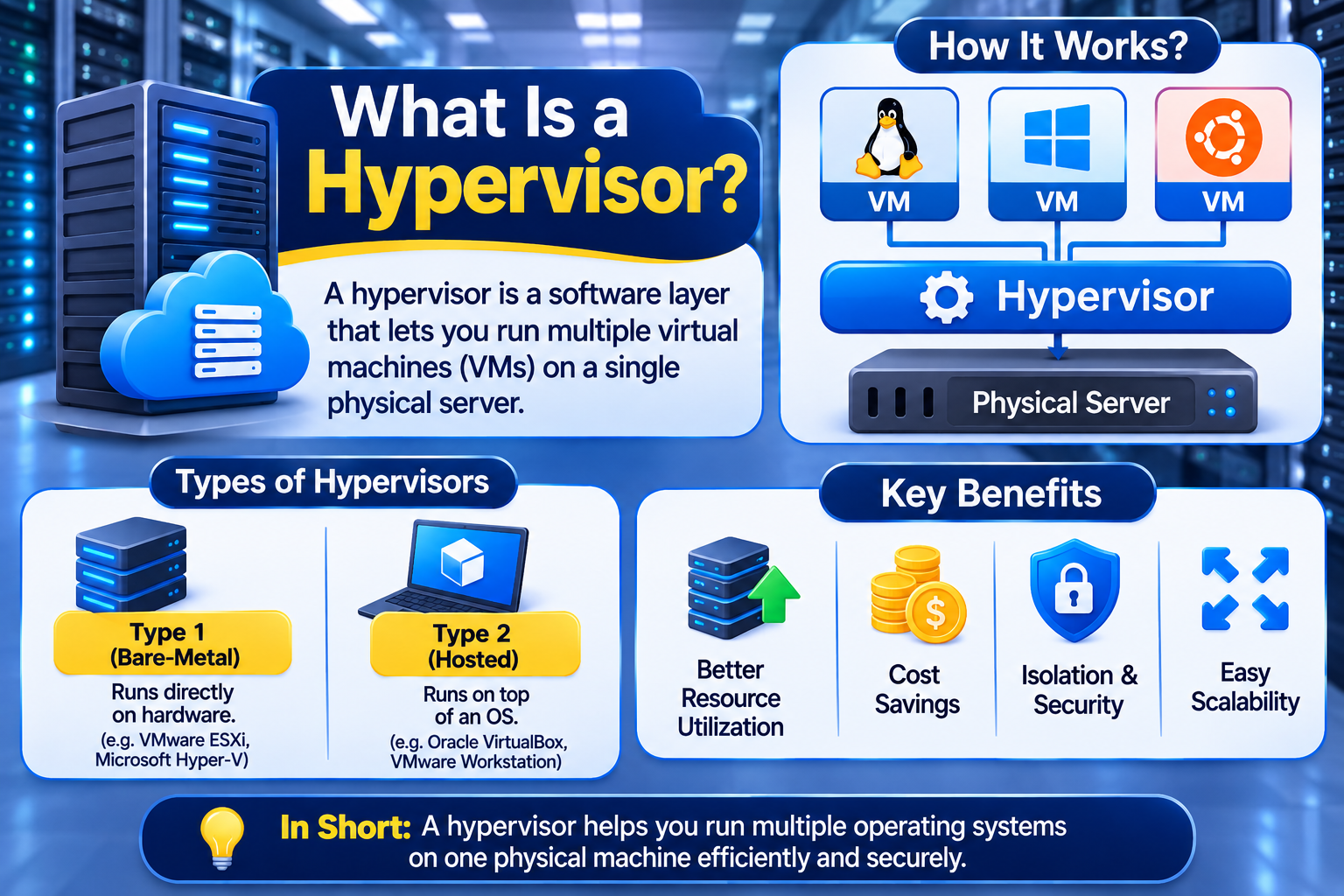
A hypervisor is a software layer that creates, runs, and manages virtual machines on a physical computer or server. It uses the hardware virtualization capabilities of modern processors to run multiple virtual machines on the same physical hardware.
Each virtual machine operates as a logically isolated computing environment with its own operating system, virtual hardware, and allocated resources.
A hypervisor manages access to physical server resources, including:
- CPU: Provides virtual processors for individual virtual machines.
- RAM: Allocates memory to each virtual machine.
- Storage: Provides virtual disks and manages access to underlying storage.
- Network: Connects virtual machines through virtual network interfaces and switches.
A hypervisor is also known as a Virtual Machine Monitor (VMM).
For example, a hosting provider can use one physical server to create several VPS environments. Each VPS runs its own operating system and applications, while the hypervisor manages how these virtual machines access the underlying hardware.
It is important to understand that hardware virtualization technologies such as Intel VT-x and AMD-V assist the hypervisor in running virtual machines. These processor technologies are not hypervisors themselves.
How Does a Hypervisor Work?
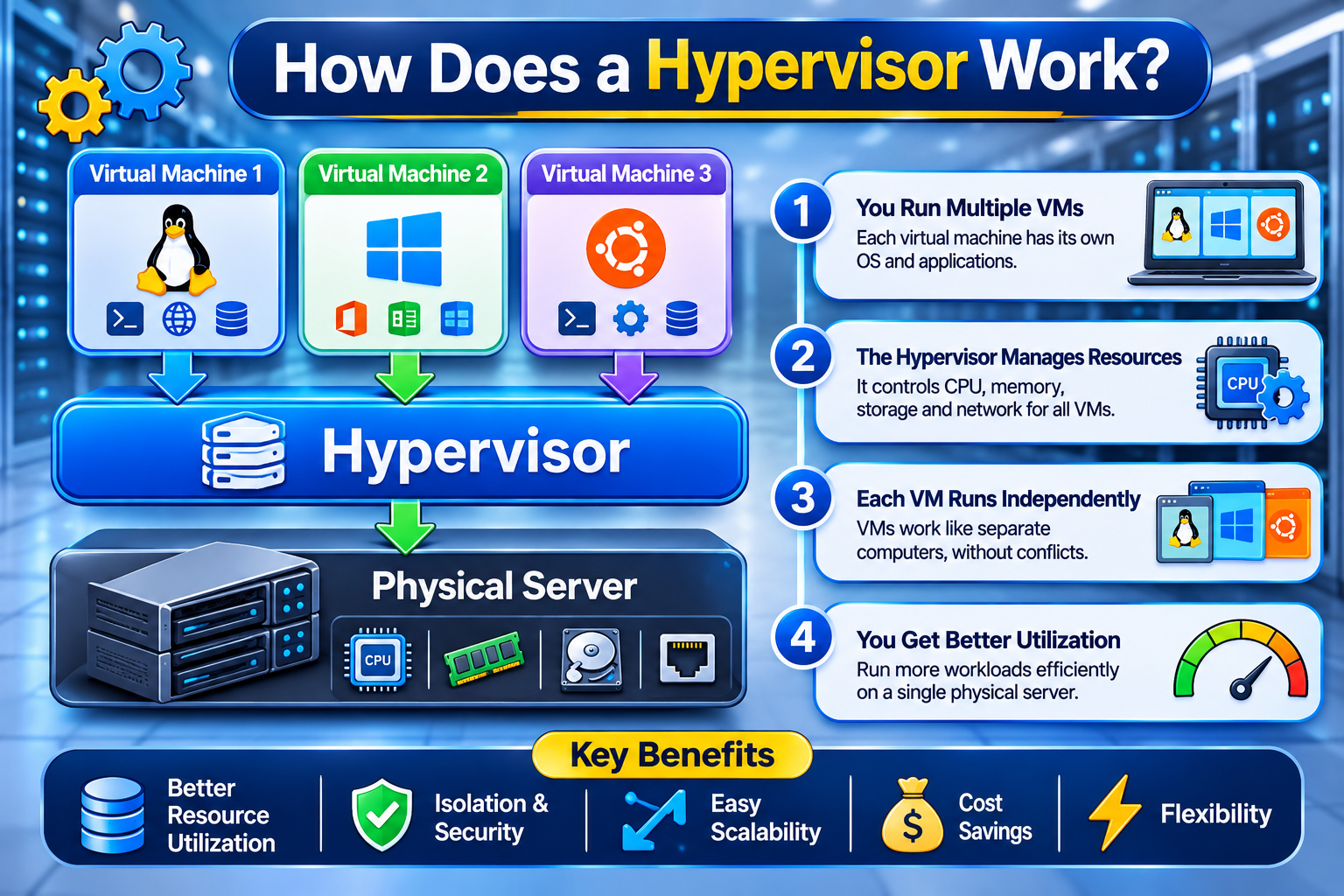
A hypervisor manages the relationship between physical server hardware and virtual machines. It provides each VM with virtualized computing resources and controls how those resources access the underlying infrastructure.
The process generally works as follows:
- Physical hardware: A physical server provides CPU cores, RAM, storage, and network interfaces.
- Hypervisor installation: The virtualization platform is installed directly on the hardware or operates through an existing host operating system, depending on its type.
- Virtual machine creation: An administrator creates multiple virtual machines using the available physical resources.
- Resource allocation: Each virtual machine receives assigned virtual CPUs, memory, storage, and network resources.
- Operating system installation: Each VM runs its own guest operating system, such as Linux or Windows Server.
- Independent operation: Virtual machines operate as separate environments while sharing the underlying physical infrastructure.
The hypervisor coordinates access to physical resources and helps maintain separation between virtual machines.
Practical Example of Hypervisor-Based Virtualization
Consider a physical server with the following specifications:
- 32 physical CPU cores
- 128 GB RAM
- 2 TB SSD storage
A hosting provider can use a hypervisor such as KVM to create multiple virtual machines from this physical server.
For example, the provider might create:
- VM 1: 4 virtual CPU cores and 16 GB RAM
- VM 2: 4 virtual CPU cores and 16 GB RAM
- VM 3: 8 virtual CPU cores and 32 GB RAM
The remaining resources can be allocated to other virtual machines or reserved for host operations.
These are illustrative allocations, not a recommended production configuration. Actual capacity depends on the processor, memory overhead, storage performance, workload, and resource allocation policies.
Types of Hypervisors
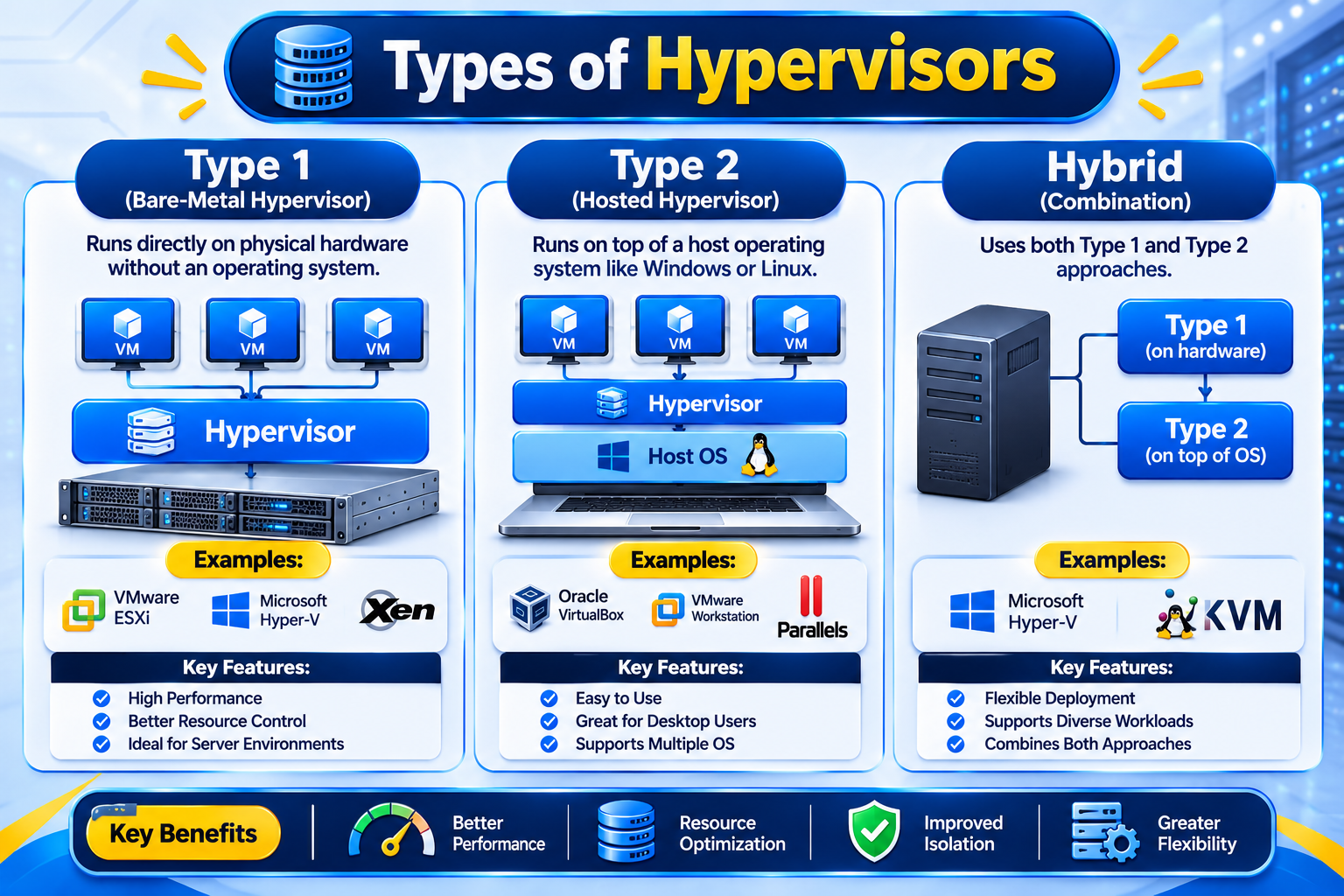
Hypervisors are traditionally divided into two main categories according to how they interact with physical hardware and the host operating system.
1. Type 1 Hypervisor (Bare-Metal Hypervisor)
A Type 1 hypervisor, also called a bare-metal hypervisor, runs directly on physical server hardware rather than as an application inside a conventional host operating system.
It manages processor and memory virtualization and provides the foundation for running multiple virtual machines.
Key characteristics:
- Runs directly on physical server hardware.
- Manages virtual machine access to hardware resources.
- Supports multiple guest operating systems.
- Commonly used in enterprise infrastructure and hosting environments.
- Provides logical isolation between virtual machines.
Examples of Type 1 hypervisors include:
- VMware ESXi
- Microsoft Hyper-V
- Xen
- KVM (Kernel-based Virtual Machine)
One important distinction is that Type 1 hypervisors can still use management components or privileged operating-system partitions. For example, Microsoft Hyper-V uses a root partition that manages many virtual machine services and hardware I/O operations. This does not make it a Type 2 hypervisor.
Type 1 hypervisors are widely used in production server environments because they provide a virtualization architecture designed for managing virtual machines directly on physical infrastructure.
2. Type 2 Hypervisor (Hosted Hypervisor)
A Type 2 hypervisor runs as an application on an existing host operating system, such as Windows, Linux, or macOS.
Instead of managing physical hardware through a bare-metal virtualization layer, it relies on the host operating system to access hardware resources.
Key characteristics:
- Installed on an existing operating system.
- Easier to install and configure for desktop use.
- Suitable for software testing and development.
- Allows users to run multiple operating systems on one computer.
- Introduces an additional software layer between virtual machines and physical hardware.
Examples of Type 2 hypervisors include:
- Oracle VirtualBox
- VMware Workstation
- VMware Fusion
Type 2 hypervisors are particularly useful for developers, IT professionals, and users who need to test different operating systems without installing them directly on their computers.
Type 1 vs Type 2 Hypervisor: Key Differences
The main difference between Type 1 and Type 2 hypervisors is where they operate within the system architecture.
| Feature | Type 1 Hypervisor | Type 2 Hypervisor |
| Installation | Directly on physical hardware | On a host operating system |
| Hardware access | Through the virtualization layer | Through the host OS |
| Performance overhead | Generally lower | Generally higher |
| Deployment | Servers and data centres | Desktop computers |
| Management | Infrastructure-focused | Usually simpler for individual users |
| Common use | Production virtualization | Testing and development |
| Examples | ESXi, Hyper-V, Xen, KVM | VirtualBox, VMware Workstation |
Which Type of Hypervisor Is Better?
For production server virtualization and VPS hosting, Type 1 architecture is generally preferred because it is designed to manage virtual machines directly on server infrastructure.
Type 2 hypervisors are more convenient when users need to run virtual machines on their existing desktop operating systems.
However, the actual performance of a virtual machine depends on more than the hypervisor category. Hardware specifications, resource allocation, storage performance, network capacity, and configuration all play important roles.
Common Hypervisor Technologies Used in Server Virtualization
Several virtualization technologies are used to create and manage virtual machines. Each has its own architecture, management tools, and deployment requirements.
KVM (Kernel-based Virtual Machine)
KVM is a Linux-based virtualization technology that turns the Linux kernel into a platform for running virtual machines.
It uses processor virtualization extensions such as Intel VT-x and AMD-V to support hardware-assisted virtualization.
KVM works with QEMU, which provides virtual machine hardware emulation and device support. Together, these technologies allow administrators to run virtual machines with supported guest operating systems, including Linux and Windows.
Key characteristics include:
- Open-source virtualization technology.
- Integrated into the Linux kernel.
- Supports multiple virtual machines.
- Uses hardware virtualization capabilities.
- Commonly deployed in server and cloud infrastructure.
KVM is generally classified as a Type 1 hypervisor because its virtualization capabilities are integrated into the Linux kernel. However, its architecture differs from a conventional standalone bare-metal hypervisor.
VMware ESXi
VMware ESXi is a bare-metal hypervisor designed for server virtualization.
It runs directly on physical server hardware and allows administrators to create, configure, and manage multiple virtual machines.
ESXi is commonly used in enterprise virtualization environments where organizations need centralized virtual machine management and infrastructure administration.
Microsoft Hyper-V
Microsoft Hyper-V is a Type 1 hypervisor technology available in supported Windows environments.
It allows organizations to create and manage virtual machines running supported guest operating systems on physical server hardware.
Hyper-V uses a root partition for management services and child partitions for virtual machines. The hypervisor manages processor and memory virtualization, while the virtualization stack helps provide device and management services.
Xen
Xen is an open-source hypervisor used to virtualize physical hardware and run multiple virtual machines.
It supports different virtualization approaches and is used in various server and cloud infrastructure environments.
These technologies differ in architecture, licensing, management capabilities, and deployment requirements. The right choice depends on the infrastructure and workload.
How Does a Hypervisor Create a VPS?
A hypervisor is one of the core technologies used in traditional virtual machine-based VPS hosting.
A Virtual Private Server is typically created by configuring a virtual machine on a physical server using a virtualization platform.
The process involves the following components:
- Physical server: Provides the underlying processing power, memory, storage, and network connectivity.
- Hypervisor: Creates and manages virtual machines on the physical server.
- Virtual machine: Provides an independent virtual computing environment.
- Guest operating system: Runs inside the virtual machine, such as Linux or Windows Server.
- VPS environment: Provides the customer with access to their allocated virtual server resources.
For example, a hosting provider can use KVM to create multiple VPS environments on a physical server. Each customer receives a virtual machine with assigned resources and an operating system.
Although VPS environments operate independently, they still share the underlying physical infrastructure. Resource allocation policies and hardware capacity therefore influence the performance of individual VPS instances.
Why Are Hypervisors Important in VPS Hosting?
Hypervisors make it possible for hosting providers to create and manage multiple virtual servers using a single physical server.
Without virtualization technology, each customer requiring an independent operating system environment would generally need separate physical hardware.
Hypervisors provide several important capabilities for VPS hosting:
- Resource allocation: Assign virtual CPU, RAM, storage, and network resources to individual virtual machines.
- Isolation: Keep virtual machine environments logically separated.
- Scalability: Allow administrators to create, modify, and manage virtual machines.
- Hardware utilization: Make more efficient use of available physical server capacity.
- Virtual machine management: Support operations such as starting, stopping, and managing virtual machines.
These capabilities make virtualization an important foundation for modern VPS hosting and cloud infrastructure.
However, virtualization does not mean every VPS receives physically dedicated hardware. CPU scheduling, storage I/O, network capacity, and resource allocation policies can influence performance.
How Does a Hypervisor Affect VPS Performance?
The hypervisor plays an important role in VPS performance, but it is not the only factor.
A VPS may perform differently depending on the underlying physical server, virtualization configuration, and workload.
The following factors are particularly important:
- CPU allocation
The number of virtual CPU cores assigned to a VPS and the host’s CPU scheduling policies affect its available processing capacity.
- Memory allocation
The amount of RAM assigned to a VPS influences how efficiently it handles applications, databases, and simultaneous requests.
- Storage performance
The underlying storage technology, I/O performance, and storage configuration influence application response times and data access.
- Network performance
Network interfaces, available bandwidth, and network congestion can affect connectivity and data transfer speeds.
- Hypervisor configuration
Virtualization settings, resource-management policies, and hardware compatibility can influence overall performance.
When selecting a VPS hosting provider, businesses should therefore evaluate the complete server infrastructure rather than choosing a service based only on its hypervisor technology.