What Is Softaculous? One-Click Installers Explained
Introduction Installing website software used to be one of the most technical parts of launching a website. Users often had to download application files, upload them through FTP, create databases manually, edit configuration files, and complete installation scripts before their website was ready. Today, most hosting providers simplify this process through automated application installers, and […]

Introduction
Installing website software used to be one of the most technical parts of launching a website. Users often had to download application files, upload them through FTP, create databases manually, edit configuration files, and complete installation scripts before their website was ready.
Today, most hosting providers simplify this process through automated application installers, and one of the most popular solutions is Softaculous.
If you’ve ever installed WordPress, Joomla, Moodle, or an online store with just a few clicks from your hosting control panel, Softaculous was likely doing the work behind the scenes.
In this guide, you’ll learn what Softaculous is, how it works, its key features, benefits, limitations, security considerations, and why it has become a standard tool in modern web hosting environments.
What Is Softaculous?
Softaculous is a web application auto-installer that allows hosting users to install website software directly from their hosting control panel without performing a manual installation.
Instead of downloading files, creating databases, uploading content, and configuring settings manually, users can install applications through a guided interface that automates most of the technical tasks.
Softaculous supports hundreds of applications across multiple categories, including:
- Content Management Systems (CMS)
- E-commerce platforms
- Learning Management Systems (LMS)
- Customer support software
- CRM solutions
- Forums and community platforms
- Business applications
- Developer tools
It is commonly integrated with hosting control panels such as cPanel, Plesk, DirectAdmin, and InterWorx.
It is important to understand that Softaculous does not provide web hosting itself. Instead, it works within an existing hosting environment to install and manage website applications.
Why Softaculous Became Popular
Before auto-installers became common, launching a website required several manual steps that could be challenging for beginners.
A typical manual installation often involved:
- Downloading software packages
- Uploading files through FTP
- Creating MySQL databases
- Creating database users
- Assigning database permissions
- Editing configuration files
- Running installation scripts
While experienced developers can complete these tasks without difficulty, many website owners found the process intimidating.
Softaculous was designed to eliminate much of this complexity by automating repetitive setup tasks while still allowing users to control key installation settings.
The result is faster website deployment, fewer mistakes, and a better user experience.
How Softaculous Works
Softaculous acts as an automation layer between your hosting account and the application you want to install.
When you select an application, Softaculous automatically performs several actions behind the scenes:
- Downloads the latest application package.
- Creates the required database.
- Generates database credentials.
- Configures installation settings.
- Deploys files to the selected directory.
- Completes the installation process.
- Provides login details and management options.
What might take a beginner thirty minutes or longer to perform manually can often be completed in less than a minute using Softaculous.
How Softaculous Is Integrated Into Hosting Platforms
Many users assume Softaculous is installed individually on their hosting account. In reality, it is usually installed and licensed by the hosting provider at the server level.
Hosting companies integrate Softaculous into their control panels, allowing customers to access its features directly from their hosting dashboard.
This means:
- The hosting provider manages the Softaculous license.
- Application libraries are maintained automatically.
- Updates are controlled by the hosting environment.
- Users gain access without needing separate software.
This integration is one reason Softaculous has become a standard feature in many shared hosting, reseller hosting, VPS hosting, and business hosting environments.
Popular Applications Available Through Softaculous
One of Softaculous’ biggest strengths is its extensive software library.
Content Management Systems
- WordPress
- Joomla
- Drupal
E-Commerce Platforms
- OpenCart
- PrestaShop
- Magento
Learning Platforms
- Moodle
Forums and Community Software
- phpBB
- MyBB
- Vanilla Forums
Help Desk Solutions
- osTicket
- HESK
Customer Relationship Management
- SuiteCRM
- Vtiger CRM
The exact applications available may vary depending on your hosting provider’s configuration and licensing.
Installing WordPress Using Softaculous
WordPress is the most frequently installed application through Softaculous.
The installation process is straightforward.
Step 1: Open Softaculous
Log in to your hosting control panel and select the Softaculous Apps Installer.
Step 2: Select WordPress
Choose WordPress from the available applications.
Step 3: Configure Installation Settings
Enter details such as:
- Website name
- Site description
- Administrator username
- Administrator password
- Administrator email address
Step 4: Choose Installation Location
You can install WordPress:
- On the primary domain
- In a subdirectory
- On a subdomain
Step 5: Complete Installation
Click Install and allow Softaculous to perform the setup.
Within a few moments, WordPress will be ready for use.
Key Features of Softaculous
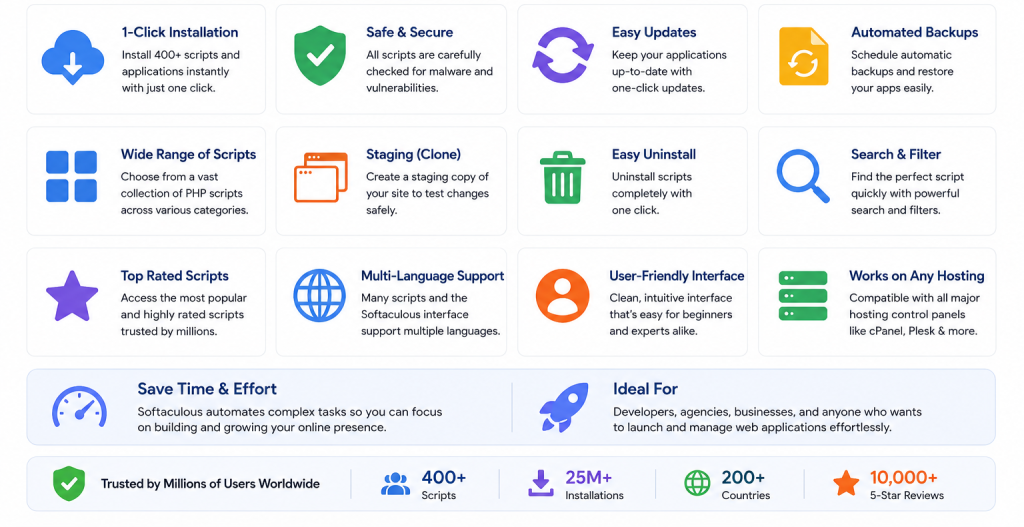
One-Click Application Installation
The primary purpose of Softaculous is to automate software deployment.
Instead of manually handling files and databases, users can install applications through a simplified interface.
Application Updates
Many hosting environments allow Softaculous to help manage application updates.
Depending on provider settings, users may be able to:
- Enable automatic updates
- Receive update notifications
- Manage software versions
Keeping applications updated is important for both security and performance.
Backup Management
Softaculous can help simplify website backup creation.
Backups are especially useful before:
- Software updates
- Theme changes
- Plugin installations
- Website redesign projects
Website Cloning
The cloning feature allows users to duplicate an existing website.
This can be useful for:
- Development work
- Testing environments
- Client demonstrations
- Website redesign projects
Staging Environments
Some hosting providers enable staging features through Softaculous.
A staging website is a separate copy of your live website where changes can be tested before being published.
This helps reduce the risk of breaking a production website.
Centralized Application Management
Users can manage multiple installations from a single interface, making website administration more efficient.
Benefits of Using Softaculous
Faster Website Deployment
Applications can be installed within minutes rather than requiring lengthy manual setup procedures.
Reduced Technical Complexity
Softaculous removes many technical barriers that often discourage beginners.
Lower Risk of Installation Errors
Automated installation reduces common mistakes such as:
- Incorrect database settings
- Missing files
- Permission problems
- Configuration errors
Improved Productivity
Agencies, freelancers, and developers can deploy multiple websites quickly, improving operational efficiency.
Easier Website Management
Updates, backups, and application management can often be handled from a single dashboard.
Softaculous vs Manual Installation
Feature | Softaculous | Manual Installation |
Installation Speed | Very Fast | Slower |
Technical Knowledge Required | Low | Moderate to High |
Database Setup | Automated | Manual |
File Deployment | Automated | Manual |
Error Risk | Lower | Higher |
Beginner Friendly | Yes | No |
Configuration Control | Moderate | Complete |
Learning Curve | Easy | Steeper |
For most website owners, Softaculous provides the ideal balance between simplicity and functionality.
Manual installations remain useful when advanced customization is required.
Softaculous vs Installatron
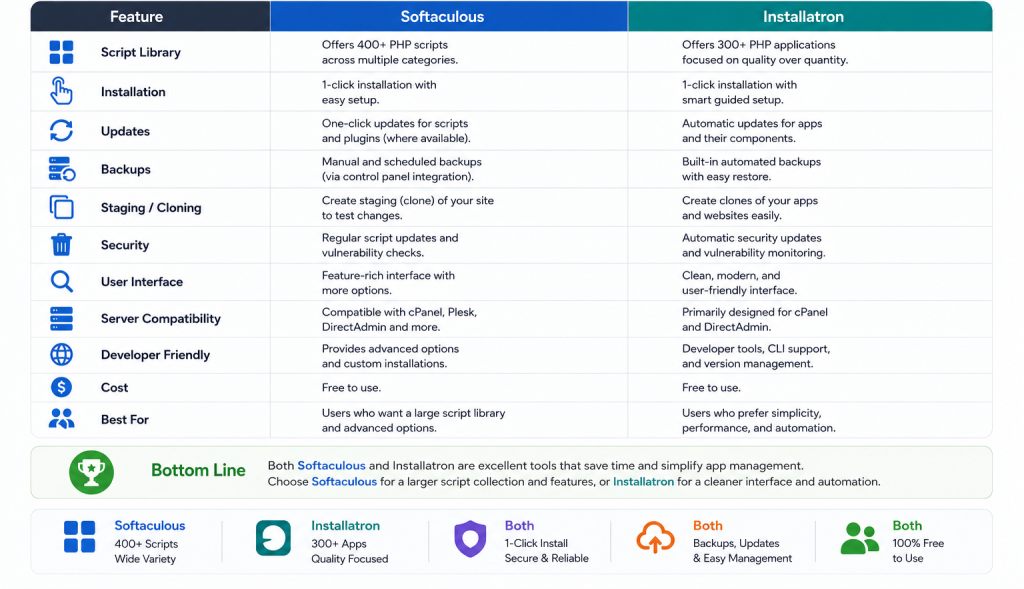
Softaculous is not the only auto-installer available in the hosting industry.
Installatron is another popular solution.
Softaculous Advantages
- Larger application library
- Widely supported by hosting providers
- Frequent software updates
- Broad control panel compatibility
Installatron Advantages
- Similar backup functionality
- Strong website management tools
- Popular among some enterprise hosting providers
For most hosting customers, both tools serve similar purposes, although Softaculous is generally more common in shared hosting environments.
Security Considerations When Using Softaculous
Softaculous simplifies software deployment, but security still depends on proper website management.
Website owners should:
Keep Applications Updated
Outdated software remains one of the most common causes of website compromise.
Use Strong Administrator Credentials
Avoid weak passwords and default usernames.
Remove Unused Applications
Unused installations increase security risks and should be removed when no longer needed.
Enable Backups
Regular backups can significantly reduce recovery time following security incidents or accidental changes.
Review Installed Plugins and Extensions
Third-party add-ons can introduce vulnerabilities if not maintained properly.
Common Mistakes Users Make
Many beginners make avoidable mistakes after installation.
Some of the most common include:
- Using weak passwords
- Ignoring software updates
- Installing unnecessary plugins
- Leaving test websites online
- Failing to create backups
- Forgetting to secure administrator accounts
Avoiding these issues can greatly improve website stability and security.
Real-World Use Cases
Small Business Website Launch
A startup can install WordPress through Softaculous and launch a professional website within minutes.
E-Commerce Store Deployment
Businesses can deploy OpenCart or PrestaShop quickly without hiring a developer for basic installation.
Educational Platforms
Training organizations can install Moodle to create online learning environments.
Agency Website Development
Web design agencies often use cloning and staging features to streamline development workflows.
Testing New Applications
Developers can quickly deploy software for evaluation before committing to production use.
When Should You Use Softaculous?
Softaculous is an excellent choice when:
- You want to launch a website quickly.
- You are installing WordPress or another CMS.
- You have limited technical experience.
- You need multiple website deployments.
- You want easier application management.
- You need staging or cloning capabilities.
For highly customized server environments, experienced developers may still prefer manual installations.
Softaculous and Modern Hosting Services
Softaculous works best when combined with reliable hosting infrastructure.
Many website owners use it alongside:
- Shared hosting
- Business hosting
- WordPress hosting
- VPS hosting solutions
- Cloud hosting infrastructure
Together, these services create an environment where websites can be launched, managed, and scaled efficiently.
For UAE businesses, startups, agencies, and e-commerce companies, having access to Softaculous through a trusted hosting provider can significantly reduce setup time and simplify website management.
Frequently Asked Questions
Softaculous is typically licensed by hosting providers and included with many hosting plans at no additional cost to customers.
No. Softaculous does not provide hosting services. It only installs and manages applications within an existing hosting environment.
Yes. WordPress is one of the most popular applications available through Softaculous.
Many installations support backup functionality, helping users restore websites when needed.
Yes. It is specifically designed to simplify application installation for users with limited technical experience.
Final Thoughts
Softaculous has become one of the most valuable tools available in modern web hosting environments. By automating application deployment, database creation, updates, backups, and website management tasks, it significantly reduces the technical barriers associated with launching and maintaining websites.
Whether you’re installing WordPress, launching an online store, creating a customer portal, or building an educational platform, Softaculous can save time while minimizing setup errors.
For businesses, developers, agencies, and website owners looking for efficient website deployment, Softaculous offers a practical and reliable solution. When paired with quality hosting infrastructure from experienced providers such as CreativeON.com and its UAE-focused subsidiary CreativeON.ae, it helps transform what was once a technical process into a simple and accessible experience.
About the Author
This guide is brought to you by Asher Feroze. I’ve worked in various roles at CreativeON, including Manager Operations, Manager Marketing, and Level 2 Client Support. These days, I focus on helping people like you understand our products — whether it’s Domains, Dedicated Servers, VPS, Cloud Hosting, or Google Workspace — in simple, practical language. My goal is to make technology work for your business, not against it.