How WordPress Hosting Affects Conversion Rates
If your WordPress site gets traffic but visitors aren’t turning into leads, sales, or sign-ups, the problem may not be your design or your copy at all. It could be your hosting. WordPress hosting affects conversion rates more directly than most site owners realize, because every conversion starts with a visitor who has to load, […]
If your WordPress site gets traffic but visitors aren’t turning into leads, sales, or sign-ups, the problem may not be your design or your copy at all. It could be your hosting. WordPress hosting affects conversion rates more directly than most site owners realize, because every conversion starts with a visitor who has to load, trust, and comfortably use your page first.
This guide breaks down exactly how hosting quality influences conversions, and what to look for if your current setup might be costing you sales.
Why Hosting and Conversions Are More Connected Than You Think
A conversion only happens after a visitor completes several invisible steps: the page loads, it loads fast enough to hold their attention, it works correctly on their device, and it feels trustworthy enough to enter payment or contact details. Hosting sits underneath every one of those steps.
Good hosting doesn’t guarantee conversions on its own — that still depends on design, offer, and copy. But poor hosting can quietly cap your conversion rate no matter how good everything else is. If the foundation is slow or unreliable, visitors drop off before your messaging even gets a chance to work.
How Page Speed Impacts Conversions
Speed is the most measurable link between hosting and conversions. Hosting determines server response time, often called Time to First Byte (TTFB), which is how quickly your server starts sending data before the page even begins rendering.
A few patterns show up consistently:
- Slow TTFB delays everything downstream. Even a fast theme and optimized images can’t compensate for a server that takes too long to respond.
- Every extra second of load time increases bounce rate. Visitors on mobile networks or slower connections are especially quick to abandon a page that stalls.
- Checkout and form pages are the most speed-sensitive. These are the pages closest to conversion, so delays here have an outsized impact on revenue or lead volume.
This is why hosting-level performance (server resources, caching layers, and PHP processing speed) matters more for conversions than most on-page tweaks.

Uptime and Reliability: The Silent Conversion Killer
A visitor can’t convert on a page that isn’t loading. Downtime during a marketing campaign, an email blast, or peak shopping hours means paid traffic and warm leads are wasted the moment they hit your site.
Reliable hosting matters most during:
- Traffic spikes from ads, promotions, or seasonal demand
- Time-sensitive campaigns where every visitor represents real ad spend
- Multi-region audiences, where inconsistent uptime affects some visitors more than others depending on server location
Hosting environments with low uptime or shared, oversold servers tend to struggle exactly when conversions matter most — under load.
Server Location and Latency
Where your hosting server is physically located affects how fast your site loads for different audiences. A server far from your target visitors adds latency, even if the hosting plan itself is otherwise solid.
For businesses targeting a specific market, such as UAE-based eCommerce stores or service businesses, choosing hosting infrastructure with servers closer to that audience (or a properly configured CDN) reduces load times for local visitors and removes one more barrier between them and a completed action.
Security and Trust Signals
Conversions depend on trust, and hosting plays a direct role in two visible trust signals:
- SSL and HTTPS, which most hosting providers now support, but implementation quality varies
- Malware-free uptime, since a compromised or blacklisted site can trigger browser warnings that stop conversions instantly
A visitor who sees a security warning or an unsecured connection indicator will rarely continue to checkout or a contact form, regardless of how strong the offer is. Hosting environments with proactive security monitoring reduce this risk before it ever reaches the visitor.
Resource Limits and Traffic Handling
Many WordPress sites run on hosting plans with limited CPU, memory, or concurrent visitor allowances. When traffic exceeds those limits, pages slow down or fail to load for a portion of visitors — often without the site owner noticing until conversions drop.
This becomes especially important for:
- Stores running flash sales or promotions
- Sites with growing organic or paid traffic
- Businesses layering multiple plugins (analytics, live chat, personalization tools) that add server load
Hosting that scales with demand prevents conversions from being lost simply because the server couldn’t keep up.
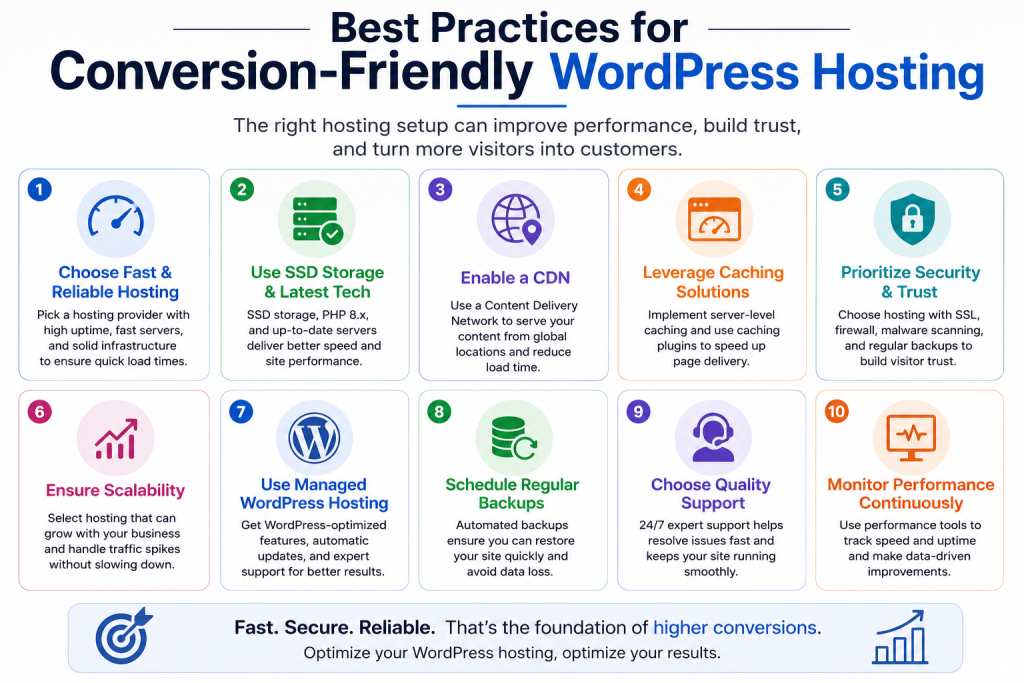
Best Practices for Conversion-Friendly WordPress Hosting
- Choose hosting optimized for WordPress specifically, rather than generic shared hosting, since WordPress-tuned environments handle caching and PHP execution more efficiently.
- Monitor TTFB and load times regularly, not just at launch.
- Prioritize hosting with strong uptime guarantees, particularly if you run paid campaigns or time-sensitive promotions.
- Use a CDN alongside your hosting to reduce latency for visitors outside your server’s region.
- Keep hosting resources aligned with actual traffic, upgrading before limits are reached rather than after a drop in conversions.
Common Mistakes That Hurt Conversions
- Choosing hosting based on price alone, without checking performance benchmarks or uptime history
- Ignoring mobile load times, treating desktop speed tests as the full picture even though most WordPress traffic today arrives on mobile connections that are slower and far less forgiving of delay
- Running high-traffic promotions on underpowered plans, launching a sale or ad campaign on the same hosting tier used for everyday traffic, then watching conversions stall right as the extra visitors arrive
- Overlooking server location, especially for businesses targeting a specific regional audience
Each of these mistakes is fixable, but they’re easy to miss because the symptom (a lower conversion rate) doesn’t obviously point back to hosting.