What Is a CDN and How It Speeds Up Your Website
If you’ve ever visited a website that loads almost instantly, chances are it’s using a Content Delivery Network (CDN). Website speed is one of the most important factors for user experience, search engine rankings, and online sales. Even a delay of a few seconds can cause visitors to leave before your page finishes loading. This […]
If you’ve ever visited a website that loads almost instantly, chances are it’s using a Content Delivery Network (CDN). Website speed is one of the most important factors for user experience, search engine rankings, and online sales. Even a delay of a few seconds can cause visitors to leave before your page finishes loading.
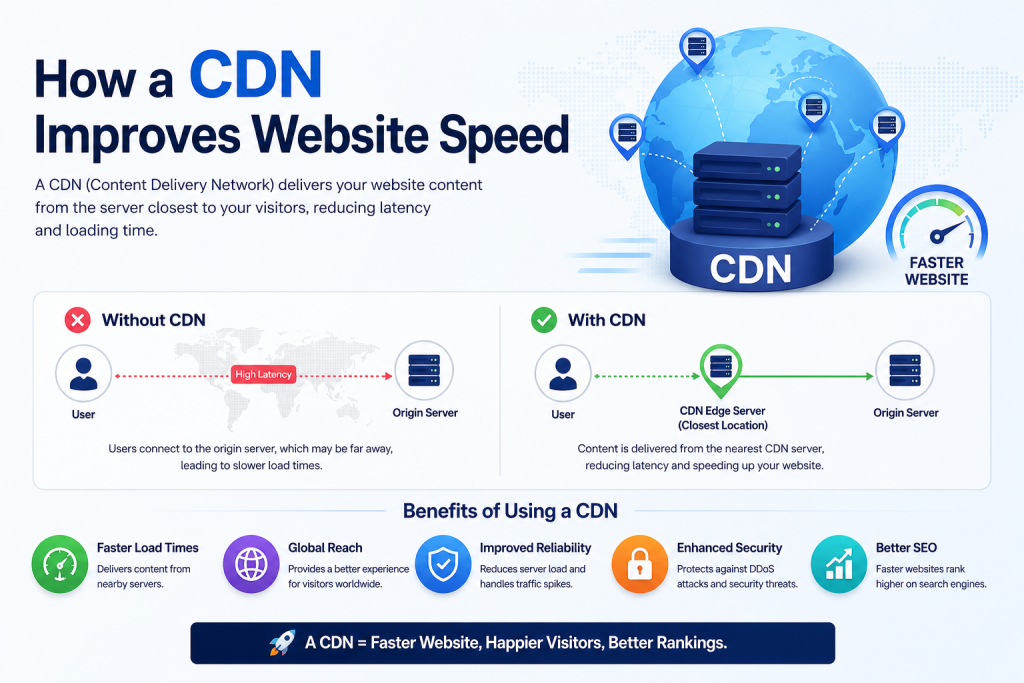
This is where a CDN comes in. It helps websites deliver content faster by storing copies of website files on multiple servers located around the world. Instead of every visitor connecting to a single server, they receive content from the server closest to their location.
In this guide, you’ll learn what a CDN is, how it works, its benefits, and whether it’s the right choice for your website.
What Is a CDN?
A Content Delivery Network (CDN) is a network of servers distributed across different geographic locations. These servers work together to deliver website content to visitors as quickly and efficiently as possible.
Rather than loading every file from your main web hosting server, a CDN stores copies of certain website assets on servers around the world. When someone visits your website, those files are delivered from the nearest CDN server instead of traveling all the way from your origin server.
The result is:
- Faster page loading
- Reduced waiting time
- Better user experience
- Improved website performance
Think of a CDN as a network of local distribution centers. Instead of shipping every package from one warehouse, products are stored closer to customers, allowing faster delivery. A CDN follows the same idea for website content.
Why Website Speed Matters
Website speed affects much more than user convenience. It plays an important role in how visitors interact with your website and how search engines evaluate it.
A faster website can help:
- Reduce bounce rates
- Increase visitor engagement
- Improve customer satisfaction
- Encourage more conversions
- Support better search engine visibility
For businesses in the UAE, where customers expect fast and responsive online experiences, website performance can directly influence customer trust and business growth.
Whether you operate an online store, a company website, or a service-based business, improving loading speed should be part of your overall website strategy.
How a CDN Works
Understanding how a CDN works becomes much easier when comparing it to a traditional website setup.
The Traditional Way Websites Deliver Content
Without a CDN, every visitor connects directly to your web hosting server.
For example:
- Your website is hosted in Dubai.
- A visitor opens your website from London.
- Every image, stylesheet, JavaScript file, and video must travel from Dubai to London.
The greater the distance, the longer the data takes to travel.
Although the difference may only be fractions of a second, these delays add up—especially on websites with many images and large files.
How a CDN Changes the Process
With a CDN:
- Your website remains hosted on its original server.
- Static files are copied to CDN servers worldwide.
- Visitors automatically connect to the nearest CDN location.
- Files are delivered from that nearby server instead of your origin server.
This significantly reduces the distance data must travel, helping pages load more quickly.
What Gets Cached?
Most CDNs cache static website content such as:
- Images
- CSS files
- JavaScript files
- Fonts
- Downloadable documents
- Videos (depending on the CDN)
Dynamic content, such as shopping carts, user accounts, or payment pages, usually continues to come directly from your hosting server.
How a CDN Improves Website Speed
A CDN improves website performance in several ways.
Shorter Distance
Visitors download files from the closest server, reducing network latency.
Faster File Delivery
Since static files are already stored on nearby servers, they don’t need to be generated or transferred from the origin server every time.
Reduced Server Load
Your hosting server handles fewer requests because the CDN serves many of the website’s static resources.
This helps maintain performance during periods of high traffic.
Better Performance During Traffic Spikes
If your website receives a sudden increase in visitors, a CDN distributes requests across multiple servers rather than relying on a single hosting server.
This helps improve stability and reduces the risk of slowdowns.
Optimized Content Delivery
Many CDN providers automatically optimize file delivery using modern technologies that improve loading efficiency without requiring changes to your website.
Benefits of Using a CDN
Using a CDN offers advantages for websites of all sizes.
Faster Loading Times
The most obvious benefit is improved website speed, especially for visitors located far from your hosting server.
Better User Experience
Visitors are more likely to stay on websites that load quickly and respond smoothly.
Improved Global Performance
Businesses serving customers across multiple countries benefit from consistent loading speeds regardless of visitor location.
Lower Bandwidth Usage
Because cached files are served by CDN servers, your hosting server transfers less data.
This can reduce bandwidth usage and improve overall hosting efficiency.
Higher Availability
Many CDNs continue serving cached content even if the origin server experiences temporary issues, helping improve website reliability.
Improved Scalability
Growing businesses often experience increased website traffic. A CDN helps websites handle more visitors without immediately upgrading hosting resources.
Can a CDN Improve SEO?

While a CDN is not a direct ranking factor, it can support search engine optimization by improving technical performance.
A faster website can contribute to:
- Better page experience
- Faster page loading
- Improved Core Web Vitals
- Lower bounce rates
- Better user engagement
These improvements create a stronger overall user experience, which can positively support your SEO efforts over time.
How a CDN Improves Website Security
Many people think a CDN is only about speed, but it can also enhance website security.
Depending on the provider, a CDN may offer:
- Basic DDoS protection
- Traffic filtering
- Rate limiting
- Web Application Firewall (WAF) integration
- Automatic HTTPS support
- SSL certificate compatibility
These features help protect websites against certain types of attacks while maintaining availability.
For complete website security, a CDN should complement—not replace—good hosting security practices and SSL certificates.
Who Should Use a CDN?
A CDN is especially valuable for websites that serve visitors from different regions or rely heavily on media-rich content.
It is a good fit for:
- Business websites
- eCommerce stores
- Corporate websites
- Educational websites
- News portals
- Media websites
- SaaS platforms
- Marketing agencies
- Growing startups
If your website attracts visitors from both the UAE and international markets, a CDN can help provide a more consistent browsing experience.
When You May Not Need a CDN
Not every website requires a CDN.
You may not notice significant benefits if:
- Your website receives very little traffic.
- Your audience is located in one small geographic area.
- Your website contains only a few lightweight pages.
- Performance is already excellent with quality web hosting.
As your website grows, however, adding a CDN often becomes a practical upgrade.
Things to Consider Before Choosing a CDN
Before selecting a CDN provider, consider several factors beyond speed alone.
Look for:
- Global server coverage
- Strong presence in regions where your visitors are located
- Easy integration with your hosting environment
- SSL support
- Security features
- Performance analytics
- Reliable uptime
- Flexible pricing
The right CDN should complement your hosting solution and support your website’s long-term growth.
Common CDN Myths
“A CDN replaces web hosting.”
No. Your website still needs web hosting. A CDN works alongside your hosting service by delivering cached content more efficiently.
“Only large companies need a CDN.”
Even small business websites can benefit from faster loading times and improved reliability.
“A CDN makes every website instantly fast.”
A CDN improves content delivery, but it cannot fix poorly optimized code, oversized images, slow databases, or inefficient website design.
“CDNs are difficult to manage.”
Many modern CDN services integrate easily with popular hosting platforms and require minimal ongoing maintenance.
Best Practices for Using a CDN
To get the most value from a CDN:
- Optimize your images before uploading them.
- Enable browser caching where appropriate.
- Keep website software updated.
- Use HTTPS across your entire website.
- Regularly monitor website performance.
- Remove unnecessary plugins and scripts.
- Choose reliable web hosting alongside your CDN.
A CDN delivers the best results when combined with good website optimization and dependable hosting.
Conclusion
A Content Delivery Network (CDN) is one of the simplest ways to improve website speed, enhance user experience, and support better website performance. By serving cached content from servers closer to your visitors, a CDN reduces loading times, lowers server workload, and helps websites remain responsive even during periods of increased traffic.
For businesses in the UAE, where customers expect fast and reliable online experiences, using a CDN can be a worthwhile investment as your website grows.
If you’re reviewing your website’s overall performance, it’s also worth exploring related topics such as Shared Web Hosting, Business Web Hosting, SSL Certificates, Website Migration, and Cloud Hosting. Choosing the right combination of hosting services and performance tools can help create a faster, more reliable online presence.
Frequently Asked Questions
A CDN (Content Delivery Network) is a network of servers that stores copies of website content and delivers it from the server closest to each visitor, helping websites load faster.
No. A CDN works alongside your web hosting service. Your hosting server stores the website, while the CDN delivers cached content more efficiently.
No. Small business websites, blogs, online stores, and corporate websites can all benefit from improved loading speed and better performance.
Many CDN providers include features such as DDoS protection, traffic filtering, SSL support, and firewall integration, adding an extra layer of security to your website.
A CDN does not directly improve search rankings, but by helping your website load faster and improving user experience, it can support your overall SEO strategy.