What Makes a Hosting Server Fast? (Explained Simply)
If your WordPress site feels sluggish, the hosting server is often the first place to look. But “fast hosting” isn’t one single feature — it’s a combination of hardware, software, and configuration working together. Understanding what makes a hosting server fast helps you make smarter decisions when choosing or upgrading your WordPress hosting plan, instead […]

If your WordPress site feels sluggish, the hosting server is often the first place to look. But “fast hosting” isn’t one single feature — it’s a combination of hardware, software, and configuration working together. Understanding what makes a hosting server fast helps you make smarter decisions when choosing or upgrading your WordPress hosting plan, instead of just trusting marketing claims like “blazing speed” or “lightning-fast servers.”
This guide breaks down the real technical factors behind server speed, in plain language, so you know exactly what to look for.
Why Server Speed Matters for WordPress Sites
Page speed affects almost everything: how long visitors stay, whether they complete a purchase, and how Google ranks your site. A slow server adds delay before your WordPress site even starts loading — no amount of front-end optimization can fully compensate for a server that’s slow to respond in the first place.
For UAE businesses running eCommerce stores, booking platforms, or lead-generation sites, even a one-second delay in server response time can measurably affect conversions. This makes server speed a business decision, not just a technical one.
The Core Factors That Make a Hosting Server Fast
1. CPU Performance
The processor handles every request your WordPress site makes — loading pages, running plugins, processing database queries. A CPU with a higher clock speed can complete individual WordPress tasks more quickly, while additional cores help when multiple requests arrive at the same time. A fast server should continue responding quickly even when many visitors browse the site simultaneously, which is why dedicated (not oversold) processing power matters as much as raw specs. On low-quality shared servers, your site competes with hundreds of others for the same CPU cycles, which slows everything down during traffic spikes.
2. Storage Type: SSD vs NVMe vs HDD
Storage speed has a massive impact on how fast a server reads and writes data.
- HDD (Hard Disk Drive): The slowest option, rarely used on modern hosting.
- SSD (Solid State Drive): Significantly faster than HDD, now considered a baseline requirement.
- NVMe SSD: The fastest widely available storage type, offering much quicker read/write speeds than standard SSDs.
Fast NVMe storage also improves disk I/O performance, allowing WordPress to read and write files more efficiently. If a hosting provider doesn’t mention storage type, it’s worth asking directly — this is one of the biggest differentiators in real-world speed.
3. RAM (Memory) Allocation
RAM determines how much data a server can process at once without slowing down. WordPress sites with several plugins, an active theme, and database queries need enough memory to avoid bottlenecks. Insufficient RAM leads to slow page generation, especially during traffic surges.
Every page request also relies on the database. Fast storage and adequate memory help MySQL respond quickly, reducing page generation time.
4. Server Software Stack
The software running on a server matters as much as the hardware. Faster-performing stacks typically include:
- LiteSpeed (with LiteSpeed Cache) or Nginx instead of older Apache configurations
- PHP-FPM with the latest supported PHP version
- Object caching at the server level (like Redis or Memcached)
A well-optimized software stack can noticeably outperform a server with better hardware but outdated or misconfigured software.
5. Server Location and Network Quality
The physical distance between your server and your visitors affects load time. A server closer to your target audience reduces latency. For UAE-based businesses, choosing a server located in or near the region — rather than in a distant data center — usually results in faster load times for local visitors.
Network quality also matters: server providers with strong peering connections and low packet loss deliver more consistent speed, even if the raw hardware specs look similar on paper.
6. Resource Allocation Model
How a hosting provider allocates resources affects real-world speed more than raw specs do:
- Shared hosting: Resources are shared across many accounts, which can slow your site during another site’s traffic spike.
- Managed WordPress hosting: Resources are typically allocated with WordPress performance in mind, often with server-level caching and optimization built in.
- Dedicated resources: Your site gets guaranteed CPU and RAM, unaffected by other accounts.
The allocation model explains why two servers with identical specs can perform very differently in practice. Some low-cost hosting providers place hundreds of websites on one server — a practice known as overselling. Even powerful hardware can slow down if too many accounts compete for the same resources, which is why allocation matters as much as the specs on paper.

How These Factors Work Together
No single factor makes a server fast on its own. A server with a powerful CPU but slow storage will still bottleneck under database-heavy WordPress operations. Similarly, NVMe storage won’t help much if the server is overloaded with too many accounts sharing the same CPU. Real server speed comes from balanced, well-matched hardware and software working together — which is why managed WordPress hosting environments are often built around this balance specifically.
Common Mistakes That Slow Down a Hosting Server
- Choosing hosting based on price alone, without checking CPU allocation or storage type
- Ignoring server location relative to the target audience
- Overlooking software stack details, assuming all “SSD hosting” plans perform the same
- Running too many resource-heavy plugins that overwhelm even a fast server
- Not testing server response time (TTFB) before committing to a long-term plan
Best Practices for Getting a Faster Hosting Server
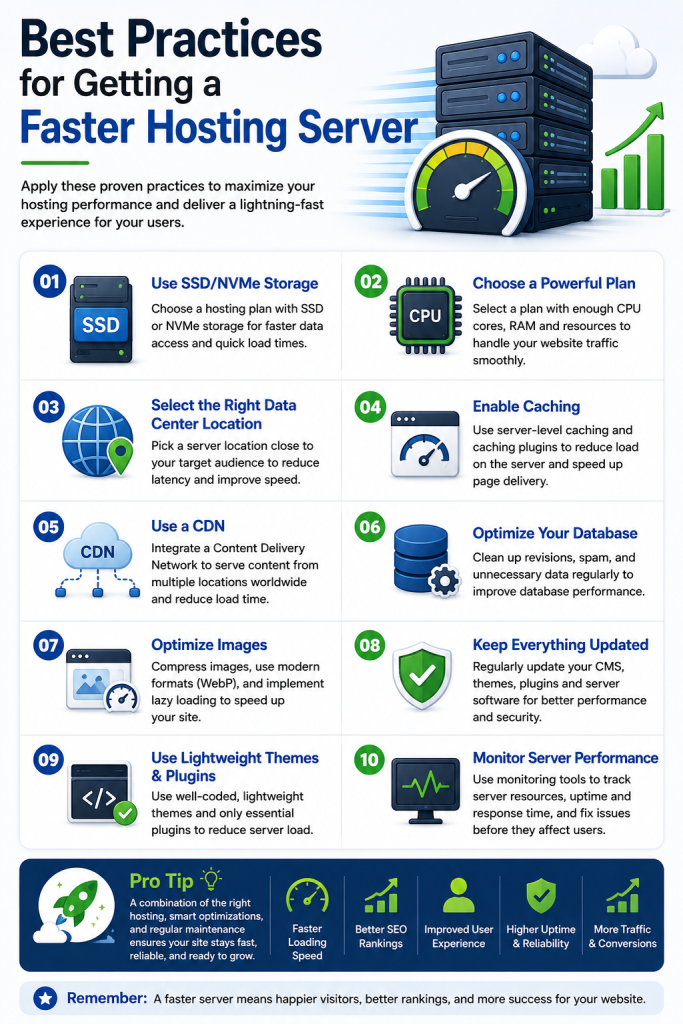
- Ask providers directly about CPU allocation, storage type, and RAM limits.
- Choose a server location close to your primary audience.
- Confirm whether server-level caching (like LiteSpeed Cache or Redis) is included.
- Check Time to First Byte (TTFB) using a testing tool before signing up.
- Match your hosting plan to your site’s actual resource needs — not just its listed price.
Time to First Byte (TTFB) measures how quickly a server begins responding after receiving a request. Lower TTFB generally indicates better server responsiveness, and it’s one of the simplest ways to compare hosting providers before committing to a plan.
Server speed is closely tied to broader performance topics like caching and site optimization. For a deeper look at improving load times beyond server hardware, see our WordPress Caching Guide, How to Speed Up WordPress Hosting, Managed WordPress Hosting Explained, How to Choose the Best WordPress Hosting Provider, WordPress Hosting vs Shared Hosting, and WordPress Hosting Security Best Practices.