What Is WordPress and How Does It Work? (UAE Guide)

What is WordPress and How Does It Work? (Simple Explanation)

Introduction

If you are planning to build a website, WordPress is usually the first tool you’ll hear about. It is the most popular website-building system in the world because it is simple, flexible, and does not require coding skills for basic use.

But for beginners, one important question always comes up: how does WordPress actually work behind the scenes?

In this article, we will keep things very simple and focus only on understanding the basic working of WordPress so you can clearly visualize what happens when a website runs on it.

What is WordPress?

WordPress is a Content Management System (CMS) that helps you create and manage websites without writing code from scratch.

Instead of building everything manually, WordPress gives you a ready system where you can:

  • Create pages and posts
  • Upload images and videos
  • Install themes for design
  • Add features using plugins

In simple terms, WordPress is a system that helps you build and manage websites easily through a dashboard.

How WordPress Actually Works (Simple Flow)

WordPress works by combining three main parts: web hosting, WordPress software, and a database. These three work together every time someone opens your website.

Here is the simple step-by-step process:

  1. A visitor opens your website in a browser
  2. The request is sent to your web hosting server
  3. WordPress receives the request
  4. It checks the database for stored content (text, images, settings)
  5. WordPress combines this data with your theme design
  6. The final page is converted into a simple HTML page
  7. The browser shows the website to the visitor

So instead of storing fixed pages, WordPress builds each page dynamically whenever someone visits your site.

This is what makes WordPress flexible — you can change content or design anytime without rebuilding the entire website.

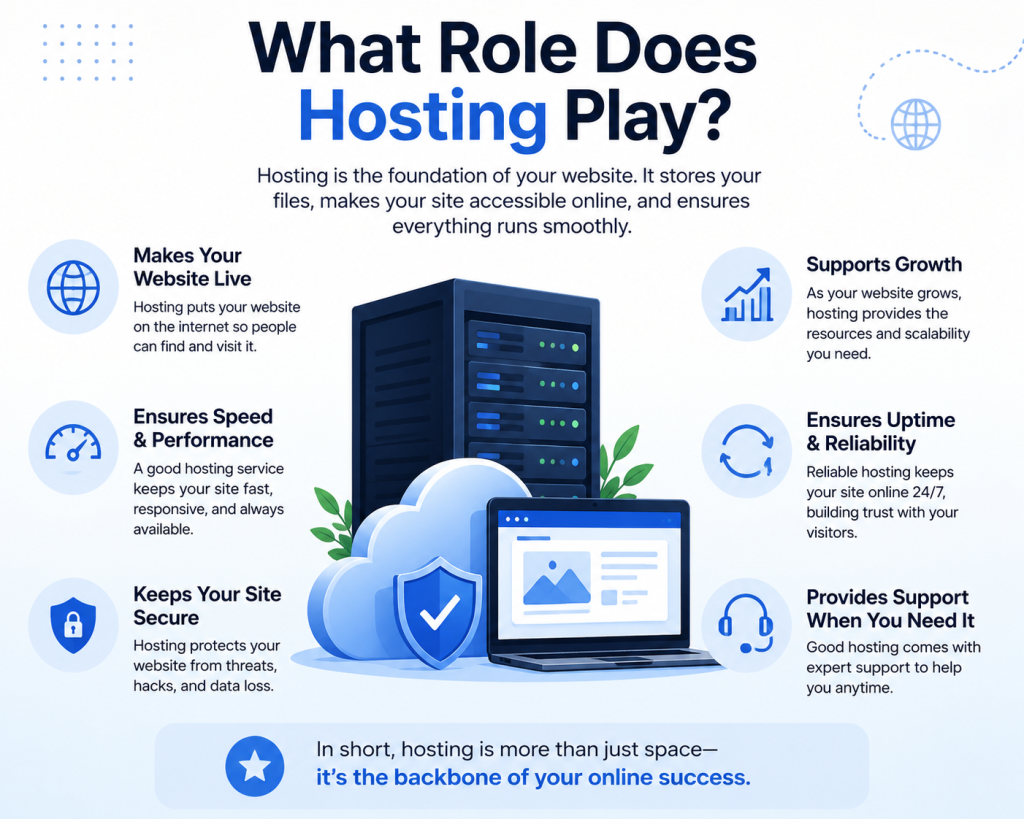
What Role Does Hosting Play?

What is WordPress and How Does It Work?

WordPress cannot work without hosting. Hosting is the place where your website lives online.

Companies like CreativeON.com provide hosting environments where WordPress websites run smoothly and remain accessible 24/7.

In simple terms:

  • Hosting = where your website is stored
  • WordPress = the system that runs your website

Both work together to keep your site online.

WordPress Core Idea in One Line

If we simplify everything:

WordPress takes stored content from a database, combines it with design, and shows it as a web page in your browser.

WordPress.com vs WordPress.org (Quick Understanding)

There are two versions of WordPress:

WordPress.org (Self-hosted)

You install it on your own hosting and get full control over your website.

WordPress.com (Hosted version)

A simpler version where hosting and setup are managed for you, but with limited control.

Most business websites use WordPress.org because it is more flexible.

Where WordPress is Commonly Used

What is WordPress and How Does It Work?

WordPress is used for many types of websites, such as:

  • Business websites
  • Blogs
  • Online stores
  • Portfolio websites
  • Educational platforms

Many businesses, including startups and SMEs in the UAE, use WordPress with professional hosting solutions like those offered by CreativeON.ae.

Why Understanding “How It Works” Matters

Even if you are not technical, understanding the basic working of WordPress helps you:

  • Choose better hosting
  • Understand website performance
  • Make better design decisions
  • Avoid beginner mistakes

You don’t need deep technical knowledge — just a clear mental picture of how everything connects.

Final Thoughts

WordPress is not complicated when you break it down.

At its core, it is just a system that:

  • Stores your content
  • Uses hosting to run your website
  • Combines everything using a theme
  • Shows it to visitors instantly

Once you understand this simple flow, everything else in WordPress becomes much easier to learn and manage.

If you want next step, I can also:
✔ Build a supporting article cluster map for WordPress (SEO silo)
✔ Or write the next supporting article like “How to Install WordPress on Hosting” or “What is WordPress Dashboard?”

AF
About the Author
Asher Feroze
Worked across multiple roles at CreativeON — from Manager Operations and Manager Marketing to Level 2 Client Support. Now focused on breaking down hosting and web products into simple, practical language for everyday users.
Domains
Dedicated Servers
VPS
Cloud Hosting
Google Workspace

Table of Contents